
Arduino UNO Controlled Obstacle Avoiding Robot with Ultrasonic Sensor and Servo
View and Edit Project In Cirkit Designer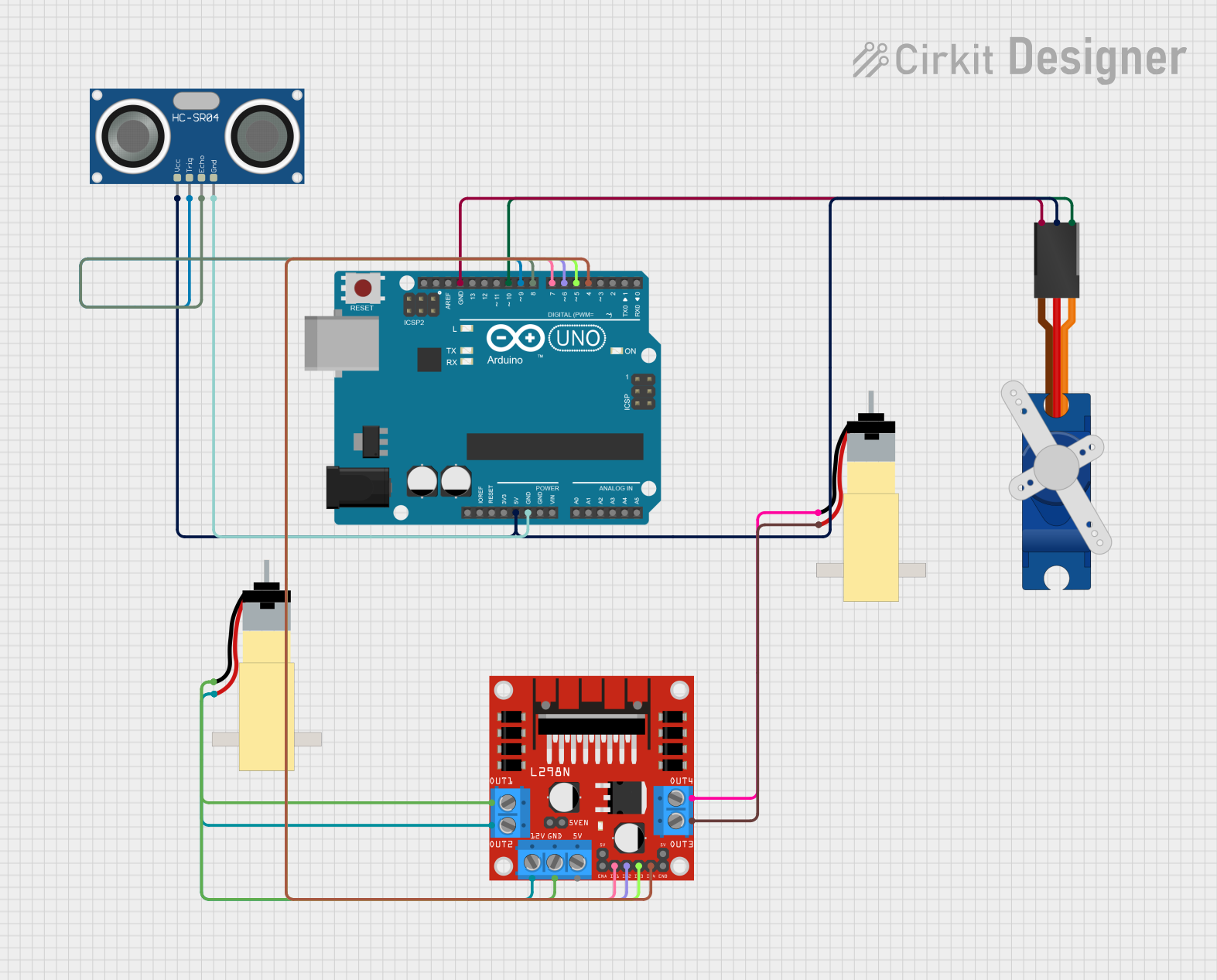
Circuit Documentation
Summary
This circuit is designed to control a servo and a pair of DC motors using an Arduino UNO microcontroller. It includes an HC-SR04 Ultrasonic Sensor for distance measurement, which informs the microcontroller how to actuate the motors and the servo based on the proximity of obstacles. The L298N DC motor driver is used to control the direction and speed of the motors. The Tower Pro SG90 servo is controlled directly by the Arduino UNO.
Component List
Arduino UNO
- Microcontroller board based on the ATmega328P
- It has 14 digital input/output pins, 6 analog inputs, a 16 MHz quartz crystal, a USB connection, a power jack, an ICSP header, and a reset button.
Hobby Gearmotor with 48:1 Gearbox (x2)
- A DC motor with a gearbox to increase torque
- It has two pins for electrical connection.
Tower Pro SG90 Servo
- A small and lightweight servo motor capable of precise control
- It has three pins: Signal, +5V, and GND.
HC-SR04 Ultrasonic Sensor
- An ultrasonic distance sensor capable of measuring distances from 2cm to 400cm
- It has four pins: VCC, TRIG, ECHO, and GND.
L298N DC Motor Driver
- A dual H-bridge motor driver capable of driving two DC motors or one stepper motor
- It has multiple pins for motor outputs, power supply, and control signals.
Wiring Details
Arduino UNO
5VandGNDpins are used to power the Tower Pro SG90 servo and the HC-SR04 Ultrasonic Sensor.- Digital pins
D10,D9,D8,D7,D6,D5, andD4are used to control the servo, ultrasonic sensor, and the L298N motor driver.
Tower Pro SG90 Servo
Signalpin connected to Arduino UNO pinD10+5Vpin connected to Arduino UNO5VGNDpin connected to Arduino UNOGND
HC-SR04 Ultrasonic Sensor
VCCpin connected to Arduino UNO5VTRIGpin connected to Arduino UNO pinD9ECHOpin connected to Arduino UNO pinD8GNDpin connected to Arduino UNOGND
L298N DC Motor Driver
IN1,IN2,IN3, andIN4pins connected to Arduino UNO pinsD7,D6,D5, andD4respectivelyOUT1,OUT2,OUT3, andOUT4pins connected to the pins of the two Hobby Gearmotors12VandGNDpins are used for power supply (not specified how they are connected)
Hobby Gearmotor with 48:1 Gearbox
- Each motor has two pins connected to the
OUT1,OUT2,OUT3, andOUT4pins of the L298N motor driver.
Documented Code
#include <Servo.h>
Servo Myservo;
#define trigPin 9           // Trig Pin Of HC-SR04
#define echoPin 8           // Echo Pin Of HC-SR04
#define MLa 4               // Left motor 1st pin
#define MLb 5               // Left motor 2nd pin
#define MRa 6               // Right motor 1st pin
#define MRb 7               // Right motor 2nd pin
long duration, distance;

void setup() {
  Serial.begin(9600);
  pinMode(MLa, OUTPUT);     // Set Motor Pins As O/P
  pinMode(MLb, OUTPUT);
  pinMode(MRa, OUTPUT);
  pinMode(MRb, OUTPUT);
  pinMode(trigPin, OUTPUT); // Set Trig Pin As O/P To Transmit Waves
  pinMode(echoPin, INPUT);  // Set Echo Pin As I/P To Receive Reflected Waves
  Myservo.attach(10);
}

void loop() {
  Serial.begin(9600);
  digitalWrite(trigPin, LOW);
  delayMicroseconds(2);
  digitalWrite(trigPin, HIGH);       // Transmit Waves For 10us
  delayMicroseconds(10);
  duration = pulseIn(echoPin, HIGH); // Receive Reflected Waves
  distance = duration / 58.2;        // Get Distance
  Serial.println(distance);
  delay(10);
  if (distance > 15)                 // Condition For Absence Of Obstacle
  {
    Myservo.write(90);
    digitalWrite(MRb, HIGH);         // Move Forward
    digitalWrite(MRa, LOW);
    digitalWrite(MLb, HIGH);
    digitalWrite(MLa, LOW);
  }
  else if ((distance < 10) && (distance > 0)) // Condition For Presence Of Obstacle
  {
    digitalWrite(MRb, LOW);         // Stop
    digitalWrite(MRa, LOW);
    digitalWrite(MLb, LOW);
    digitalWrite(MLa, LOW);
    delay(100);

    Myservo.write(0);
    delay(500);
    Myservo.write(180);
    delay(500);
    Myservo.write(90);
    delay(500);

    digitalWrite(MRb, LOW);         // Move Backward
    digitalWrite(MRa, HIGH);
    digitalWrite(MLb, LOW);
    digitalWrite(MLa, HIGH);
    delay(500);
    digitalWrite(MRb, LOW);         // Stop
    digitalWrite(MRa, LOW);
    digitalWrite(MLb, LOW);
    digitalWrite(MLa, LOW);
    delay(100);
    digitalWrite(MRb, HIGH);       // Move Left
    digitalWrite(MRa, LOW);
    digitalWrite(MLa, LOW);
    digitalWrite(MLb, LOW);
    delay(500);
  }
}
This code is designed to be uploaded to the Arduino UNO microcontroller. It initializes the servo and sets up the pins for the motors and ultrasonic sensor. In the main loop, it measures the distance using the ultrasonic sensor and controls the motors and servo based on the distance to obstacles. If no obstacle is detected within 15 cm, the motors move forward. If an obstacle is detected within 10 cm, the motors stop, and the servo sweeps from 0 to 180 degrees before the motors move backward and then turn left.