
Bluetooth-Controlled Smart Robot Car with Ultrasonic Obstacle Avoidance and Water Pump
View and Edit Project In Cirkit Designer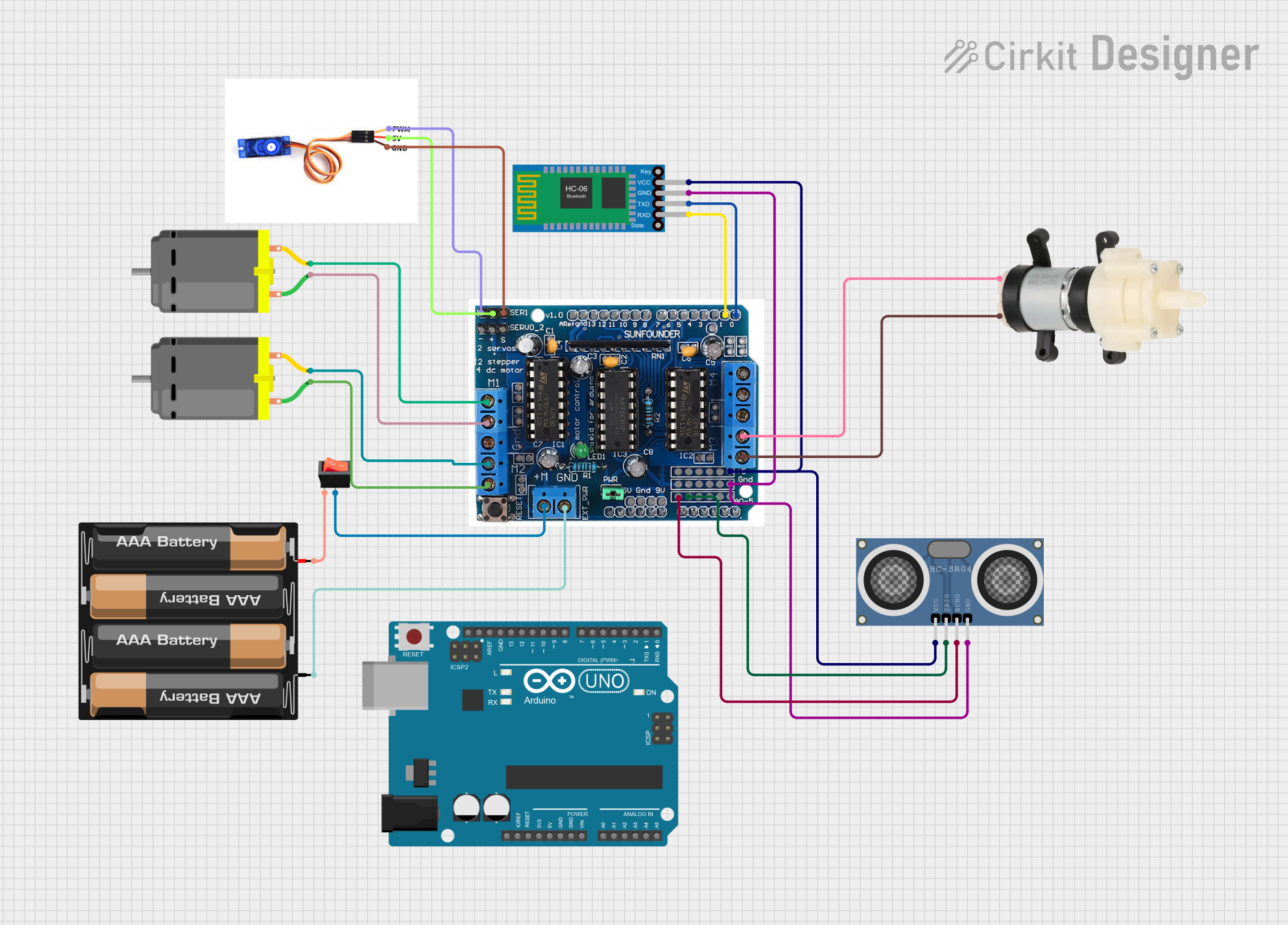
Smart Robot Car Circuit Documentation
Summary
The Smart Robot Car circuit is designed to control a robotic vehicle with wireless communication capabilities. It features an Arduino UNO microcontroller interfaced with an L293D motor driver shield to drive two DC motors and a water pump. The circuit also includes an HC-SR04 ultrasonic distance sensor for obstacle detection, a Bluetooth HC-06 module for wireless communication, and a servo motor for precise angular movement. Power management is handled by a 4 x AAA battery mount and a rocker switch.
Component List
Arduino UNO
- Microcontroller board based on the ATmega328P
- Provides the main control and processing for the robot car
L293D Motor Driver Shield
- Interfaces with the Arduino UNO to drive the DC motors and water pump
- Provides necessary current and protection for motor control
4 x AAA Battery Mount
- Supplies power to the circuit
- Holds four AAA batteries
HC-SR04 Ultrasonic Distance Sensor
- Measures distances using ultrasonic waves
- Used for obstacle detection and avoidance
Bluetooth HC-06
- Wireless communication module
- Allows for remote control and data transmission
DC Motor (x2)
- Provides motion for the robot car
- Controlled by the L293D motor driver shield
Rocker Switch
- Manages the power supply to the circuit
- Acts as an on/off switch
Mini Diaphragm Water Pump
- Moves liquids as part of the robot car's functionality
- Controlled by the L293D motor driver shield
SG90 Servo Motor
- Provides precise angular movement
- Used for steering or other articulated movements
Wiring Details
Arduino UNO
5VandGNDpins provide power to the L293D motor driver shield- Digital and analog pins interface with the L293D shield for control signals
L293D Motor Driver Shield
5vandGNDpins connected to the power supply and groundA0andA1pins connected to the HC-SR04 sensor for trigger and echo signalsM1,M2,M3, andM4pins connected to the DC motors and water pump for control0and1pins connected to the Bluetooth HC-06 for serial communicationServo1pin connected to the SG90 servo motor for control
4 x AAA Battery Mount
+and-pins provide power to the circuit through the rocker switch
HC-SR04 Ultrasonic Distance Sensor
VCCandGNDpins connected to power and groundTRIGandECHOpins connected to the L293D shield for distance measurement
Bluetooth HC-06
VCCandGNDpins connected to power and groundTXDandRXDpins connected to the L293D shield for serial communication
DC Motors
- Each motor has two pins (
pin 1andpin 2) connected to the L293D shield for control
Rocker Switch
inputpin connected to the positive terminal of the battery mountoutputpin connected to theM+pin on the L293D shield
Mini Diaphragm Water Pump
Positive (+)andNegative (-)pins connected to the L293D shield for control
SG90 Servo Motor
PWMpin connected to the L293D shield for control signals5VandGNDpins connected to power and ground
Documented Code
/*
 * Smart Robot Car
 * This code interfaces with an L293D motor driver shield to drive two DC motors
 * and a water pump, controls a servo motor, uses an HC-SR04 ultrasonic sensor
 * for distance sensing, and communicates wirelessly via a Bluetooth HC-06
 * module. Power is supplied by a 4 x AAA battery mount and managed by a
 * rocker switch.
 */

#include <Servo.h>

// Pin definitions
const int trigPin = A1;
const int echoPin = A0;
const int motor1Pin1 = 10;
const int motor1Pin2 = 11;
const int motor2Pin1 = 12;
const int motor2Pin2 = 13;
const int pumpPin1 = 8;
const int pumpPin2 = 9;
const int servoPin = 2;

Servo myServo;

void setup() {
  // Initialize serial communication
  Serial.begin(9600);

  // Initialize motor pins
  pinMode(motor1Pin1, OUTPUT);
  pinMode(motor1Pin2, OUTPUT);
  pinMode(motor2Pin1, OUTPUT);
  pinMode(motor2Pin2, OUTPUT);
  pinMode(pumpPin1, OUTPUT);
  pinMode(pumpPin2, OUTPUT);

  // Initialize ultrasonic sensor pins
  pinMode(trigPin, OUTPUT);
  pinMode(echoPin, INPUT);

  // Attach servo motor
  myServo.attach(servoPin);
}

void loop() {
  // Read distance from ultrasonic sensor
  long duration, distance;
  digitalWrite(trigPin, LOW);
  delayMicroseconds(2);
  digitalWrite(trigPin, HIGH);
  delayMicroseconds(10);
  digitalWrite(trigPin, LOW);
  duration = pulseIn(echoPin, HIGH);
  distance = (duration / 2) / 29.1;

  // Print distance to serial monitor
  Serial.print("Distance: ");
  Serial.print(distance);
  Serial.println(" cm");

  // Example motor control logic
  if (distance < 20) {
    // Stop motors if obstacle is too close
    digitalWrite(motor1Pin1, LOW);
    digitalWrite(motor1Pin2, LOW);
    digitalWrite(motor2Pin1, LOW);
    digitalWrite(motor2Pin2, LOW);
  } else {
    // Move forward
    digitalWrite(motor1Pin1, HIGH);
    digitalWrite(motor1Pin2, LOW);
    digitalWrite(motor2Pin1, HIGH);
    digitalWrite(motor2Pin2, LOW);
  }

  // Example pump control logic
  digitalWrite(pumpPin1, HIGH);
  digitalWrite(pumpPin2, LOW);
  delay(1000);
  digitalWrite(pumpPin1, LOW);
  digitalWrite(pumpPin2, LOW);

  // Example servo control logic
  myServo.write(90); // Move servo to 90 degrees
  delay(1000);
  myServo.write(0); // Move servo to 0 degrees
  delay(1000);

  delay(100); // Delay between loop iterations
}
This code is responsible for the main control loop of the Smart Robot Car. It initializes the hardware components, reads sensor data, and controls the motors, pump, and servo based on the sensor inputs and predefined logic. The code also includes serial communication for debugging and wireless control via Bluetooth.