
Raspberry Pi Pico W-Based Smart Home Automation System with Motion Detection and Environmental Monitoring
View and Edit Project In Cirkit Designer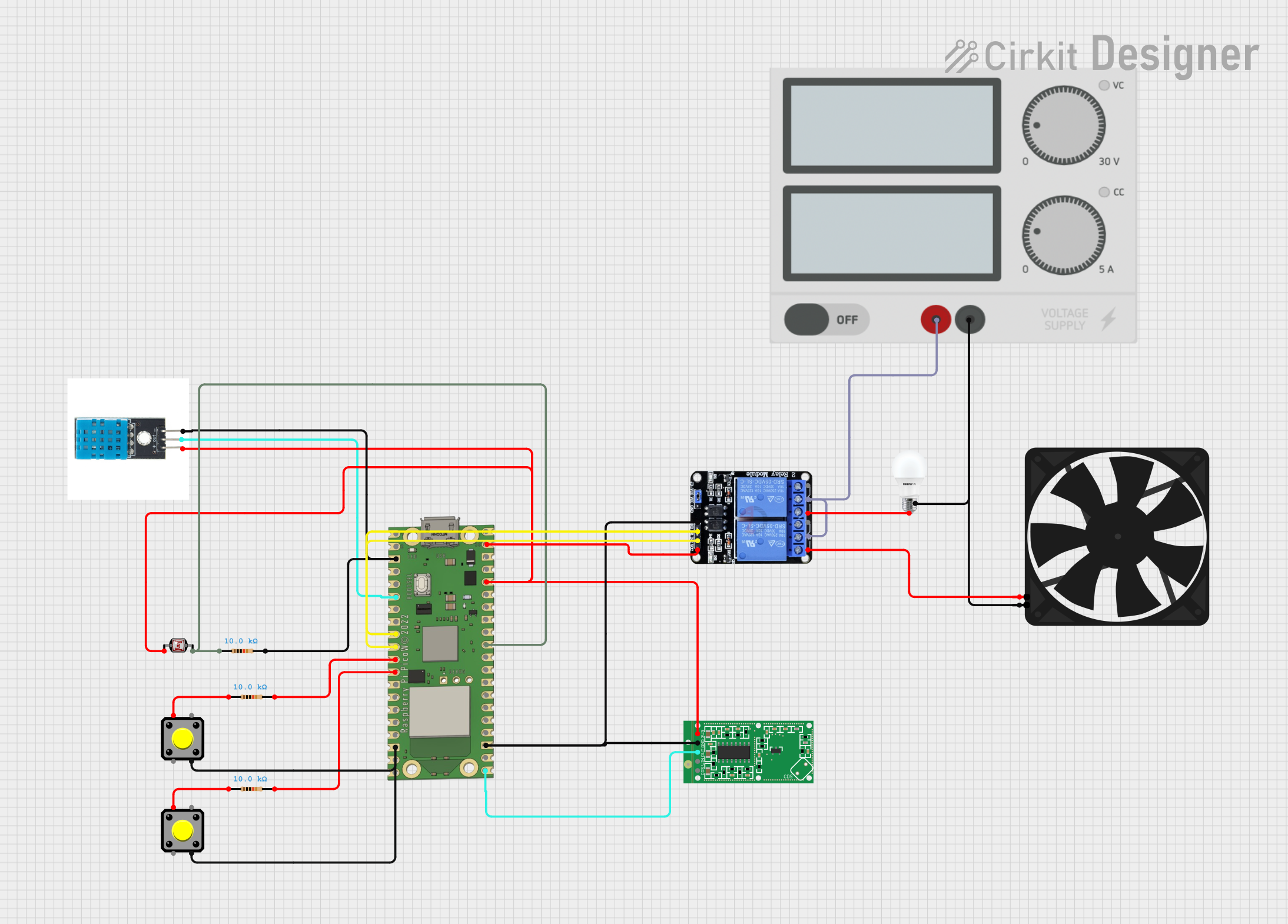
Circuit Documentation
Summary
This circuit is designed to interface with various sensors and actuators through a Raspberry Pi Pico W microcontroller. It includes environmental sensing through a DHT11 temperature and humidity sensor, light level sensing with a photocell (LDR), and motion detection using an RCWL-0516 microwave radar sensor. The circuit can control a two-channel relay to switch external devices like a bulb and a fan. It also features pushbuttons for user input. The Raspberry Pi Pico W is programmed to operate in either an app mode with Wi-Fi and MQTT communication or an automatic mode that reacts to sensor inputs.
Component List
Raspberry Pi Pico W
- Microcontroller board with Wi-Fi capabilities.
- Provides GPIO pins for interfacing with sensors and actuators.
DHT11
- Temperature and humidity sensor.
- Outputs digital signal with environmental data.
Two Channel Relay 5V
- Relay module with two channels.
- Allows for controlling high power devices like a bulb and a fan.
Photocell (LDR)
- Light-dependent resistor.
- Changes resistance based on the ambient light level.
Resistor (10k Ohms)
- Three resistors with a resistance of 10k Ohms.
- Used for pull-up/pull-down configurations or as part of a voltage divider.
RCWL-0516 Microwave Radar Motion Sensor Module
- Motion detection sensor using microwave radar technology.
- Outputs digital signal upon detecting motion.
Pushbutton
- Two simple pushbuttons for user input.
- Can be used to change modes or trigger events.
BULB
- A generic bulb that can be switched on or off.
- Connected to the relay for control by the microcontroller.
Power Supply
- Provides power to the circuit.
- Outputs a stable voltage for the components.
Fan
- An electric fan that can be switched on or off.
- Connected to the relay for control by the microcontroller.
Wiring Details
Raspberry Pi Pico W
VSYSconnected to Relay VCC.GP16connected to RCWL-0516 OUT.GNDconnected to common grounds.GP26connected to one side of the LDR and a 10k Ohm resistor.3V3 OUTconnected to LDR, DHT11, and RCWL-0516 3V3.GP4connected to DHT11 out.GP6connected to Relay IN1.GP7connected to Relay IN2.GP8andGP9connected to pushbuttons through 10k Ohm resistors.
DHT11
+connected to 3V3 OUT from Raspberry Pi Pico W.outconnected to GP4 on Raspberry Pi Pico W.-connected to GND.
Two Channel Relay 5V
VCCconnected to VSYS on Raspberry Pi Pico W.IN1andIN2connected to GP6 and GP7 on Raspberry Pi Pico W.GNDconnected to common ground.NC1andNC2connected to BULB and Fan respectively.C1andC2connected to Power Supply +.
Photocell (LDR)
- One side connected to 3V3 OUT from Raspberry Pi Pico W.
- Other side connected to GP26 on Raspberry Pi Pico W and a 10k Ohm resistor.
Resistor (10k Ohms)
- Three resistors used, each connected between a signal line and ground or 3V3 OUT.
RCWL-0516 Microwave Radar Motion Sensor Module
OUTconnected to GP16 on Raspberry Pi Pico W.GNDconnected to common ground.3V3connected to 3V3 OUT from Raspberry Pi Pico W.
Pushbutton
- One side of each button connected to GP8 and GP9 on Raspberry Pi Pico W through a 10k Ohm resistor.
- Other side connected to GND.
BULB
+connected to NC1 on Relay.-connected to Power Supply -.
Power Supply
+connected to C1 and C2 on Relay.-connected to common ground, BULB -, and Fan GND.
Fan
5Vconnected to NC2 on Relay.GNDconnected to Power Supply -.
Documented Code
import machine
import network
import time
import dht
from machine import Pin
from machine import I2C
from lcd_api import LcdApi
from i2c_lcd import I2cLcd
from time import sleep
import utime
from umqtt.simple import MQTTClient

SSID = "project"
PASSWORD = "12345678"
MQTT_BROKER = "test.mosquitto.org"
MQTT_TOPIC = "JN_17102024"

# Set up the DHT11 sensor
dht_pin = machine.Pin(4)  # Change this to the GPIO pin you connected the DHT11 data pin to
dht_sensor = dht.DHT11(dht_pin)
degree_celsius_symbol = chr(223)

ldr_pin = machine.ADC(26)  # LDR sensor (light detection)
microwave_sensor = machine.Pin(16, machine.Pin.IN)
light = machine.Pin(6, machine.Pin.OUT)  # LED 1
fan = machine.Pin(7, machine.Pin.OUT)  # LED 2
button1 = machine.Pin(8, machine.Pin.IN)
button2 = machine.Pin(9, machine.Pin.IN)
light.value(1)
fan.value(1)
current_mode = None

I2C_ADDR = 0x27
totalRows = 2
totalColumns = 16
sensor = dht.DHT11(Pin(6))

i2c = I2C(1, sda=machine.Pin(2), scl=machine.Pin(3), freq=400000)
lcd = I2cLcd(i2c, I2C_ADDR, totalRows, totalColumns)

lcd.clear()
lcd.putstr("     WELCOME      ")
lcd.move_to(0,1)
lcd.putstr("________________")
time.sleep(1)
lcd.clear()
lcd.putstr("SELECT MODE")
time.sleep(1)

def connect_wifi():
    wlan = network.WLAN(network.STA_IF)
    wlan.active(True)
    if not wlan.isconnected():
        print('Connecting to Wi-Fi...')
        lcd.clear()
        lcd.putstr("CONNECTING")
        lcd.move_to(0,1)
        lcd.putstr("WIFI....")
        time.sleep(2)
        wlan.connect(SSID, PASSWORD)
        while not wlan.isconnected():
            time.sleep(1)
    print('Connected to Wi-Fi:', wlan.ifconfig())
    lcd.clear()
    lcd.putstr("WIFI")
    lcd.move_to(0,1)
    lcd.putstr("CONNECTED")
    time.sleep(2)

# Function to handle MQTT messages
def mqtt_callback(topic, msg):
    print((topic, msg))

    # Check message and control LED
    if msg == b'a':
        light.value(0)
    elif msg == b'b':
        light.value(1)
    elif msg == b'c':
        fan.value(0)
    elif msg == b'd':
        fan.value(1)

# Connect to the MQTT broker and subscribe to the topic
def connect_mqtt():
    client = MQTTClient('raspberry_pi_pico', MQTT_BROKER)
    lcd.clear()
    lcd.putstr("MQTT")
    lcd.move_to(0,1)
    lcd.putstr("CONNECTING..")
    time.sleep(2)
    client.set_callback(mqtt_callback)
    client.connect()
    client.subscribe(MQTT_TOPIC)
    print(f"Subscribed to topic {MQTT_TOPIC}")
    lcd.clear()
    lcd.putstr("MQTT")
    lcd.move_to(0,1)
    lcd.putstr("CONNECTED")
    time.sleep(2)

    while True:
        client.check_msg()  # Continuously check for incoming messages
        time.sleep(1)
        if button2.value() == 0:
            break

def sensor_control():
    while True:
        movement_detected = microwave_sensor.value()
        dht_sensor.measure()
        temperature_c = dht_sensor.temperature()
        temperature_string = f'{temperature_c}{degree_celsius_symbol}C'
        humidity = dht_sensor.humidity()
        print(movement_detected)
        if movement_detected == 1:
            lcd.clear()
            lcd.putstr("MOVEMENT")
            lcd.putstr(" DET")
            time.sleep(2)
            for i in range(60, 0, -1):   # Reverse loop from 100 to 1
                if i>=40:
                    fan.value(0)
                lcd.clear()
                lcd.putstr("Time:")
                lcd.putstr(str(i))  # Countdown
                lcd.putstr(" SECS")
                lcd.move_to(0,1)
                lcd.putstr("T:")
                lcd.putstr(str(temperature_string))
                lcd.putstr(" H:")
                lcd.putstr(str(humidity))
                lcd.putstr("%")
                time.sleep(1)
                light_value = ldr_pin.read_u16()
                if light_value <= 10000:
                    light.value(0)
                if light_value >= 20000