
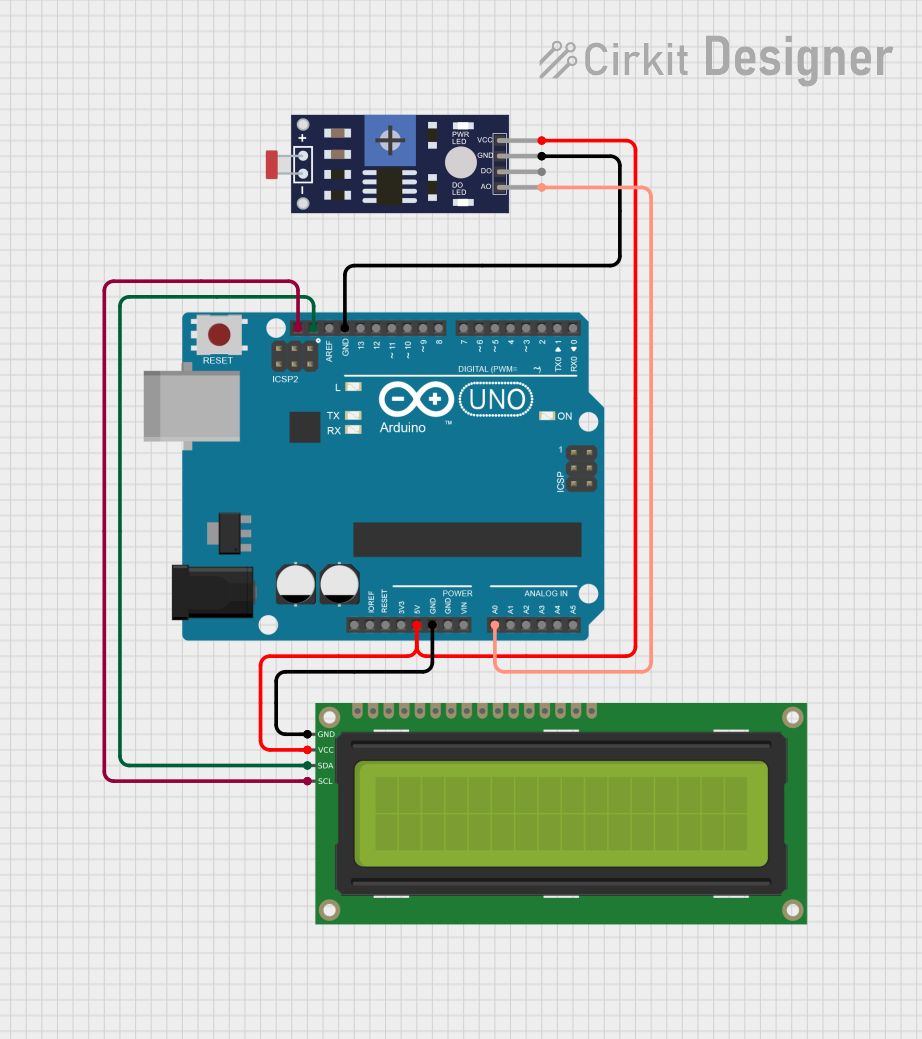
Circuit Documentation
Summary
This circuit is designed to measure the ambient light level using a photoresistor (LDR) sensor and display the results on a 16x2 I2C LCD. The circuit is controlled by an Arduino UNO microcontroller. The photoresistor provides an analog voltage corresponding to the light intensity, which is read by the Arduino. The Arduino processes this data and displays the light level on the LCD.
Component List
Arduino UNO
- Description: A microcontroller board based on the ATmega328P.
- Pins: UNUSED, IOREF, Reset, 3.3V, 5V, GND, Vin, A0, A1, A2, A3, A4, A5, SCL, SDA, AREF, D13, D12, D11, D10, D9, D8, D7, D6, D5, D4, D3, D2, D1, D0
16x2 I2C LCD
- Description: A 16x2 character LCD display with I2C interface.
- Pins: GND, VCC, SDA, SCL
Photoresistor (LDR) Sensor (Wokwi Compatible)
- Description: A light-dependent resistor (LDR) sensor that changes its resistance based on the light intensity.
- Pins: VCC, GND, DO, AO
Wiring Details
Arduino UNO
- 5V: Connected to VCC of 16x2 I2C LCD and VCC of Photoresistor (LDR) Sensor
- GND: Connected to GND of 16x2 I2C LCD and GND of Photoresistor (LDR) Sensor
- A0: Connected to AO of Photoresistor (LDR) Sensor
- SCL: Connected to SCL of 16x2 I2C LCD
- SDA: Connected to SDA of 16x2 I2C LCD
16x2 I2C LCD
- VCC: Connected to 5V of Arduino UNO
- GND: Connected to GND of Arduino UNO
- SCL: Connected to SCL of Arduino UNO
- SDA: Connected to SDA of Arduino UNO
Photoresistor (LDR) Sensor (Wokwi Compatible)
- VCC: Connected to 5V of Arduino UNO
- GND: Connected to GND of Arduino UNO
- AO: Connected to A0 of Arduino UNO
Code Documentation
/*
  Photoresistor (LDR) Analog Demo

  Copyright (C) 2021 Uri Shaked.

  https://wokwi.com/arduino/projects/305193627138654786
*/

#include <LiquidCrystal_I2C.h>

#define LDR_PIN 2

// LDR Characteristics
const float GAMMA = 0.7;
const float RL10 = 50;

LiquidCrystal_I2C lcd(0x27, 20, 4);

void setup() {
  pinMode(LDR_PIN, INPUT);

  lcd.init();
  lcd.backlight();
}

void loop() {
  int analogValue = analogRead(A0);
  float voltage = analogValue / 1024. * 5;
  float resistance = 2000 * voltage / (1 - voltage / 5);
  float lux = pow(RL10 * 1e3 * pow(10, GAMMA) / resistance, (1 / GAMMA));

  lcd.setCursor(2, 0);
  lcd.print("Room: ");
  if (lux > 50) {
    lcd.print("Light!");
  } else {
    lcd.print("Dark  ");
  }

  lcd.setCursor(0, 1);
  lcd.print("Lux: ");
  lcd.print(lux);
  lcd.print("          ");

  delay(100);
}
This code reads the analog value from the photoresistor, calculates the light intensity in lux, and displays the result on the 16x2 I2C LCD. The LCD shows whether the room is "Light" or "Dark" based on the measured lux value.