
Arduino-Controlled Obstacle Avoiding Robot with Ultrasonic Sensor and Servo Motor
View and Edit Project In Cirkit Designer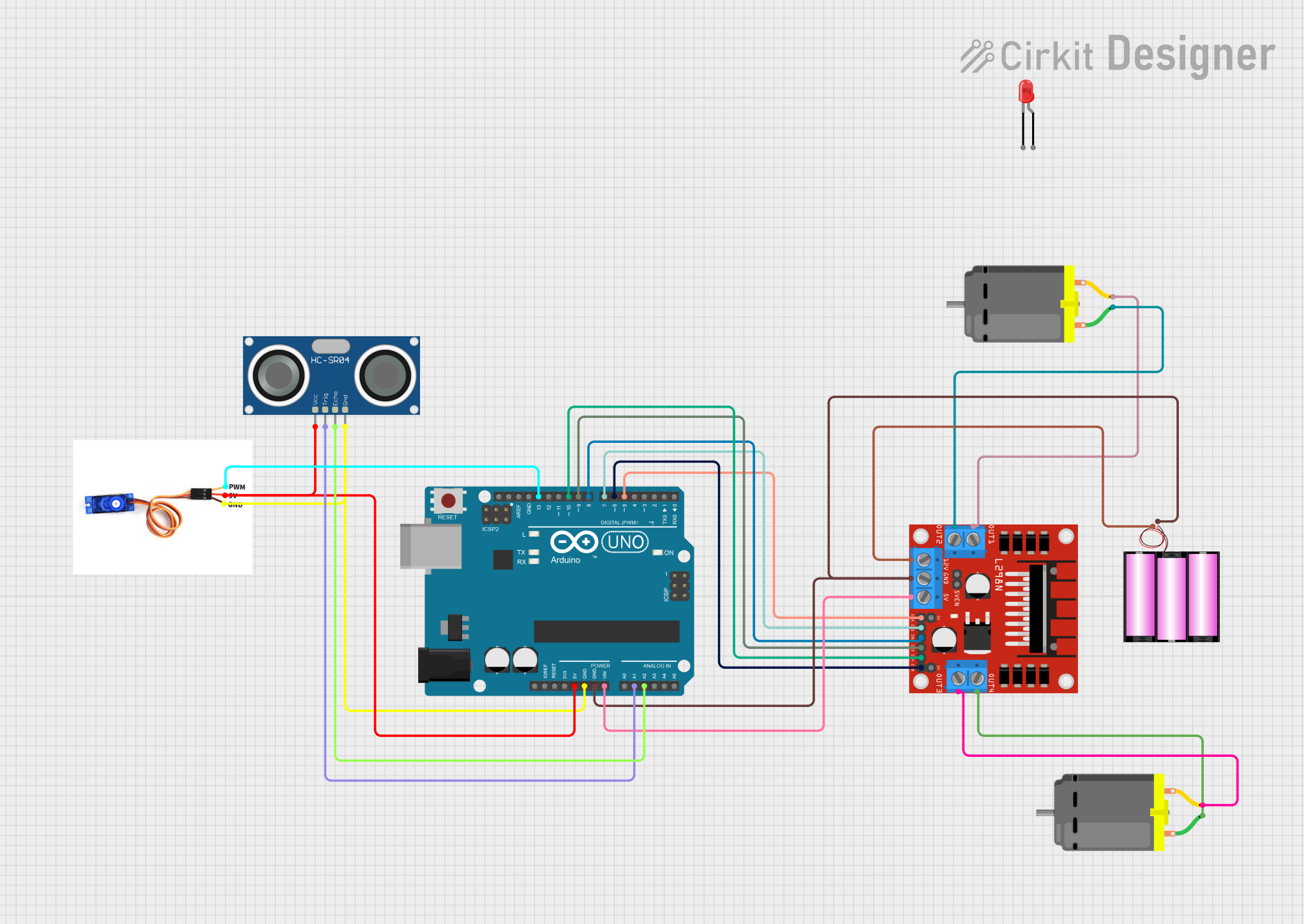
Circuit Documentation
Summary
The circuit in question is designed to control a pair of DC motors using an L298N motor driver, interfaced with an Arduino UNO microcontroller. The system also includes an HC-SR04 ultrasonic sensor for distance measurement and an SG90 servo motor for directional control. A 12V battery provides power to the motor driver, which in turn powers the DC motors. The Arduino UNO is powered through its Vin pin connected to the battery and regulates power to the servo motor and the ultrasonic sensor. The circuit is intended for a robotic application that requires obstacle detection and navigation.
Component List
Arduino UNO
- Microcontroller board based on the ATmega328P
- Provides I/O pins for interfacing with various sensors and actuators
HC-SR04 Ultrasonic Sensor
- Measures distances by emitting ultrasonic waves and measuring the time taken for the echo to return
- Operates on 5V and provides distance measurement for obstacle detection
SG90 Servo Motor
- A small and lightweight servo motor used for precise angular movement
- Typically used for steering mechanisms in robotic applications
L298N DC Motor Driver
- An H-bridge motor driver capable of driving a pair of DC motors
- Accepts high-level signal inputs to control the speed and direction of the motors
DC Motor (x2)
- Converts electrical energy into mechanical energy to drive the robot's wheels
- Operated by the L298N motor driver
Battery 12V
- Provides the main power source for the motor driver and indirectly for the DC motors
LED: Two Pin (red)
- A simple red LED used as an indicator or for debugging purposes
Wiring Details
Arduino UNO
5VandGNDpins provide power to the HC-SR04 ultrasonic sensor and the SG90 servo motorVinreceives power from the 12V battery- Digital pins
D5,D6,D7,D8,D9, andD10are connected to the L298N motor driver for motor control - Analog pins
A1andA2are connected to theTRIGandECHOpins of the HC-SR04 ultrasonic sensor, respectively - Digital pin
D13is connected to thePWMpin of the SG90 servo motor for control
HC-SR04 Ultrasonic Sensor
VCCconnected to5Von the Arduino UNOGNDconnected toGNDon the Arduino UNOTRIGconnected toA1on the Arduino UNOECHOconnected toA2on the Arduino UNO
SG90 Servo Motor
PWMconnected toD13on the Arduino UNO5VandGNDconnected to the corresponding power pins on the Arduino UNO
L298N DC Motor Driver
12VandGNDconnected to the corresponding pins on the 12V battery5Vconnected toVinon the Arduino UNOENA,IN1,IN2,IN3,IN4, andENBconnected to digital pinsD5,D7,D8,D9,D10, andD6on the Arduino UNO, respectivelyOUT1,OUT2,OUT3, andOUT4connected to the DC motors
DC Motors
- Each motor has two pins connected to the
OUTpins of the L298N motor driver
Battery 12V
+connected to12Von the L298N motor driver-connected toGNDon the L298N motor driver and the Arduino UNO
LED: Two Pin (red)
- Not explicitly wired in the provided net list
Documented Code
#include <Servo.h>  // Include the Servo library

Servo myServo;  // Create a servo object to control the servo

// Define pins for L298N motor driver
#define enA 5
#define in1 7
#define in2 8
#define in3 9
#define in4 10
#define enB 6

// Define pins for HC-SR04 ultrasonic sensor
#define echo A2
#define trigger A1

// Define the pin for the servo
#define servoPin 13

int Set = 20;  // Set distance threshold in cm
int distance_L, distance_F, distance_R;

void setup() {
  Serial.begin(9600); // Start serial communication at 9600bps

  // Set ultrasonic sensor pins as input/output
  pinMode(echo, INPUT);
  pinMode(trigger, OUTPUT);

  // Set L298N motor driver pins as output
  pinMode(enA, OUTPUT);
  pinMode(in1, OUTPUT);
  pinMode(in2, OUTPUT);
  pinMode(in3, OUTPUT);
  pinMode(in4, OUTPUT);
  pinMode(enB, OUTPUT);

  // Set speed for motors
  analogWrite(enA, 130);
  analogWrite(enB, 130);

  // Attach the servo to pin 13 and sweep it
  myServo.attach(servoPin);
  for (int angle = 70; angle <= 140; angle += 5) {
    myServo.write(angle);
    delay(100);
  }
  for (int angle = 140; angle >= 0; angle -= 5) {
    myServo.write(angle);
    delay(100);
  }
  for (int angle = 0; angle <= 70; angle += 5) {
    myServo.write(angle);
    delay(100);
  }

  // Initial ultrasonic reading
  distance_F = Ultrasonic_read();
  delay(500);
}

void loop() {
  // Obstacle avoiding logic
  distance_F = Ultrasonic_read();
  Serial.print("D F="); Serial.println(distance_F);

  // If no obstacle ahead, move forward
  if (distance_F > Set) {
    forword();
  } else {
    // Check left and right sides if obstacle is detected ahead
    Check_side();
  }

  delay(10);  // Short delay for stability
}

// Function to read the ultrasonic sensor
long Ultrasonic_read() {
  digitalWrite(trigger, LOW);
  delayMicroseconds(5);
  digitalWrite(trigger, HIGH);
  delayMicroseconds(10);
  digitalWrite(trigger, LOW);

  long time = pulseIn(echo, HIGH, 38000); // Limit to 38ms

  if (time == 0) {
    Serial.println("No echo detected");
    return 9999; // Return large value if no echo is detected
  }

  long distance = time / 29 / 2;  // Convert time to distance in cm
  Serial.print("Distance: "); Serial.println(distance);
  return distance;
}

void compareDistance() {
  if (distance_L > distance_R) {
    turnLeft();
    delay(200);
    forword();
    delay(700);
    turnRight();
    delay(500);
  } else {
    turnRight();
    delay(300);
    forword();
    delay(700);
    turnLeft();
    delay(500);
  }
}

void Check_side() {
  Stop();  // Stop the robot before checking sides
  delay(100);

  // Move servo to check right side
  Serial.println("Checking Right");
  myServo.write(140);
  delay(300);
  distance_R = Ultrasonic_read();
  Serial.print("D R="); Serial.println(distance_R);
  delay(100);

  // Move servo to check left side
  Serial.println("Checking Left");
  myServo.write(0);
  delay(500);
  distance_L = Ultrasonic_read();
  Serial.print("D L="); Serial.println(distance_L);
  delay(100);

  // Reset servo to center
  myServo.write(70);
  delay(300);

  compareDistance();  // Compare distances and decide direction
}

void forword() {  // Move forward
  digitalWrite(in1, LOW);
  digitalWrite(in2, HIGH);
  digitalWrite(in3, HIGH);
  digitalWrite(in4, LOW);
}

void turnRight() { // Turn right
  digitalWrite(in1, LOW);
  digitalWrite(in2, HIGH);
  digitalWrite(in3, LOW);
  digitalWrite(in4, HIGH);
}

void turnLeft() {  // Turn left
  digitalWrite(in1, HIGH);
  digitalWrite(in2, LOW);
  digitalWrite(in3, HIGH);
  digitalWrite(in4, LOW);
}

void Stop() {  // Stop
  digitalWrite(in1, LOW);
  digitalWrite(in2, LOW);
  digitalWrite(in3, LOW);
  digitalWrite(in4, LOW);
}
This code controls the servo motor and the DC motors based on the distance measurements from the ultrasonic sensor. It includes functions for moving forward, turning, and stopping the robot. The servo motor is used to scan the environment by moving the ultrasonic sensor to the left and right. The robot uses this information to navigate and avoid obstacles.