
Circuit Documentation
Summary
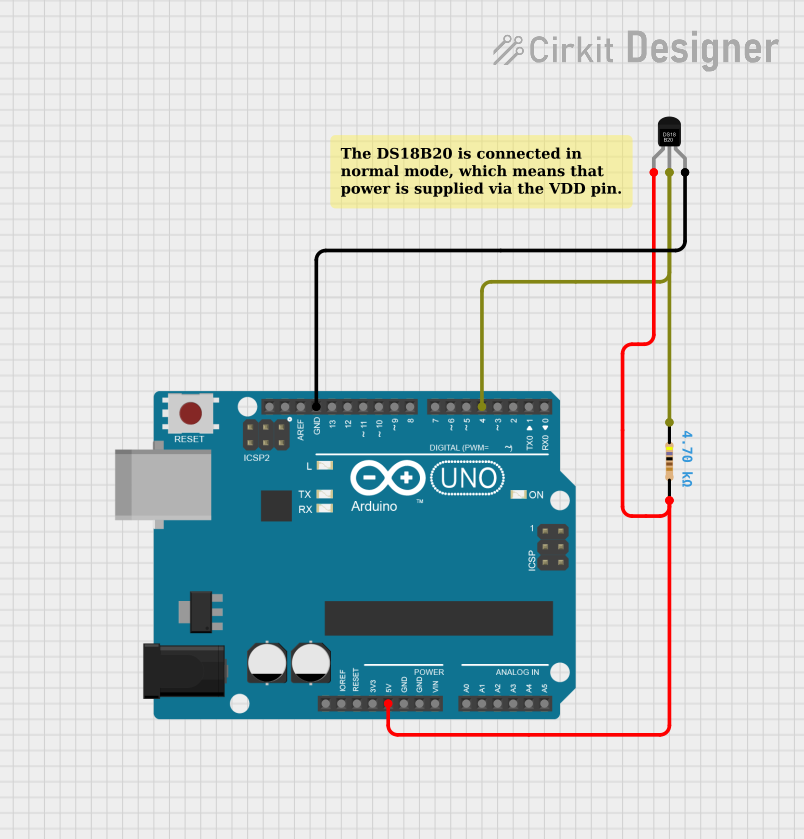
This document describes a simple temperature sensing circuit using a DS18B20 digital temperature sensor interfaced with an Arduino UNO microcontroller. The circuit is designed to measure temperature and output the readings in both Celsius and Fahrenheit to the serial monitor. A 4.7k Ohm pull-up resistor is used on the data line of the DS18B20 sensor.
Component List
DS18B20 Temperature Sensor
- Pins: VDD, DQ, GND
- Description: A digital temperature sensor capable of providing temperature readings in a digital format, eliminating the need for analog-to-digital conversions.
Arduino UNO
- Pins: UNUSED, IOREF, Reset, 3.3V, 5V, GND, Vin, A0-A5, SCL, SDA, AREF, D0-D13
- Description: A microcontroller board based on the ATmega328P, widely used for building digital devices and interactive objects that can sense and control objects in the physical world.
Resistor (4.7k Ohms)
- Pins: pin1, pin2
- Description: A passive two-terminal electrical component that implements electrical resistance as a circuit element, used here as a pull-up resistor for the data line of the DS18B20 sensor.
Comment
- Pins: N/A
- Description: A placeholder or annotation within the circuit design, not a physical component.
Wiring Details
DS18B20 Temperature Sensor
- VDD: Connected to Arduino UNO 5V
- DQ: Connected to Arduino UNO Digital Pin 4 through a 4.7k Ohm pull-up resistor
- GND: Connected to Arduino UNO GND
Arduino UNO
- 5V: Provides power to the DS18B20 VDD pin
- D4: Receives data from the DS18B20 DQ pin through a 4.7k Ohm pull-up resistor
- GND: Common ground with the DS18B20 GND pin
Resistor (4.7k Ohms)
- pin1: Connected to Arduino UNO Digital Pin 4
- pin2: Connected to DS18B20 DQ pin
Documented Code
/**
 * Temperature Sensor Reading with DS18B20
 *
 * This sketch demonstrates how to connect a DS18B20 temperature sensor to an Arduino UNO
 * and read temperatures in both Celsius and Fahrenheit. The temperature is printed to the
 * serial monitor.
 *
 * Circuit connections:
 * - DS18B20 Data pin connected to Arduino Digital Pin 4 with a 4.7k Ohm pull-up resistor.
 * - DS18B20 VDD pin connected to Arduino 5V.
 * - DS18B20 GND pin connected to Arduino GND.
 *
 * Libraries used:
 * - OneWire.h for communication with OneWire devices.
 * - DallasTemperature.h for interfacing with the Dallas Temperature sensors.
 */

#include <OneWire.h>
#include <DallasTemperature.h>

// Data wire is connected to the Arduino digital pin 4
#define ONE_WIRE_BUS 4

// Setup a oneWire instance to communicate with any OneWire devices
OneWire oneWire(ONE_WIRE_BUS);

// Pass our oneWire reference to Dallas Temperature sensor
DallasTemperature sensors(&oneWire);

void setup(void) {
  // Start serial communication for debugging purposes
  Serial.begin(9600);
  // Start up the library
  sensors.begin();
}

void loop(void) {
  // Call sensors.requestTemperatures() to issue a global temperature
  // request to all devices on the bus
  sensors.requestTemperatures();

  // Print the temperature in Celsius
  Serial.print("Celsius temperature: ");
  Serial.print(sensors.getTempCByIndex(0));

  // Print the temperature in Fahrenheit
  Serial.print(" - Fahrenheit temperature: ");
  Serial.println(sensors.getTempFByIndex(0));

  // Wait for a second before reading the temperature again
  delay(1000);
}
This code is designed to run on the Arduino UNO and requires the OneWire and DallasTemperature libraries for interfacing with the DS18B20 temperature sensor. The sensor's data pin is connected to digital pin 4 on the Arduino, and the code initializes the sensor and reads the temperature at one-second intervals, outputting the results to the serial monitor.