
Arduino Nano Controlled NRF24L01 Wireless Communication and MPU6050 Motion Tracking System
View and Edit Project In Cirkit Designer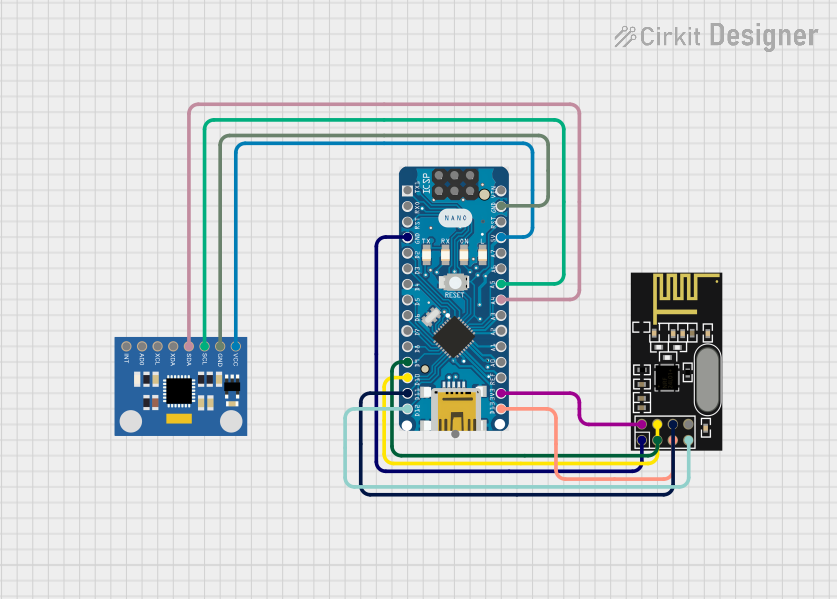
Circuit Documentation
Summary
This circuit integrates an NRF24L01 transceiver module with an Arduino Nano microcontroller and an MPU6050 accelerometer and gyroscope module. The NRF24L01 is used for wireless communication, while the MPU6050 provides motion tracking capabilities. The Arduino Nano serves as the central processing unit, interfacing with both the NRF24L01 and MPU6050 modules and executing the embedded code to control the circuit's functionality.
Component List
NRF24L01 Transceiver Module
- Description: A 2.4GHz wireless transceiver module.
- Pins:
- IRQ (not used)
- MOSI
- CSN
- VCC (3V)
- GND
- CE
- SCK
- MISO
MPU6050 Accelerometer + Gyroscope (Wokwi Compatible)
- Description: A motion tracking device that combines a 3-axis gyroscope and a 3-axis accelerometer.
- Pins:
- INT
- AD0
- XCL
- XDA
- SDA
- SCL
- GND
- VCC
Arduino Nano
- Description: A small, complete, and breadboard-friendly microcontroller board based on the ATmega328P.
- Pins:
- D1/TX
- D0/RX
- RESET
- GND
- D2 to D13
- VIN
- 5V
- A0 to A7
- AREF
- 3V3
Wiring Details
NRF24L01 Transceiver Module
- MOSI connected to Arduino Nano D11/MOSI
- CSN connected to Arduino Nano D10
- VCC (3V) connected to Arduino Nano 3V3
- GND connected to Arduino Nano GND
- CE connected to Arduino Nano D9
- SCK connected to Arduino Nano D13/SCK
- MISO connected to Arduino Nano D12/MISO
MPU6050 Accelerometer + Gyroscope (Wokwi Compatible)
- SDA connected to Arduino Nano A4
- SCL connected to Arduino Nano A5
- GND connected to Arduino Nano GND
- VCC connected to Arduino Nano 5V
Documented Code
Arduino Nano Code (sketch.ino)
void setup() {
  // put your setup code here, to run once:

}

void loop() {
  // put your main code here, to run repeatedly:

}
Additional Documentation (documentation.txt)
No additional documentation provided for the code.
This document provides an overview of the circuit, including a description of each component, their wiring connections, and the embedded code for the Arduino Nano. The code is currently a template with empty setup() and loop() functions, which should be filled with the logic required to initialize the components and define the main behavior of the circuit.