
Bluetooth-Controlled Arduino Nano Relay Switch for Motor and LED
View and Edit Project In Cirkit Designer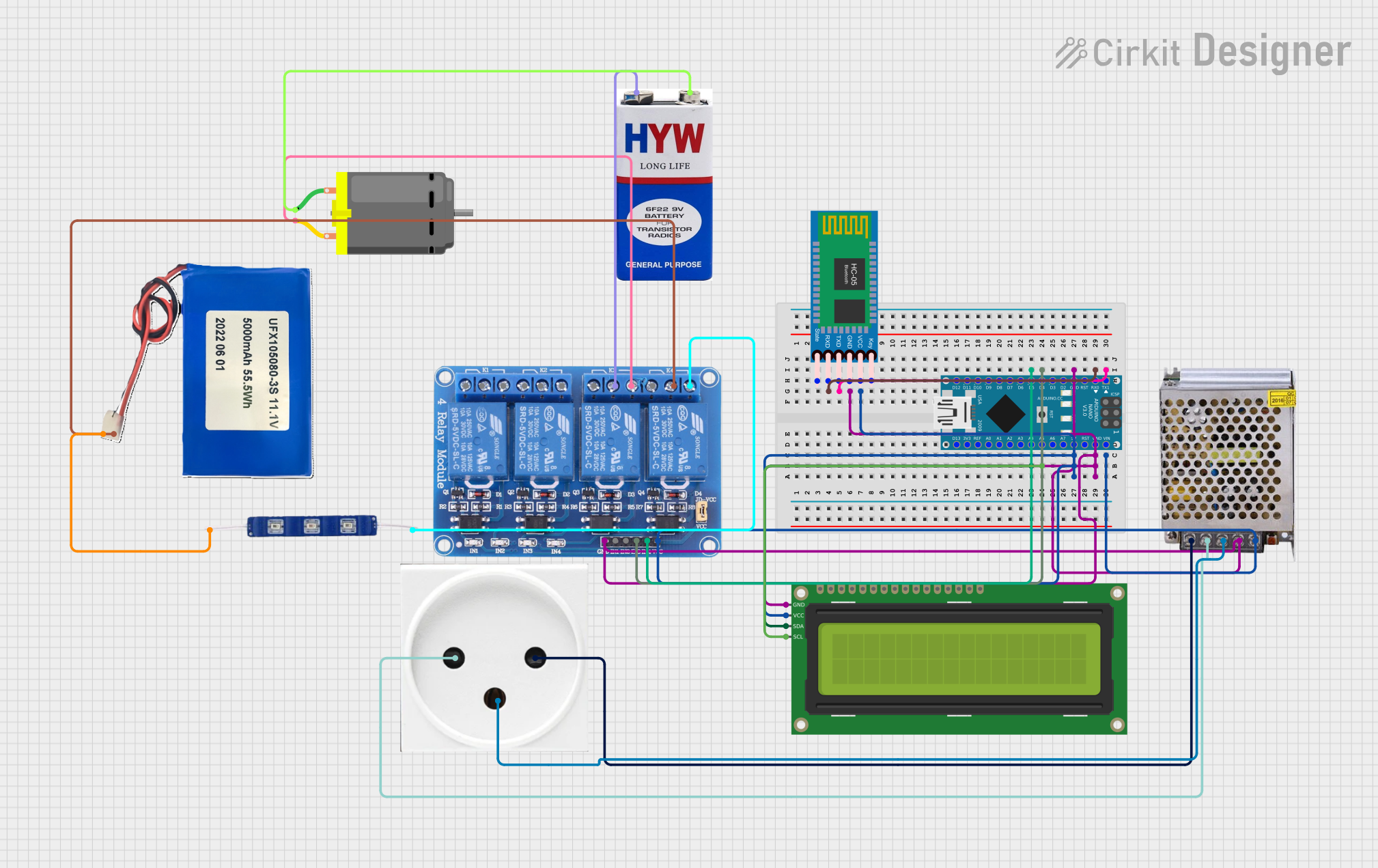
Circuit Documentation
Summary
This circuit is designed to control a DC motor and a 12V blue LED via an Arduino Nano, which is interfaced with an HC-05 Bluetooth module for wireless communication. The circuit also includes a 4-channel 5V relay module to switch the DC motor and LED on and off, a 16x2 I2C LCD for display purposes, and a 5V 5A power supply to power the components. Additionally, a 9V battery and a Li-ion 5000mAh battery are included to provide power to the motor and LED, respectively. The power supply is connected to a power outlet for AC input.
Component List
Arduino Nano
A compact microcontroller board based on the ATmega328P, featuring digital and analog I/O pins.
DC Motor
An electric motor that runs on direct current (DC) electricity.
12V Blue LED
A blue light-emitting diode that operates at 12 volts.
Relay 4 Channel 5V
A 4-channel relay module that allows for controlling high power devices with low power signals.
HC-05 Bluetooth Module
A Bluetooth module that enables wireless communication with the Arduino.
16x2 I2C LCD
A liquid crystal display with 16 characters by 2 lines, interfaced via the I2C protocol.
POWER SUPPLY 5V 5AMP
A power supply unit that converts 220V AC to 5V DC with a 5A current rating.
9V Battery
A standard 9V battery used to provide power to the circuit.
Li-ion 5000mAh Battery
A rechargeable lithium-ion battery with a capacity of 5000mAh and a nominal voltage of 11.1V.
Power Outlet (IL)
A power outlet interface for connecting the power supply to the AC mains.
Wiring Details
Arduino Nano
D0/RXconnected to HC-05 Bluetooth ModuleTXDD1/TXconnected to HC-05 Bluetooth ModuleRXDGNDconnected to common ground5VandVINconnected to 5V power railA4connected to 16x2 I2C LCDSDAA5connected to 16x2 I2C LCDSCLD4connected to Relay 4 Channel 5VIN3D5connected to Relay 4 Channel 5VIN4
DC Motor
pin 1connected to 9V battery-pin 2connected to Relay 4 Channel 5VNO3
12V Blue LED
GNDconnected to Li-ion 5000mAh BatteryGNDVCCconnected to Relay 4 Channel 5VNO4
Relay 4 Channel 5V
GNDconnected to common groundVCCconnected to 5V power railIN3andIN4controlled by Arduino NanoCOM3connected to 9V battery+COM4connected to Li-ion 5000mAh Battery11.1VNO3connected to DC Motorpin 2NO4connected to 12V Blue LEDVCC
HC-05 Bluetooth Module
RXDconnected to Arduino NanoD1/TXTXDconnected to Arduino NanoD0/RXGNDconnected to common groundVCCconnected to 5V power rail
16x2 I2C LCD
GNDconnected to common groundVCCconnected to 5V power railSDAconnected to Arduino NanoA4SCLconnected to Arduino NanoA5
POWER SUPPLY 5V 5AMP
220V Positive Pole (AC)connected to power outletL220V Negative Pole (AC)connected to power outletNGND (DC)connected to common ground12V-24V Output (DC)connected to 5V power rail
9V Battery
+connected to Relay 4 Channel 5VCOM3-connected to DC Motorpin 1
Li-ion 5000mAh Battery
11.1Vconnected to Relay 4 Channel 5VCOM4GNDconnected to 12V Blue LEDGND
Power Outlet (IL)
Nconnected to POWER SUPPLY 5V 5AMP220V Negative Pole (AC)Lconnected to POWER SUPPLY 5V 5AMP220V Positive Pole (AC)GNDconnected to POWER SUPPLY 5V 5AMPGND
Documented Code
#include<EEPROM.h>
#include<SoftwareSerial.h>
#include <Wire.h>
#include <LiquidCrystal_I2C.h>

LiquidCrystal_I2C lcd(0x27, 16, 2); // Adjust address if necessary

// Define relay pins
const int relayMotor = 4; // Relay channel for DC motor
const int relayLED = 5;   // Relay channel for LED module

// Define HC-05 Bluetooth Serial
#define BTSerial Serial

void setup() {
  // Set up relay pins
  pinMode(relayMotor, OUTPUT);
  pinMode(relayLED, OUTPUT);

  // Initially turn off all relays
  digitalWrite(relayMotor, HIGH); // Relay modules are typically active LOW
  digitalWrite(relayLED, HIGH);

  // Initialize LCD
  lcd.begin();
  lcd.backlight(); // Turn on the LCD backlight
  lcd.clear();
  lcd.print("Ready for Commands");

  // Initialize Serial for HC-05 Bluetooth
  BTSerial.begin(9600);  // Default baud rate for HC-05
}

void loop() {
  // Check if data is available from Bluetooth
  if (BTSerial.available()) {
    char command = BTSerial.read();

    // Process received command
    switch (command) {
      case '1': // Turn on LCD display
        lcd.display();
        lcd.backlight();
        lcd.clear();
        lcd.print("LCD is ON");
        break;

      case '2': // Turn off LCD display
        lcd.noDisplay();
        lcd.noBacklight();
        lcd.clear();
        break;

      case '3': // Turn on Motor
        digitalWrite(relayMotor, LOW); // Relay active LOW
        lcd.clear();
        lcd.print("Motor is ON");
        break;

      case '4': // Turn off Motor
        digitalWrite(relayMotor, HIGH); // Relay off
        lcd.clear();
        lcd.print("Motor is OFF");
        break;

      case '5': // Turn on LED
        digitalWrite(relayLED, LOW); // Relay active LOW
        lcd.clear();
        lcd.print("LED is ON");
        break;

      case '6': // Turn off LED
        digitalWrite(relayLED, HIGH); // Relay off
        lcd.clear();
        lcd.print("LED is OFF");
        break;

      default:
        lcd.clear();
        lcd.print("Unknown Command");
        break;
    }
    delay(1000); // Small delay for readability
  }
}
This code is designed to run on the Arduino Nano and controls the relay module to switch the DC motor and LED on and off based on commands received via Bluetooth. It also updates the LCD display with the status of the devices.