
Circuit Documentation
Summary
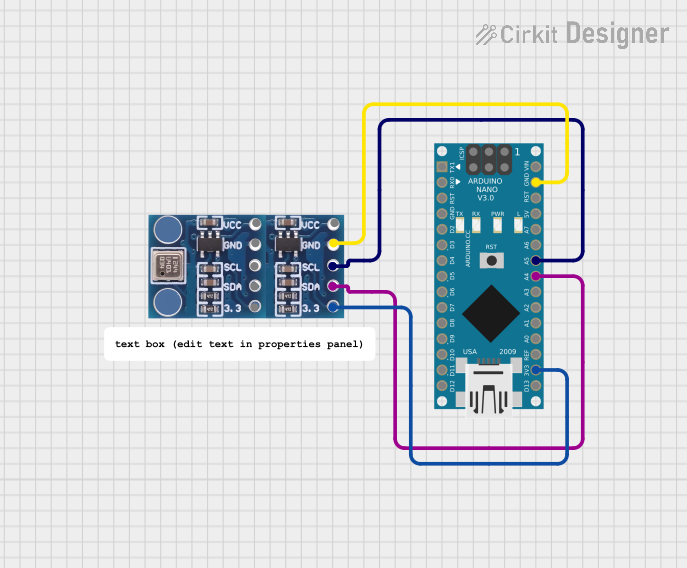
This circuit involves an Arduino Nano microcontroller interfaced with two BMP180 atmospheric pressure sensors. The Arduino Nano reads atmospheric pressure data from the BMP180 sensors and displays the pressure in the atmosphere. The connections between the components are established through specific pins, and the Arduino Nano is programmed to read and display the sensor data.
Component List
BMP180 Atmospheric Pressure Sensor
- Description: A sensor used to measure atmospheric pressure.
- Pins: 3.3, SDA, SCL, GND, VCC
Arduino Nano
- Description: A small, complete, and breadboard-friendly board based on the ATmega328P.
- Pins: D1/TX, D0/RX, RESET, GND, D2, D3, D4, D5, D6, D7, D8, D9, D10, D11/MOSI, D12/MISO, VIN, 5V, A7, A6, A5, A4, A3, A2, A1, A0, AREF, 3V3, D13/SCK
Comment
- Description: Placeholder for comments in the circuit design.
- Pins: None
Wiring Details
BMP180 Atmospheric Pressure Sensor 1
- 3.3V connected to Arduino Nano 3V3
- SDA connected to Arduino Nano A4
- SCL connected to Arduino Nano A5
- GND connected to Arduino Nano GND
BMP180 Atmospheric Pressure Sensor 2
- 3.3V connected to Arduino Nano 3V3
- SDA connected to Arduino Nano A4
- SCL connected to Arduino Nano A5
- GND connected to Arduino Nano GND
Arduino Nano
- 3V3 connected to BMP180 3.3V
- A4 connected to BMP180 SDA
- A5 connected to BMP180 SCL
- GND connected to BMP180 GND
Code Documentation
/*
 * This Arduino sketch reads atmospheric pressure data from a BMP180 sensor
 * connected to an Arduino Nano and displays the pressure in the atmosphere.
 * Connections:
 * BMP180 -> Arduino Nano
 * 3.3V  -> 3V3
 * GND   -> GND
 * SCL   -> A5
 * SDA   -> A4
 */

#include <Wire.h>
#include <Adafruit_Sensor.h>
#include <Adafruit_BMP085_U.h>

Adafruit_BMP085_Unified bmp = Adafruit_BMP085_Unified(10085);

void setup() {
  Serial.begin(9600);
  if (!bmp.begin()) {
    Serial.print("Could not find a valid BMP085 sensor, check wiring!");
    while (1);
  }
}

void loop() {
  sensors_event_t event;
  bmp.getEvent(&event);
  if (event.pressure) {
    Serial.print("Pressure: ");
    Serial.print(event.pressure);
    Serial.println(" hPa");
  } else {
    Serial.println("Sensor error");
  }
  delay(1000);
}
This code initializes the BMP180 sensor and reads the atmospheric pressure data. If the sensor is not found, it prints an error message. The pressure data is read and printed to the serial monitor every second.