
Arduino-Controlled Obstacle-Avoiding Robot with IR and Ultrasonic Sensors
View and Edit Project In Cirkit Designer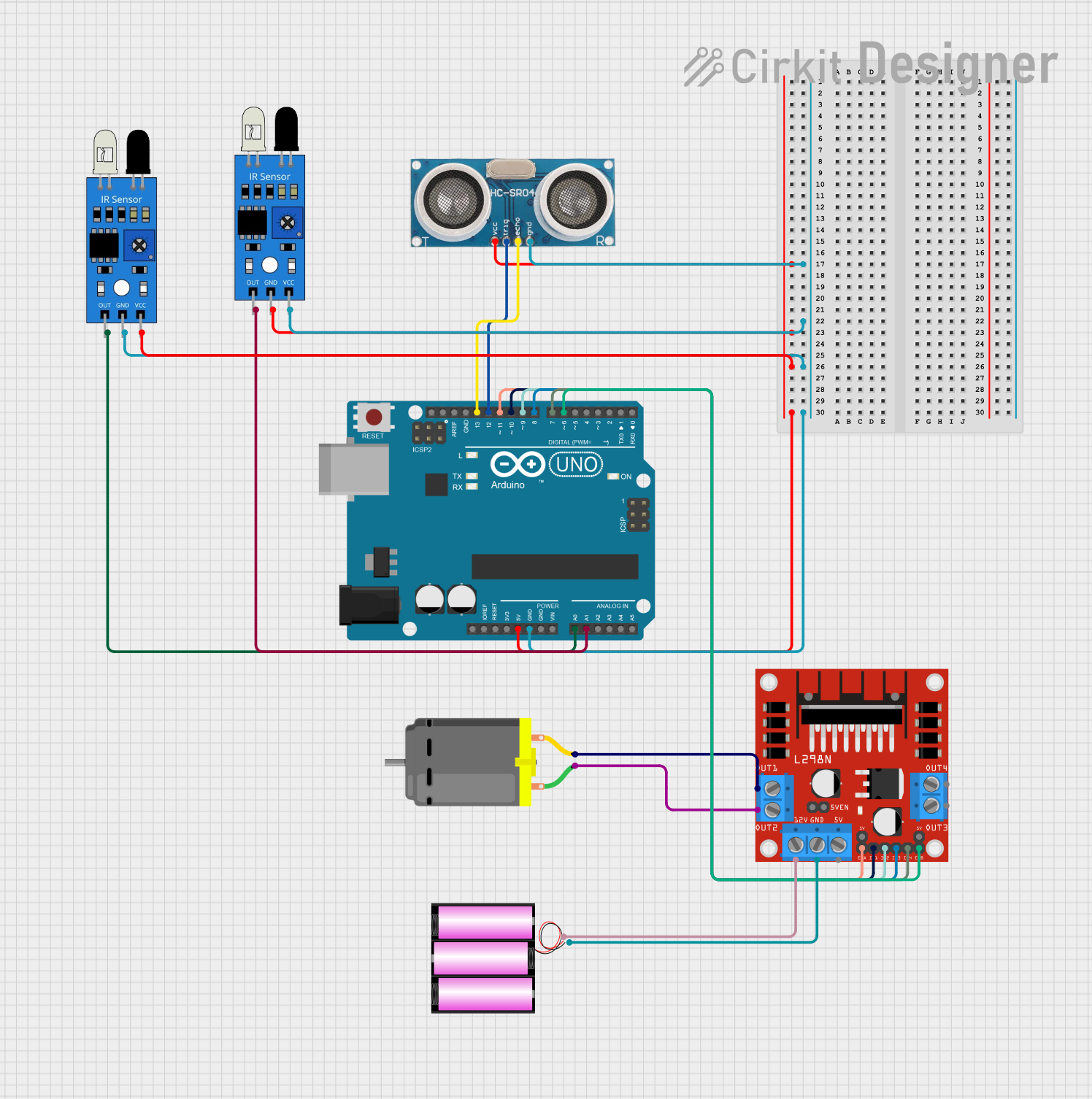
Circuit Documentation
Summary
This circuit is designed to control a DC motor using an Arduino UNO microcontroller and an L298N DC motor driver. It also includes an ultrasonic sensor for distance measurement and two IR sensors for object detection. The circuit is powered by a 12V battery, which also supplies power to the motor driver. The Arduino UNO manages the inputs and outputs, interfacing with the sensors and controlling the motor driver.
Component List
Arduino UNO
- Microcontroller board based on the ATmega328P
- It has 14 digital input/output pins, 6 analog inputs, a 16 MHz quartz crystal, a USB connection, a power jack, an ICSP header, and a reset button.
L298N DC Motor Driver
- A motor driver module capable of driving two DC motors or one stepper motor.
- It has an onboard 5V regulator which can be used to power the microcontroller.
12V Battery
- Provides the power source for the motor driver and the motor.
Ultrasonic Sensor
- Used for measuring distance via ultrasonic waves.
- It has four pins: VCC, Trigger, Echo, and GND.
DC Motor
- A simple electric motor that is driven by the motor driver.
IR Sensor
- An infrared sensor used for object detection.
- It has three pins: out, gnd, and vcc.
Wiring Details
Arduino UNO
5VandGNDare used to power the Ultrasonic Sensor and IR sensors.A0is connected to the output of one IR sensor.A1is connected to the output of the other IR sensor.D13is connected to the Echo pin of the Ultrasonic Sensor.D12is connected to the Trigger pin of the Ultrasonic Sensor.D11,D10,D9,D8,D7, andD6are connected to theENA,IN1,IN2,IN3,IN4, andENBpins of the L298N motor driver, respectively.
L298N DC Motor Driver
12VandGNDare connected to the 12V battery.OUT1andOUT2are connected to the two pins of the DC motor.ENA,IN1,IN2,IN3,IN4, andENBare controlled by the Arduino UNO.
12V Battery
+is connected to the12Vinput of the L298N motor driver.-is connected to theGNDof the L298N motor driver.
Ultrasonic Sensor
+VCCis connected to the5Voutput of the Arduino UNO.GNDis connected to theGNDon the Arduino UNO.Echois connected to pinD13on the Arduino UNO.Triggeris connected to pinD12on the Arduino UNO.
DC Motor
pin 1andpin 2are connected toOUT2andOUT1of the L298N motor driver, respectively.
IR Sensor
- Both IR sensors have their
vccconnected to5Von the Arduino UNO andgndtoGNDon the Arduino UNO. - The
outpins of the IR sensors are connected toA0andA1on the Arduino UNO.
Documented Code
Arduino UNO Code (sketch.ino)
void setup() {
  // put your setup code here, to run once:

}

void loop() {
  // put your main code here, to run repeatedly:

}
This code is a template and does not contain any functional code. It is expected that the user will fill in the setup() function with initialization code and the loop() function with the main logic of the application.