
Circuit Documentation
Summary
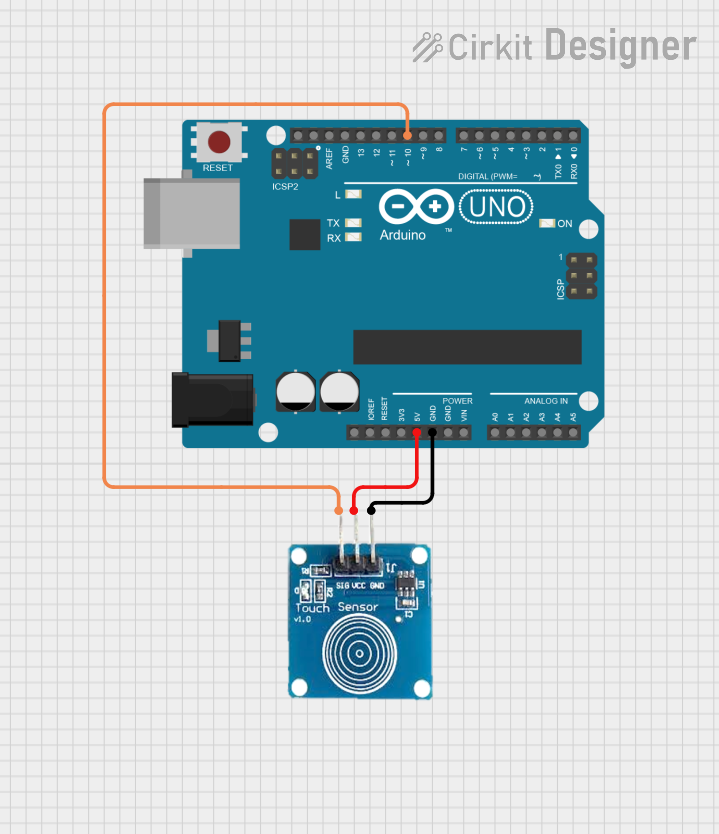
This document provides a detailed overview of a simple circuit involving an Arduino UNO and a capacitive touch sensor. The Arduino UNO serves as the microcontroller, while the capacitive touch sensor detects touch inputs. The sensor is powered by the Arduino and communicates touch events to the Arduino through a digital pin.
Component List
Arduino UNO
- Description: A microcontroller board based on the ATmega328P.
- Pins: UNUSED, IOREF, Reset, 3.3V, 5V, GND, Vin, A0, A1, A2, A3, A4, A5, SCL, SDA, AREF, D13, D12, D11, D10, D9, D8, D7, D6, D5, D4, D3, D2, D1, D0
Sensor Touch Capacitivo
- Description: A capacitive touch sensor used to detect touch inputs.
- Pins: OUT, VCC, GND
Wiring Details
Arduino UNO
- 5V: Connected to VCC of the Sensor Touch Capacitivo
- GND: Connected to GND of the Sensor Touch Capacitivo
- D10: Connected to OUT of the Sensor Touch Capacitivo
Sensor Touch Capacitivo
- VCC: Connected to 5V of the Arduino UNO
- GND: Connected to GND of the Arduino UNO
- OUT: Connected to D10 of the Arduino UNO
Code Documentation
Arduino UNO Code
sketch.ino
void setup() {
  // put your setup code here, to run once:

}

void loop() {
  // put your main code here, to run repeatedly:

}
documentation.txt
This document provides a comprehensive overview of the circuit, including the components used, their connections, and the code running on the Arduino UNO.