
Bluetooth-Controlled Robotic Vehicle with Arduino and L298N Motor Driver
View and Edit Project In Cirkit Designer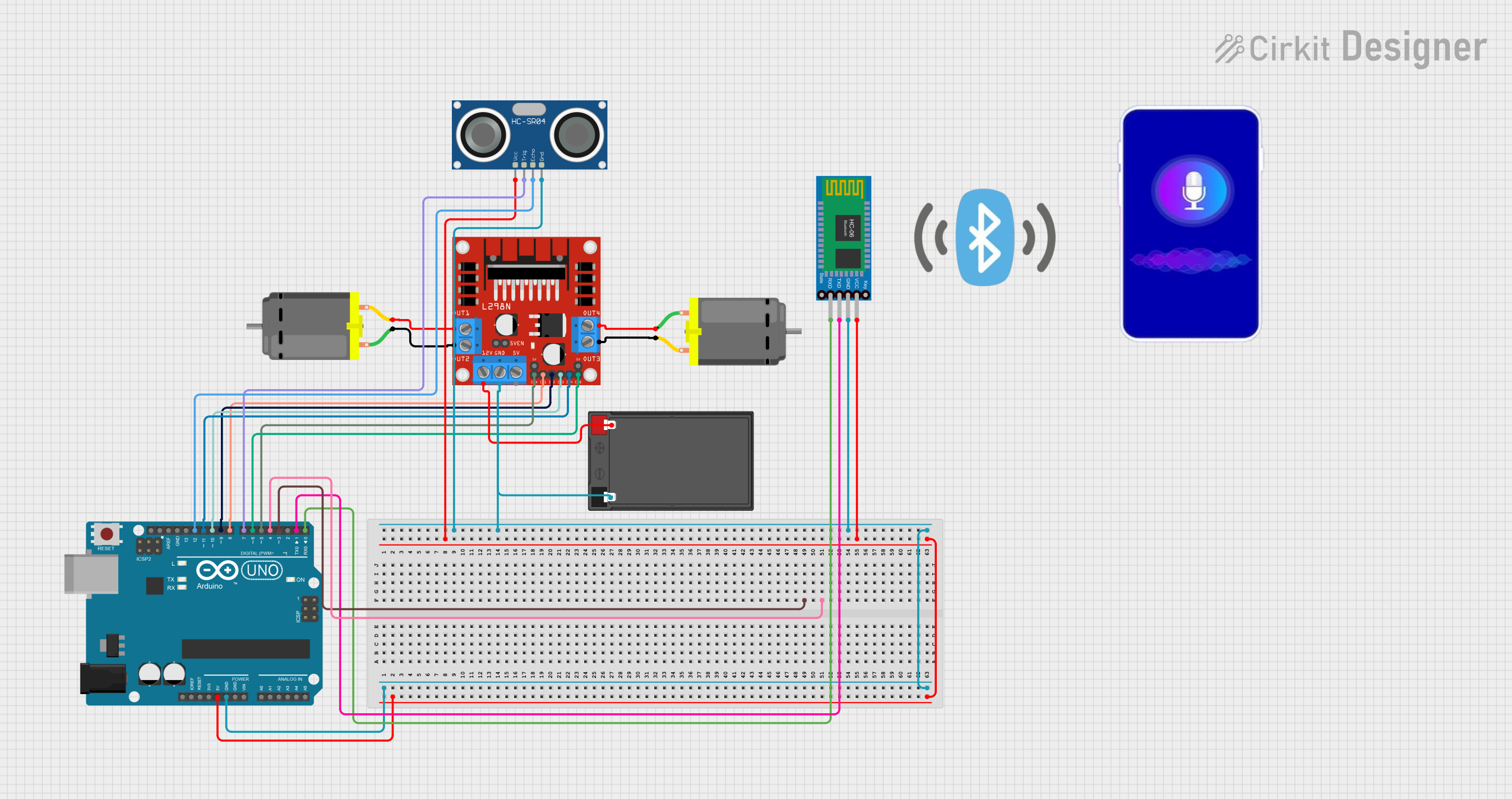
Circuit Documentation
Summary
This circuit is designed to control two DC motors using an L298N DC motor driver, which is interfaced with an Arduino UNO microcontroller. The Arduino UNO also connects to an HC-SR04 Ultrasonic Sensor for distance measurement and a Bluetooth HC-06 module for wireless communication, likely for remote control purposes. The circuit is powered by a 12V 7Ah battery. The microcontroller receives commands via Bluetooth to drive the motors in various directions (forward, backward, left, right) or to stop them.
Component List
L298N DC Motor Driver
- Description: A module used to control the direction and speed of DC motors.
- Pins: OUT1, OUT2, 12V, GND, 5V, OUT3, OUT4, 5V-ENA-JMP-I, 5V-ENA-JMP-O, +5V-J1, +5V-J2, ENA, IN1, IN2, IN3, IN4, ENB
DC Motor (x2)
- Description: Electric motors that convert DC electrical energy into mechanical energy.
- Pins: pin 1, pin 2
Arduino UNO
- Description: A microcontroller board based on the ATmega328P, used for controlling the components in the circuit.
- Pins: UNUSED, IOREF, Reset, 3.3V, 5V, GND, Vin, A0-A5, SCL, SDA, AREF, D0-D13
Bluetooth HC-06
- Description: A Bluetooth module for wireless communication.
- Pins: VCC, GND, TXD, RXD
12V 7Ah Battery
- Description: A rechargeable battery providing the power source for the circuit.
- Pins: 12v +, 12v -
HC-SR04 Ultrasonic Sensor
- Description: A sensor used for measuring distances via ultrasonic waves.
- Pins: VCC, TRIG, ECHO, GND
Mobile Phone
- Description: Not directly connected to the circuit but likely used as a Bluetooth remote control interface.
- Pins: N/A
Bluetooth Logo
- Description: Likely a visual indicator or label, not an electronic component.
- Pins: N/A
Wiring Details
L298N DC Motor Driver
- 12V: Connected to the 12v + of the 12V 7Ah Battery
- GND: Connected to the GND of Arduino UNO, HC-SR04 Ultrasonic Sensor, 12V 7Ah Battery, and Bluetooth HC-06
- ENA, IN1, IN2: Controlled by Arduino UNO pins D5, D8, D9 respectively
- ENB, IN3, IN4: Controlled by Arduino UNO pins D6, D10, D11 respectively
- OUT1, OUT2: Connected to one of the DC Motors
- OUT3, OUT4: Connected to the other DC Motor
DC Motors
- Each motor has two pins connected to the corresponding OUT pins on the L298N DC Motor Driver.
Arduino UNO
- D0-D13: Various control pins connected to the L298N DC Motor Driver, HC-SR04 Ultrasonic Sensor, and Bluetooth HC-06
- 5V: Powers the HC-SR04 Ultrasonic Sensor and Bluetooth HC-06
- GND: Common ground with other components
Bluetooth HC-06
- VCC: Powered by the 5V from Arduino UNO
- GND: Common ground with other components
- TXD, RXD: Serial communication with Arduino UNO pins D0, D1 respectively
HC-SR04 Ultrasonic Sensor
- VCC: Powered by the 5V from Arduino UNO
- GND: Common ground with other components
- TRIG, ECHO: Connected to Arduino UNO pins D7, D12 respectively
Documented Code
// Pin Definitions
#define in1 8
#define in2 9
#define in3 10
#define in4 11
#define enA 5
#define enB 6

// Variables
char command = 'S';  // Default command is 'Stop'

void setup() {
  // Motor pins setup
  pinMode(in1, OUTPUT);
  pinMode(in2, OUTPUT);
  pinMode(in3, OUTPUT);
  pinMode(in4, OUTPUT);
  pinMode(enA, OUTPUT);
  pinMode(enB, OUTPUT);

  // Set initial motor speed
  analogWrite(enA, 255);
  analogWrite(enB, 255);

  // Initialize Serial communication (for Bluetooth)
  Serial.begin(9600);
}

void loop() {
  // Check if data is available on Serial (Bluetooth)
  if (Serial.available() > 0) {
    command = Serial.read();  // Read the incoming command
    Serial.println(command);  // Print the received command for debugging

    // Execute the corresponding command
    if (command == 'F') {      // Forward
      forward();
    } else if (command == 'B') { // Backward
      backward();
    } else if (command == 'L') { // Left
      left();
    } else if (command == 'R') { // Right
      right();
    } else if (command == 'S') { // Stop
      stop();
    }
  }
}

// Functions to control the motors
void forward() {
  Serial.println("Forward");  // Debugging print
  digitalWrite(in1, HIGH);
  digitalWrite(in2, LOW);
  digitalWrite(in3, HIGH);
  digitalWrite(in4, LOW);
}

void backward() {
  Serial.println("Backward");  // Debugging print
  digitalWrite(in1, LOW);
  digitalWrite(in2, HIGH);
  digitalWrite(in3, LOW);
  digitalWrite(in4, HIGH);
}

void left() {
  Serial.println("Left");  // Debugging print
  digitalWrite(in1, LOW);
  digitalWrite(in2, HIGH);
  digitalWrite(in3, HIGH);
  digitalWrite(in4, LOW);
}

void right() {
  Serial.println("Right");  // Debugging print
  digitalWrite(in1, HIGH);
  digitalWrite(in2, LOW);
  digitalWrite(in3, LOW);
  digitalWrite(in4, HIGH);
}

void stop() {
  Serial.println("Stop");  // Debugging print
  digitalWrite(in1, LOW);
  digitalWrite(in2, LOW);
  digitalWrite(in3, LOW);
  digitalWrite(in4, LOW);
}
The code is written for the Arduino UNO and controls the L298N DC motor driver based on serial commands received from the Bluetooth HC-06 module. It defines motor control functions for moving forward, backward, turning left, and right, as well as stopping the motors. The loop function listens for incoming serial data and calls the appropriate motor control function based on the received command.