
Arduino Nano Controlled TFT Display with Multiple Pushbuttons
View and Edit Project In Cirkit Designer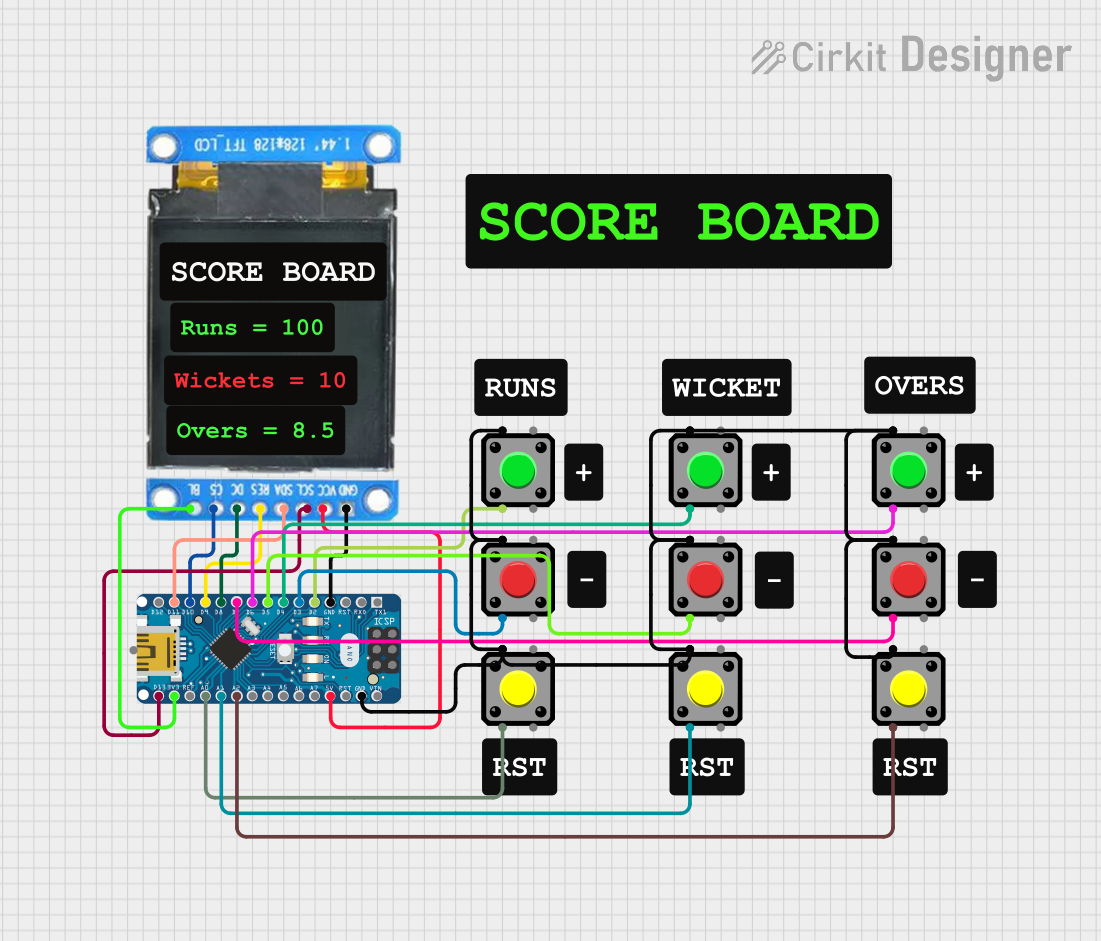
Circuit Documentation
Summary
This circuit integrates an Arduino Nano microcontroller with an ST7735 128x128 1.44" TFT I2C Color display and multiple pushbuttons. The display is controlled via SPI communication, and the pushbuttons are interfaced with the digital and analog input pins of the Arduino Nano. The circuit is designed to capture user inputs through the pushbuttons and display relevant information on the TFT screen.
Component List
Arduino Nano
- Microcontroller board based on the ATmega328P
- Offers a variety of digital and analog I/O pins
- Supports I2C, SPI, and serial communication
ST7735 128x128 1.44" TFT I2C Color
- Small form factor color display
- 128x128 pixel resolution
- Communicates with the microcontroller via SPI
Pushbuttons
- Momentary tactile switches
- Used to capture user inputs
- Connected to various digital and analog pins on the Arduino Nano
Comments
- Non-electrical components used for annotation and documentation purposes within the circuit design
Wiring Details
Arduino Nano
3V3connected to ST7735BL(Backlight)D10connected to ST7735C5D8connected to ST7735DC(Data/Command select)D9connected to ST7735RES(Reset)D11/MOSIconnected to ST7735SDA(Serial Data)D13/SCKconnected to ST7735SCL(Serial Clock)GNDconnected to ST7735GNDand all pushbuttonPin 15Vconnected to ST7735VCCD2,D3,D4,D5,D6,D7,A2,A1,A0connected to corresponding pushbuttonPin 2
ST7735 128x128 1.44" TFT I2C Color
BLconnected to Arduino Nano3V3C5connected to Arduino NanoD10DCconnected to Arduino NanoD8RESconnected to Arduino NanoD9SDAconnected to Arduino NanoD11/MOSISCLconnected to Arduino NanoD13/SCKGNDconnected to Arduino NanoGNDVCCconnected to Arduino Nano5V
Pushbuttons
Pin 2of each pushbutton connected to a unique digital or analog pin on the Arduino Nano (D2,D3,D4,D5,D6,D7,A2,A1,A0)Pin 1of all pushbuttons connected to Arduino NanoGND
Documented Code
Arduino Nano Code (sketch.ino)
void setup() {
  // put your setup code here, to run once:

}

void loop() {
  // put your main code here, to run repeatedly:

}
Additional Notes (documentation.txt)
No additional code documentation provided.