
Arduino Mega 2560 Controlled Robotic Vehicle with Bluetooth and ESP32-CAM
View and Edit Project In Cirkit Designer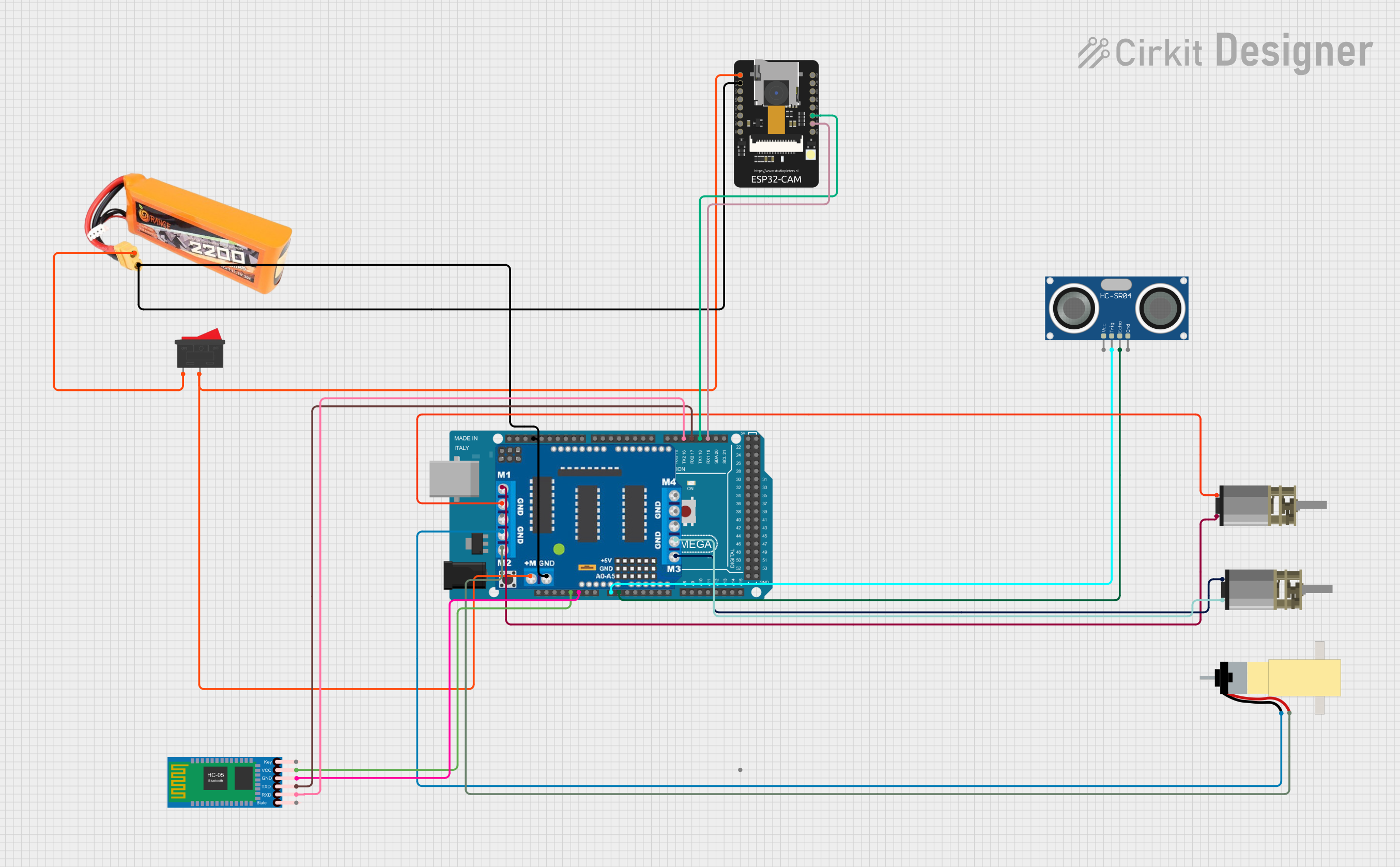
Circuit Documentation
Summary
The circuit in question is designed to control a vehicle with various sensors and communication modules. It includes an Arduino Mega 2560 as the central microcontroller, interfaced with an HC-05 Bluetooth Module for wireless communication, an ESP32-CAM for image capture and processing, and an HC-SR04 Ultrasonic Sensor for distance measurement. The circuit also features a L293D Driver Shield to control multiple DC motors, a lipo battery for power supply, and a Rocker Switch as a power toggle. The motors in the circuit are two DC Mini Metal Gear Motors and a Hobby Gearmotor with a 48:1 gearbox.
Component List
- Arduino Mega 2560: A microcontroller board based on the ATmega2560, with numerous digital and analog I/O pins.
- L293D Driver Shield: A motor driver shield that can control up to 4 DC motors or 2 stepper motors.
- Rocker Switch: A simple on-off switch to control the power flow in the circuit.
- DC Mini Metal Gear Motor: A small DC motor with a gearbox for increased torque.
- Hobby Gearmotor with 48:1 gearbox: A DC motor with a 48:1 reduction gearbox for high torque applications.
- lipo battery 2200mAH 30c: A rechargeable lithium polymer battery with a capacity of 2200mAh.
- HC-05 Bluetooth Module: A Bluetooth module for wireless data communication.
- ESP32 - CAM: A small camera module with Wi-Fi capabilities, based on the ESP32 chip.
- HC-SR04 Ultrasonic Sensor: An ultrasonic distance sensor that can measure distances by emitting ultrasonic waves.
Wiring Details
Arduino Mega 2560
5Vconnected to HC-05 Bluetooth ModuleVCCGNDconnected to HC-05 Bluetooth ModuleGND, ESP32 - CAMGND, L293D Driver ShieldGND, and lipo batteryGNDA0connected to HC-SR04 Ultrasonic SensorTRIGA1connected to HC-SR04 Ultrasonic SensorECHOD19/RX1connected to ESP32 - CAMVOTD18/TX1connected to ESP32 - CAMVORD17 PWM/RX2connected to HC-05 Bluetooth ModuleTXDD16 PWM/TX2connected to HC-05 Bluetooth ModuleRXD
L293D Driver Shield
m1connected to DC Mini Metal Gear MotorIN1andIN2m2connected to Hobby Gearmotor with 48:1 gearboxpin 1andpin 2m3connected to another DC Mini Metal Gear MotorIN1andIN2GNDshared with Arduino Mega 2560GND+and-connected to Rocker Switch2
Rocker Switch
1connected to lipo batteryVCC2connected to L293D Driver Shield+and-, and ESP32 - CAM5V
DC Mini Metal Gear Motor
- Two instances, each with
IN1andIN2connected to L293D Driver Shieldm1andm3respectively
Hobby Gearmotor with 48:1 gearbox
pin 1andpin 2connected to L293D Driver Shieldm2
lipo battery 2200mAH 30c
VCCconnected to Rocker Switch1GNDshared with Arduino Mega 2560GND
HC-05 Bluetooth Module
VCCconnected to Arduino Mega 25605VGNDshared with Arduino Mega 2560GNDTXDconnected to Arduino Mega 2560D17 PWM/RX2RXDconnected to Arduino Mega 2560D16 PWM/TX2
ESP32 - CAM
5Vconnected to Rocker Switch2GNDshared with Arduino Mega 2560GNDVOTconnected to Arduino Mega 2560D19/RX1VORconnected to Arduino Mega 2560D18/TX1
HC-SR04 Ultrasonic Sensor
VCCnot explicitly connected in the provided net listTRIGconnected to Arduino Mega 2560A0ECHOconnected to Arduino Mega 2560A1GNDnot explicitly connected in the provided net list
Documented Code
The code is written for the Arduino Mega 2560 and is responsible for controlling the vehicle's movement based on sensor inputs and wireless commands. It includes motor control, distance measurement with the ultrasonic sensor, and communication with the ESP32-CAM and Bluetooth module.
#include <AFMotor.h>
#include <Wire.h>

// Sonar sensor pins
int echo_pin = A1;
int trigger_pin = A0;

// Data handling
String espData = "";   // Variable to store data from ESP32-CAM
String btData = "";    // Variable to store data from Bluetooth
boolean espNewData = false;  // Flag to indicate new data from ESP32-CAM
boolean btNewData = false;   // Flag to indicate new data from Bluetooth

// Motor initialization
AF_DCMotor LF(1);
AF_DCMotor LB(2);
AF_DCMotor RF(3);
//AF_DCMotor RB(4);

void setup() {
  pinMode(echo_pin, INPUT);
  pinMode(trigger_pin, OUTPUT);

  Serial.begin(115200);    // Start USB serial communication for debugging
  Serial1.begin(115200);   // Start serial communication with the ESP32-CAM
  Serial2.begin(9600);     // Start serial communication with the Bluetooth module

  Serial.println("Arduino Ready to Receive Data");
  Wire.begin();

  // Set motor speeds
  LF.setSpeed(150);
  LB.setSpeed(80);
  RF.setSpeed(150);
  //RB.setSpeed(90);
}

void loop() {
  long duration, distance;
  boolean actionTriggered = false;

  // Trigger the sonar sensor
  digitalWrite(trigger_pin, LOW);
  delayMicroseconds(2);
  digitalWrite(trigger_pin, HIGH);
  delayMicroseconds(10);
  digitalWrite(trigger_pin, LOW);

  // Read the echo signal and calculate distance
  duration = pulseIn(echo_pin, HIGH);
  distance = (duration / 2) / 29.1;  // Convert time to distance (cm)

  // If distance is less than or equal to 60 cm, turn the vehicle
  if (distance <= 40 && distance > 0) {  // Ensure valid reading
    Serial.println("Obstacle detected by Sonar! Turning the vehicle.");
    RobotRight();  // Turn the vehicle
    delay(1000);   // Turn duration (adjust as needed)
    RobotStop();   // Stop after turning
    actionTriggered = true;
  }

  // Check if data is available on Serial1 (from ESP32-CAM)
  while (Serial1.available() > 0) {
    char receivedChar = Serial1.read();  // Read each character from Serial1
    espData += receivedChar;             // Append character to the string

    // Check if the data received ends with a newline character
    if (receivedChar == '\n') {
      espNewData = true;
      break;
    }
  }

  // Check if data is available on Serial2 (from Bluetooth)
  while (Serial2.available() > 0) {
    char receivedChar = Serial2.read();  // Read each character from Serial2
    btData += receivedChar;              // Append character to the string

    // Check if the data received ends with a newline character
    if (receivedChar == '\n') {
      btNewData = true;
      break;
    }
  }

  // Process the Bluetooth data if available and not already triggered by sonar
  if (btNewData && !actionTriggered) {
    btData.trim();
    Serial.println("Bluetooth Command: " + btData);

    // Handle Bluetooth commands
    if (btData == "X") {
      Serial.println("Action Triggered by Bluetooth: Stop the vehicle!");
      RobotStop();
      actionTriggered = true;
    } else if (btData == "R") {
      Serial.println("Action Triggered by Bluetooth: Turn the vehicle!");
      RobotRight();
      delay(1000);
      actionTriggered = true;
    } else if (btData == "F") {
      Serial.println("Action Triggered by Bluetooth: Move Forward!");
      RobotForward();
    }

    // Clear the Bluetooth data
    btData = "";
    btNewData = false;
  }

  // If no Bluetooth command, process the ESP32-CAM data
  if (espNewData && !actionTriggered) {
    espData.trim();

    // Print the received data for debugging
    Serial.println("Received from ESP32-CAM: " + espData);

    // Parse the incoming data (e.g., "Stop