
Circuit Documentation
Summary
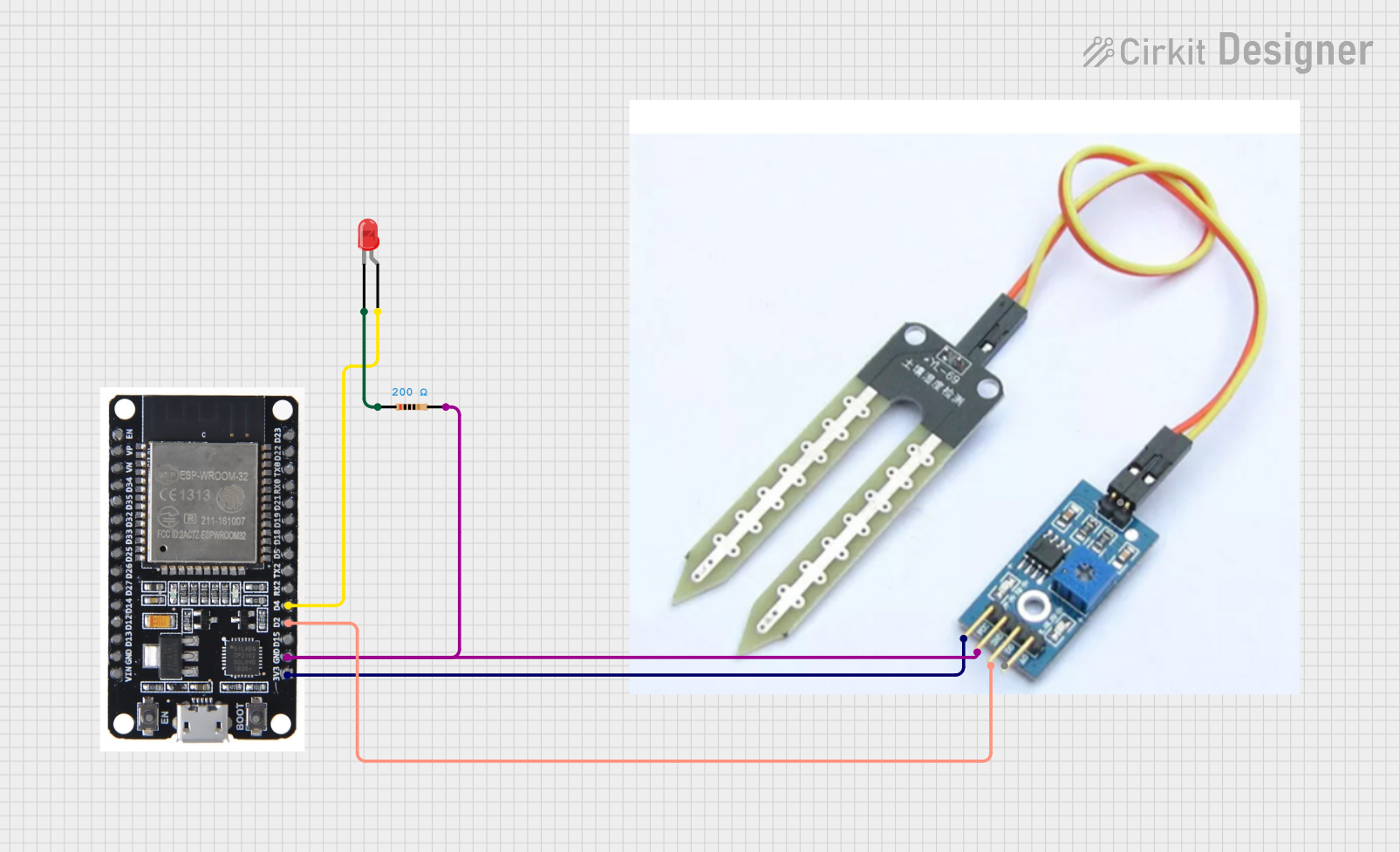
This circuit is designed to monitor soil moisture levels using a soil sensor and indicate the moisture status with an LED. The circuit uses an ESP32 microcontroller to read the soil sensor's output and control the LED. When the soil is dry, the LED will turn on, and when the soil is wet, the LED will turn off.
Component List
ESP32
- Description: A powerful microcontroller with Wi-Fi and Bluetooth capabilities.
- Pins: EN, VP, VN, D34, D35, D32, D33, D25, D26, D27, D14, D12, D13, GND, VIN, 3V3, D15, D2, D4, RX2, TX2, D5, D18, D19, D21, RX0, TX0, D22, D23, BOOT
Soil Sensor
- Description: A sensor used to measure the moisture content in the soil.
- Pins: VCC, GND, D0, A0
LED: Two Pin (red)
- Description: A red LED used to indicate the soil moisture status.
- Pins: Cathode, Anode
Resistor
- Description: A resistor used to limit the current through the LED.
- Pins: Pin1, Pin2
- Properties:
- Resistance: 200 Ohms
Wiring Details
ESP32
- 3V3 connected to VCC of the Soil Sensor
- GND connected to GND of the Soil Sensor and Pin2 of the Resistor
- D2 connected to D0 of the Soil Sensor
- D4 connected to Anode of the LED
Soil Sensor
- VCC connected to 3V3 of the ESP32
- GND connected to GND of the ESP32 and Pin2 of the Resistor
- D0 connected to D2 of the ESP32
LED: Two Pin (red)
- Anode connected to D4 of the ESP32
- Cathode connected to Pin1 of the Resistor
Resistor
- Pin1 connected to Cathode of the LED
- Pin2 connected to GND of the ESP32 and GND of the Soil Sensor
Code Documentation
Code for ESP32
#define SOIL_SENSOR_PIN 2  // Digital pin connected to soil sensor
#define LED_PIN 4          // Digital pin connected to LED

void setup() {
  pinMode(SOIL_SENSOR_PIN, INPUT);  // Set soil sensor pin as input
  pinMode(LED_PIN, OUTPUT);         // Set LED pin as output
  Serial.begin(115200);             // Initialize serial communication
}

void loop() {
  int sensorValue = digitalRead(SOIL_SENSOR_PIN);  // Read the digital value from the soil sensor
  Serial.println(sensorValue);  // Print the sensor value to the Serial Monitor

  if (sensorValue == LOW) {
    digitalWrite(LED_PIN, HIGH);  // Turn on the LED if soil is dry
  } else {
    digitalWrite(LED_PIN, LOW);   // Turn off the LED if soil is wet
  }

  delay(1000);  // Wait for a second before the next reading
}
This code initializes the soil sensor and LED pins, reads the soil sensor's digital output, and controls the LED based on the soil moisture level. The sensor value is also printed to the Serial Monitor for debugging and monitoring purposes.