
Arduino UNO Controlled Dual Servo Motor System with Button Activation
View and Edit Project In Cirkit Designer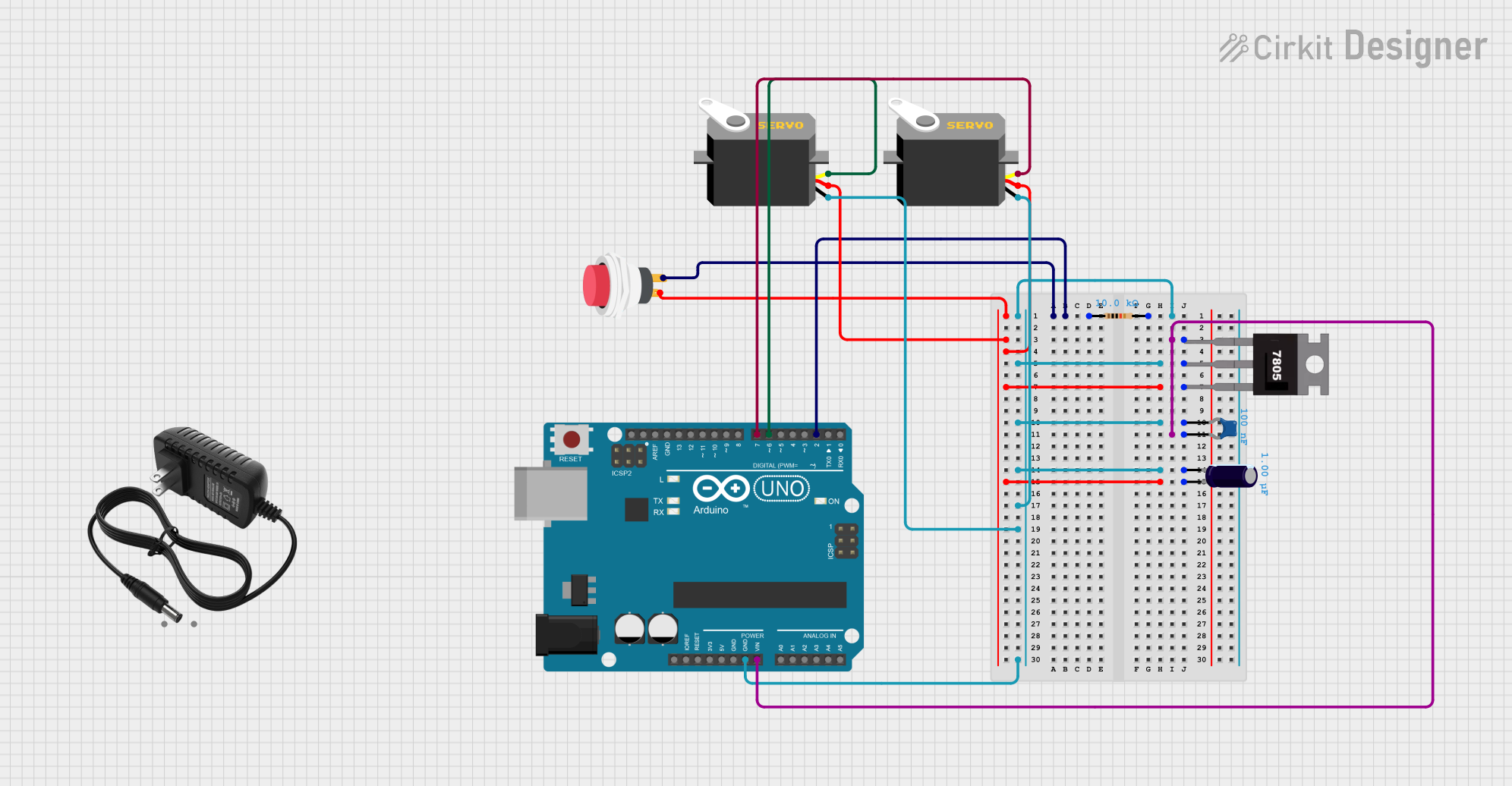
Circuit Documentation
Summary
This circuit is designed to control two servos using an Arduino UNO and a push button. The servos start at position 0. When the button is pressed, the servos rotate to 150 degrees and then return to 0 at half the speed. If the button is pressed multiple times within 1 second, the cycle operates multiple times accordingly.
Component List
Arduino UNO
- Description: Microcontroller board based on the ATmega328P.
- Pins: UNUSED, IOREF, Reset, 3.3V, 5V, GND, Vin, A0, A1, A2, A3, A4, A5, SCL, SDA, AREF, D13, D12, D11, D10, D9, D8, D7, D6, D5, D4, D3, D2, D1, D0
Servo (x2)
- Description: Standard servo motor.
- Pins: gnd, vcc, pulse
2Pin Push Switch
- Description: Simple push button switch.
- Pins: Input +, Output +
7805
- Description: Voltage regulator to convert 12V to 5V.
- Pins: Vin, Gnd, Vout
Ceramic Capacitor
- Description: Capacitor with a capacitance of 0.1 µF.
- Pins: pin0, pin1
Electrolytic Capacitor
- Description: Capacitor with a capacitance of 1 µF.
- Pins: -, +
Resistor
- Description: Resistor with a resistance of 10 kΩ.
- Pins: pin1, pin2
12V Power Supply
- Description: Power supply providing 12V.
- Pins: +, -
Wiring Details
Arduino UNO
GND is connected to:
- Resistor pin2
- 7805 Gnd
- Ceramic Capacitor pin0
- Electrolytic Capacitor -
- Servo gnd (both servos)
Vin is connected to:
- 7805 Vin
- Ceramic Capacitor pin1
D2 is connected to:
- Resistor pin1
- 2Pin Push Switch Output +
D6 is connected to:
- Servo pulse (first servo)
D7 is connected to:
- Servo pulse (second servo)
Servo (first)
- gnd is connected to Arduino UNO GND.
- vcc is connected to:
- 7805 Vout
- Electrolytic Capacitor +
- 2Pin Push Switch Input +
- pulse is connected to Arduino UNO D6.
Servo (second)
- gnd is connected to Arduino UNO GND.
- vcc is connected to:
- 7805 Vout
- Electrolytic Capacitor +
- 2Pin Push Switch Input +
- pulse is connected to Arduino UNO D7.
2Pin Push Switch
- Input + is connected to:
- 7805 Vout
- Electrolytic Capacitor +
- Servo vcc (both servos)
- Output + is connected to:
- Resistor pin1
- Arduino UNO D2
7805
- Vin is connected to:
- 12V Power Supply +
- Ceramic Capacitor pin1
- Gnd is connected to:
- Resistor pin2
- Ceramic Capacitor pin0
- Electrolytic Capacitor -
- Servo gnd (both servos)
- Arduino UNO GND
- Vout is connected to:
- Electrolytic Capacitor +
- 2Pin Push Switch Input +
- Servo vcc (both servos)
Ceramic Capacitor
- pin0 is connected to:
- 7805 Gnd
- Resistor pin2
- Electrolytic Capacitor -
- Servo gnd (both servos)
- Arduino UNO GND
- pin1 is connected to:
- 7805 Vin
- Arduino UNO Vin
Electrolytic Capacitor
- - is connected to:
- 7805 Gnd
- Resistor pin2
- Ceramic Capacitor pin0
- Servo gnd (both servos)
- Arduino UNO GND
- + is connected to:
- 7805 Vout
- 2Pin Push Switch Input +
- Servo vcc (both servos)
Resistor
- pin1 is connected to:
- 2Pin Push Switch Output +
- Arduino UNO D2
- pin2 is connected to:
- 7805 Gnd
- Ceramic Capacitor pin0
- Electrolytic Capacitor -
- Servo gnd (both servos)
- Arduino UNO GND
12V Power Supply
- + is connected to 7805 Vin.
- - is not connected to any other component in the provided net list.
Code Documentation
// This Arduino sketch controls two servos using a button. The servos start at
// position 0. When the button is pressed, the servos rotate to 150 degrees
// and then return to 0 at half the speed. If the button is pressed twice
// within 1 second, the cycle operates 2 times. If the button is pressed
// three times within 1 second, the cycle operates 3 times.

#include <Servo.h>

#define BUTTON_PIN 2
#define SERVO_PIN_1 6
#define SERVO_PIN_2 7

Servo servo1;
Servo servo2;

unsigned long lastPressTime = 0;
int pressCount = 0;

void setup() {
  pinMode(BUTTON_PIN, INPUT);
  servo1.attach(SERVO_PIN_1);
  servo2.attach(SERVO_PIN_2);
  servo1.write(0); // Initialize servos to position 0
  servo2.write(0); // Initialize servos to position 0
  delay(500); // Wait for servos to reach position 0
  servo1.detach();
  servo2.detach();
}

void loop() {
  if (digitalRead(BUTTON_PIN) == HIGH) {
    unsigned long currentTime = millis();
    if (currentTime - lastPressTime < 1000) {
      pressCount++;
    } else {
      pressCount = 1;
    }
    lastPressTime = currentTime;
    delay(50); // Debounce delay
    while (digitalRead(BUTTON_PIN) == HIGH);
    delay(50); // Debounce delay
  }

  if (pressCount > 0 && millis() - lastPressTime > 1000) {
    for (int i = 0; i < pressCount; i++) {
      servo1.attach(SERVO_PIN_1);
      servo2.attach(SERVO_PIN_2);

      // Move servos to position 0 before starting the sweep
      servo1.write(0);
      servo2.write(0);
      delay(500); // Wait for servos to reach position 0

      servo1.write(150);
      servo2.write(150);
      delay(300); // Wait for servos to reach position 150
      for (int pos = 150; pos >= 0; pos--) {
        servo1.write(pos);
        servo2.write(pos);
        delay(30); // Half the speed of moving to 150
      }
      servo1.detach();
      servo2.detach();
    }
    pressCount = 0;
  }
}
This code initializes the servos to position 0 and waits for a button press. Depending on the number of button presses within 1 second, the servos will rotate to 150 degrees and return to 0 at half the speed. The cycle repeats based on the number of button presses detected.