
Arduino UNO Smart Motion-Activated RGB LED Light with Light Sensor
View and Edit Project In Cirkit Designer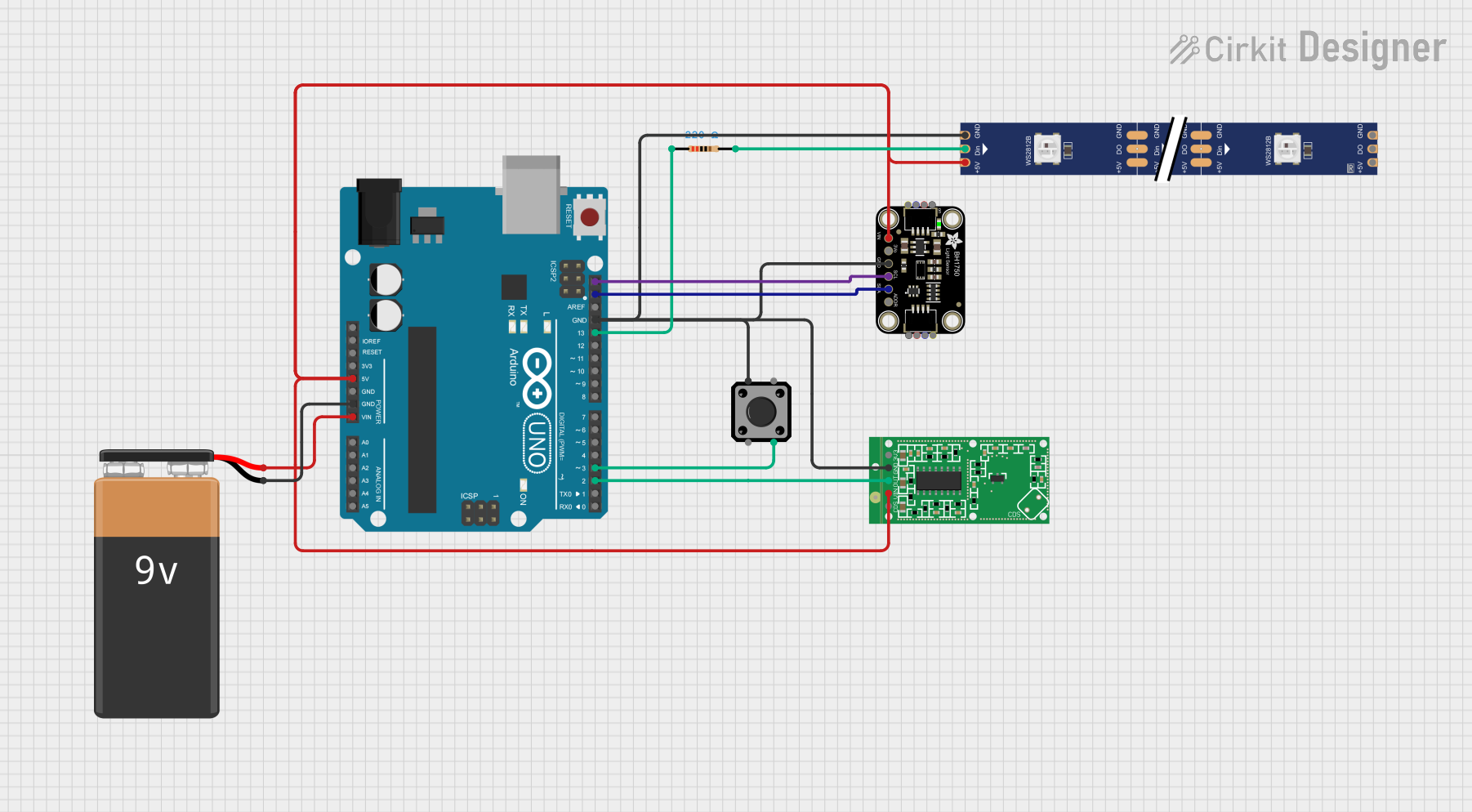
Circuit Documentation
Summary
This circuit integrates an Arduino UNO microcontroller with various sensors and modules, including a WS2812 RGB LED strip, an RCWL-0516 Microwave Radar Motion Sensor Module, an Adafruit BH1750 light sensor, a tactile switch button, and a 9V battery for power. The circuit is designed to detect motion, measure light intensity, and control an RGB LED strip based on the sensor inputs.
Component List
Arduino UNO
- Description: A microcontroller board based on the ATmega328P.
- Pins: UNUSED, IOREF, Reset, 3.3V, 5V, GND, Vin, A0, A1, A2, A3, A4, A5, SCL, SDA, AREF, D13, D12, D11, D10, D9, D8, D7, D6, D5, D4, D3, D2, D1, D0
WS2812 RGB LED strip
- Description: An addressable RGB LED strip.
- Pins: DIN, 5V, GND, DO
RCWL-0516 Microwave Radar Motion Sensor Module
- Description: A motion sensor module that uses microwave radar technology.
- Pins: CDS, VIN, OUT, GND, 3V3
Resistor
- Description: A 220 Ohm resistor.
- Pins: pin1, pin2
- Properties: Resistance: 220 Ohms
Tactile Switch Buttons - 12mm Square
- Description: A 12mm square tactile switch button.
- Pins: 3, 1, 4, 2
Adafruit BH1750
- Description: A digital light sensor.
- Pins: VCC, 3.3V, GND, SCL, SDA, ADDR
9V Battery
- Description: A 9V battery for power supply.
- Pins: -, +
Wiring Details
Arduino UNO
5V connected to:
- RCWL-0516 Microwave Radar Motion Sensor Module (VIN)
- WS2812 RGB LED strip (5V)
- Adafruit BH1750 (VCC)
GND connected to:
- 9V Battery (-)
- RCWL-0516 Microwave Radar Motion Sensor Module (GND)
- WS2812 RGB LED strip (GND)
- Tactile Switch Buttons - 12mm Square (1)
- Adafruit BH1750 (GND)
Vin connected to:
- 9V Battery (+)
SCL connected to:
- Adafruit BH1750 (SCL)
SDA connected to:
- Adafruit BH1750 (SDA)
D13 connected to:
- Resistor (pin1)
D3 connected to:
- Tactile Switch Buttons - 12mm Square (4)
D2 connected to:
- RCWL-0516 Microwave Radar Motion Sensor Module (OUT)
WS2812 RGB LED strip
- DIN connected to:
- Resistor (pin2)
RCWL-0516 Microwave Radar Motion Sensor Module
VIN connected to:
- Arduino UNO (5V)
GND connected to:
- Arduino UNO (GND)
OUT connected to:
- Arduino UNO (D2)
Resistor
pin1 connected to:
- Arduino UNO (D13)
pin2 connected to:
- WS2812 RGB LED strip (DIN)
Tactile Switch Buttons - 12mm Square
1 connected to:
- Arduino UNO (GND)
4 connected to:
- Arduino UNO (D3)
Adafruit BH1750
VCC connected to:
- Arduino UNO (5V)
GND connected to:
- Arduino UNO (GND)
SCL connected to:
- Arduino UNO (SCL)
SDA connected to:
- Arduino UNO (SDA)
9V Battery
- connected to:
- Arduino UNO (GND)
+ connected to:
- Arduino UNO (Vin)
Documented Code
Arduino UNO Code (sketch.ino)
void setup() {
  // put your setup code here, to run once:

}

void loop() {
  // put your main code here, to run repeatedly:

}
Additional Documentation (documentation.txt)
This documentation provides a comprehensive overview of the circuit, including a summary, detailed component list, wiring details, and the code used in the Arduino UNO microcontroller.