
Raspberry Pi 4B with I2C Sensor Data Acquisition and OLED Display
View and Edit Project In Cirkit Designer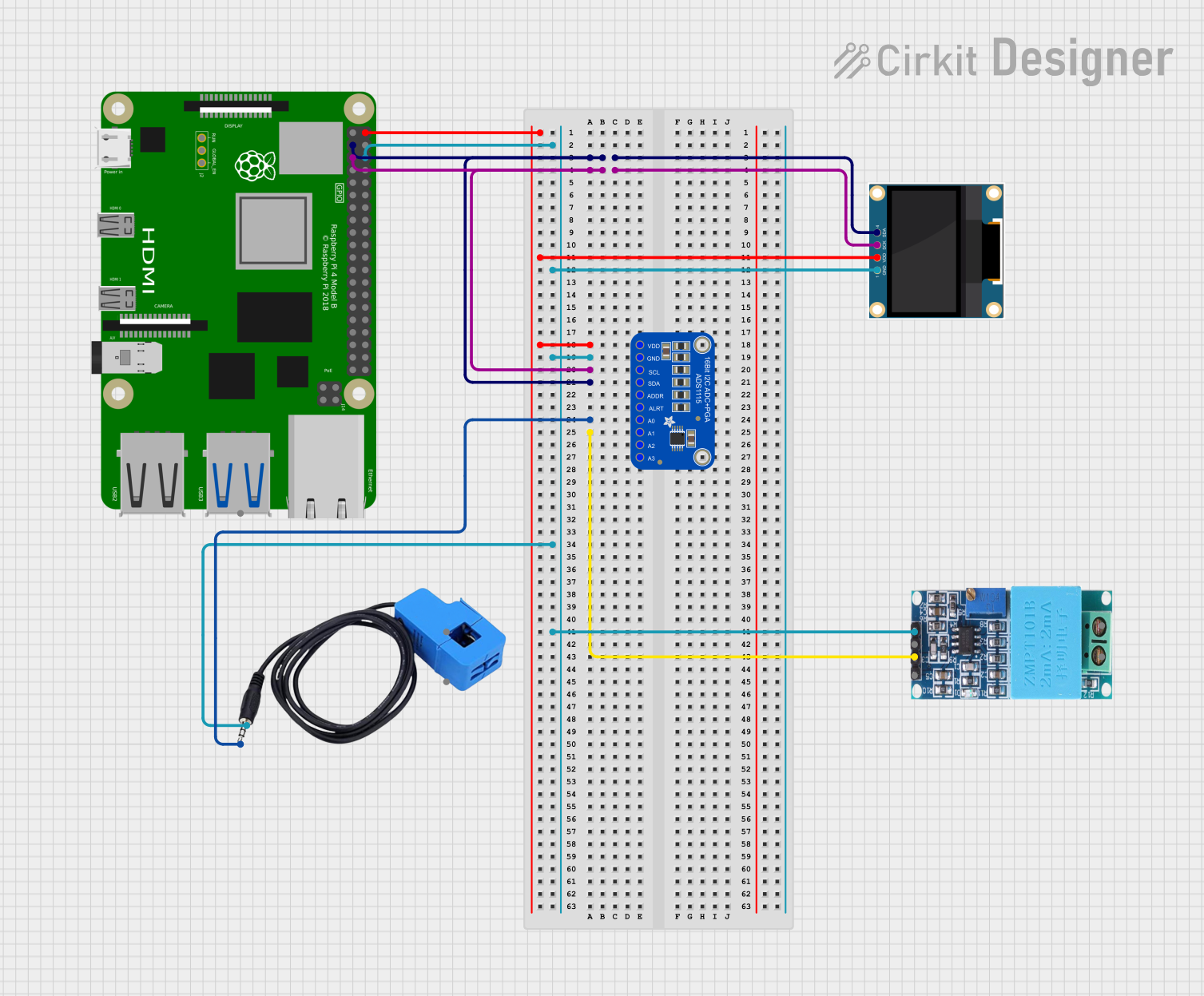
Circuit Documentation
Summary
The circuit in question is designed to interface a Raspberry Pi 4B with an Adafruit ADS1115 16-Bit I2C ADC, a current sensor, a ZMPT101B voltage sensor, and a 0.96" OLED display. The Raspberry Pi 4B serves as the central processing unit, controlling data flow and communication between the sensors and the display. The Adafruit ADS1115 is used to convert analog signals from the current sensor and the ZMPT101B to digital signals that the Raspberry Pi can process. The 0.96" OLED display is used to output data or status information. The circuit utilizes the I2C communication protocol for data transfer between the Raspberry Pi, the ADC, and the OLED display. Power is supplied through the Raspberry Pi's 5V and GND pins, which are distributed to the other components.
Component List
Raspberry Pi 4B
- Description: A powerful microcomputer with multiple GPIO pins for interfacing with various peripherals.
- Pins: 3V3, 5V, multiple GPIOs, GND, and others for specific functions.
Adafruit ADS1115 16-Bit I2C ADC
- Description: A precision analog-to-digital converter with I2C interface, used for reading analog signals.
- Pins: VDD, GND, SCL, SDA, ADDR, ALERT, AIN0-AIN3.
Current Sensor
- Description: A sensor used to measure electrical current flowing through a conductor.
- Pins: Out, Burden, In_current, Out_current.
ZMPT101B Voltage Sensor
- Description: A module for measuring AC voltage in a non-invasive way.
- Pins: OUT, GND, VCC, NEUTRO, FASE.
0.96" OLED Display
- Description: A small display for showing data or status information.
- Pins: GND, VDD, SCK, SDA.
Wiring Details
Raspberry Pi 4B
- 5V: Power supply to Adafruit ADS1115 and 0.96" OLED.
- GND: Common ground with Adafruit ADS1115, 0.96" OLED, current sensor, and ZMPT101B.
- GPIO2 (SDA): I2C data line connected to Adafruit ADS1115 and 0.96" OLED.
- GPIO3 (SCL): I2C clock line connected to Adafruit ADS1115 and 0.96" OLED.
Adafruit ADS1115 16-Bit I2C ADC
- VDD: Connected to Raspberry Pi 5V.
- GND: Common ground with Raspberry Pi, 0.96" OLED, current sensor, and ZMPT101B.
- SCL: Connected to Raspberry Pi GPIO3.
- SDA: Connected to Raspberry Pi GPIO2.
- AIN0: Connected to current sensor Out.
- AIN1: Connected to ZMPT101B OUT.
Current Sensor
- Out: Connected to Adafruit ADS1115 AIN0.
- Burden: Connected to common ground.
ZMPT101B Voltage Sensor
- OUT: Connected to Adafruit ADS1115 AIN1.
- GND: Connected to common ground.
- VCC: Power supply (not specified in the net list, assumed to be connected to an appropriate power source).
0.96" OLED Display
- VDD: Connected to Raspberry Pi 5V.
- GND: Common ground with Raspberry Pi, Adafruit ADS1115, current sensor, and ZMPT101B.
- SCK: Connected to Raspberry Pi GPIO3.
- SDA: Connected to Raspberry Pi GPIO2.
Documented Code
No code has been provided for the microcontrollers in the circuit. The documentation for the code section will be added once the code is available. The code would typically include initialization and configuration of the I2C interface, reading data from the ADC, processing the data, and displaying the results on the OLED.