
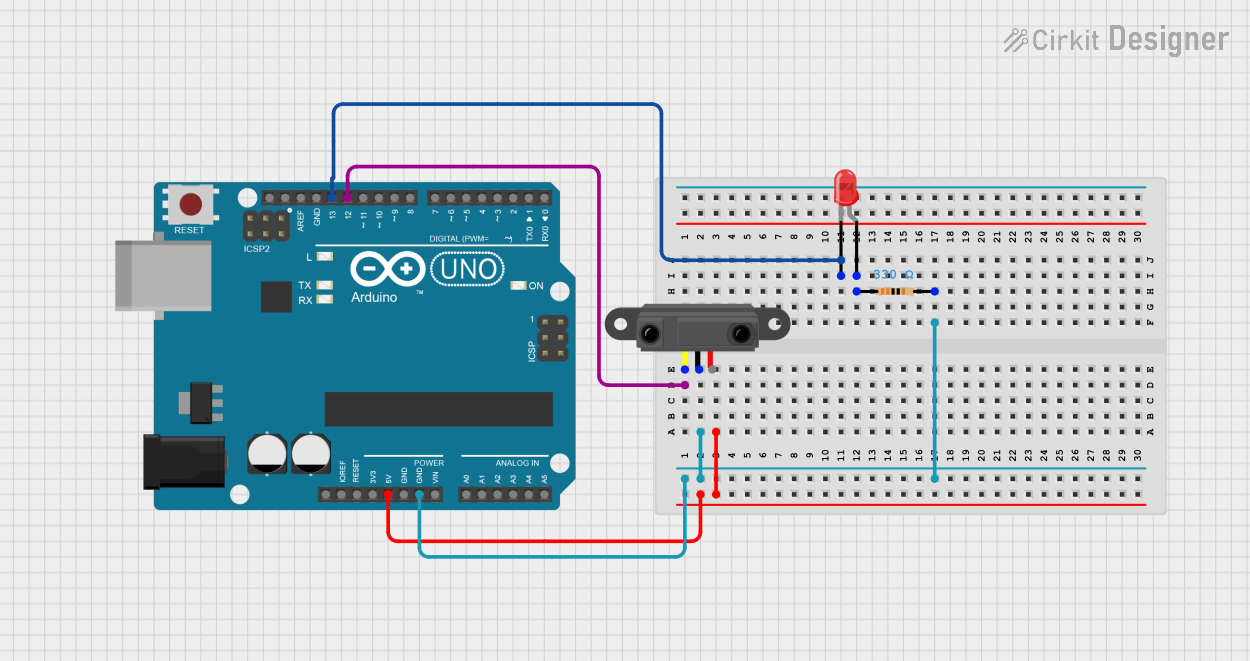
Circuit Documentation
Summary
This circuit consists of an Arduino UNO microcontroller, an infrared proximity sensor, a red LED, and a resistor. The infrared proximity sensor detects the presence of an object and signals the Arduino. The Arduino then controls the LED, turning it on when an object is detected and off when no object is present.
Component List
Arduino UNO
- Description: A microcontroller board based on the ATmega328P.
- Pins: UNUSED, IOREF, Reset, 3.3V, 5V, GND, Vin, A0, A1, A2, A3, A4, A5, SCL, SDA, AREF, D13, D12, D11, D10, D9, D8, D7, D6, D5, D4, D3, D2, D1, D0
LED: Two Pin (red)
- Description: A red light-emitting diode.
- Pins: cathode, anode
Infrared Proximity Sensor
- Description: A sensor that detects the presence of an object using infrared light.
- Pins: Vout, GND, Vcc
Resistor
- Description: A 330 Ohm resistor.
- Pins: pin1, pin2
- Properties: Resistance: 330 Ohms
Wiring Details
Arduino UNO
- 5V: Connected to Vcc of the Infrared Proximity Sensor.
- GND: Connected to pin2 of the Resistor and GND of the Infrared Proximity Sensor.
- D12: Connected to Vout of the Infrared Proximity Sensor.
- D13: Connected to the cathode of the LED.
LED: Two Pin (red)
- cathode: Connected to D13 of the Arduino UNO.
- anode: Connected to pin1 of the Resistor.
Infrared Proximity Sensor
- Vout: Connected to D12 of the Arduino UNO.
- GND: Connected to pin2 of the Resistor and GND of the Arduino UNO.
- Vcc: Connected to 5V of the Arduino UNO.
Resistor
- pin1: Connected to the anode of the LED.
- pin2: Connected to GND of the Arduino UNO and GND of the Infrared Proximity Sensor.
Code Documentation
// Define the pin numbers for the IR sensor and the LED
const int irSensorPin = 12; // IR sensor connected to pin 12
const int ledPin = 13;       // LED connected to pin 13

void setup() {
  // Initialize the IR sensor pin as an input
  pinMode(irSensorPin, INPUT);

  // Initialize the LED pin as an output
  pinMode(ledPin, OUTPUT);

  // Start serial communication for debugging (optional)
  Serial.begin(9600);
}

void loop() {
  // Read the state of the IR sensor
  int sensorState = digitalRead(irSensorPin);

  // Check if the sensor detects an object (assuming HIGH means an object is present)
  if (sensorState == HIGH) {
    digitalWrite(ledPin, HIGH); // Turn on the LED
    Serial.println("Object detected! LED is ON.");
  } else {
    digitalWrite(ledPin, LOW);  // Turn off the LED
    Serial.println("No object detected. LED is OFF.");
  }

  // Add a small delay to prevent excessive serial output
  delay(100);
}
This code initializes the infrared proximity sensor and the LED. In the loop function, it continuously reads the state of the sensor. If an object is detected, the LED is turned on, and a message is printed to the serial monitor. If no object is detected, the LED is turned off, and a different message is printed.