
ESP8266 NodeMCU Student Counter with IR Sensors and I2C LCD Display
View and Edit Project In Cirkit Designer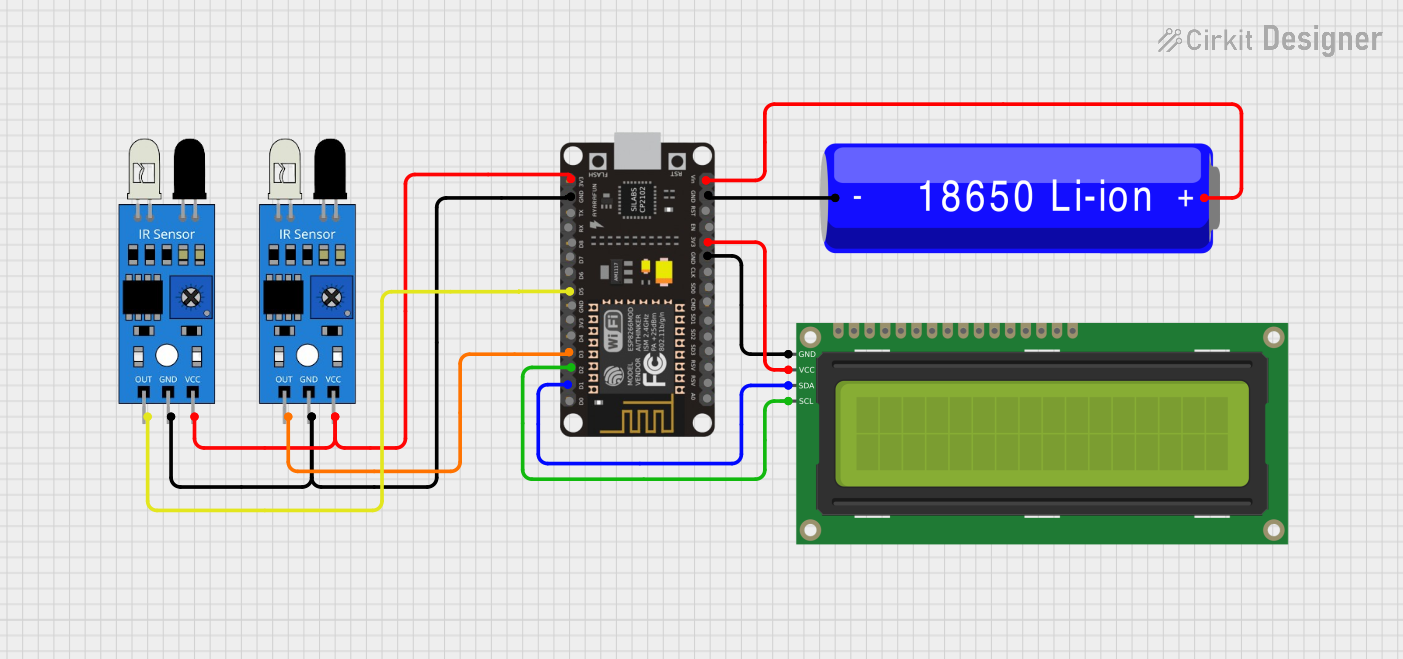
Circuit Documentation
Summary
This circuit is designed to count the number of students entering and exiting a room using IR sensors and display the count on a 16x2 I2C LCD. The data is also sent to ThingSpeak for remote monitoring. The circuit is powered by a 18650 Li-ion battery and controlled by an ESP8266 NodeMCU microcontroller.
Component List
ESP8266 NodeMCU
- Description: A low-cost Wi-Fi microcontroller with GPIO, ADC, and other features.
- Pins: D0, D1, D2, D3, D4, 3V3, GND, D5, D6, D7, D8, RX, TX, A0, RSV, SD3, SD2, SD1, CMD, SD0, CLK, EN, RST, VIN
IR Sensor (Entry)
- Description: An infrared sensor used to detect the presence of an object.
- Pins: out, gnd, vcc
IR Sensor (Exit)
- Description: An infrared sensor used to detect the presence of an object.
- Pins: out, gnd, vcc
16x2 I2C LCD
- Description: A 16x2 character LCD with I2C interface for easy communication.
- Pins: GND, VCC, SDA, SCL
18650 Li-ion Battery
- Description: A rechargeable lithium-ion battery.
- Pins: -, +
Wiring Details
ESP8266 NodeMCU
- D1: Connected to SDA of 16x2 I2C LCD
- D2: Connected to SCL of 16x2 I2C LCD
- D3: Connected to out of IR Sensor (Entry)
- D5: Connected to out of IR Sensor (Exit)
- 3V3: Connected to vcc of both IR Sensors and VCC of 16x2 I2C LCD
- GND: Connected to gnd of both IR Sensors, GND of 16x2 I2C LCD, and - of 18650 Li-ion Battery
- VIN: Connected to + of 18650 Li-ion Battery
IR Sensor (Entry)
- out: Connected to D3 of ESP8266 NodeMCU
- gnd: Connected to GND of ESP8266 NodeMCU
- vcc: Connected to 3V3 of ESP8266 NodeMCU
IR Sensor (Exit)
- out: Connected to D5 of ESP8266 NodeMCU
- gnd: Connected to GND of ESP8266 NodeMCU
- vcc: Connected to 3V3 of ESP8266 NodeMCU
16x2 I2C LCD
- SDA: Connected to D1 of ESP8266 NodeMCU
- SCL: Connected to D2 of ESP8266 NodeMCU
- GND: Connected to GND of ESP8266 NodeMCU
- VCC: Connected to 3V3 of ESP8266 NodeMCU
18650 Li-ion Battery
- -: Connected to GND of ESP8266 NodeMCU
- +: Connected to VIN of ESP8266 NodeMCU
Code Documentation
#include <ESP8266WiFi.h>
#include <ThingSpeak.h>
#include <Wire.h>
#include <LiquidCrystal_I2C.h>

// WiFi Credentials
const char* ssid = "Smart";
const char* password = "123456789";

// ThingSpeak Settings
unsigned long channelID = 2745468;
const char* writeAPIKey = "0VRHEIVEBLZPEOQZ";

// Pin Definitions
#define IR_SENSOR1 D3  // Entry sensor
#define IR_SENSOR2 D5  // Exit sensor

// LCD setup (adjust if needed)
LiquidCrystal_I2C lcd(0x27, 16, 2);

int totalCount = 0;         // Students currently present
int entryCount = 0;         // Total entries
int exitCount = 0;          // Total exits

// Variables to track state of IR sensors
bool sensor1LastState = HIGH;
bool sensor2LastState = HIGH;

WiFiClient client;

void setup() {
  Serial.begin(115200);

  // Initialize LCD
  lcd.init();
  lcd.clear();
  lcd.backlight();
  lcd.setCursor(4, 0);
  lcd.print("WELCOME");
  lcd.setCursor(1, 1);
  lcd.print("STUDENT COUNT");
  delay(1500);
  lcd.clear();

  lcd.setCursor(0, 0);
  lcd.print("CONNECTING...");

  // Initialize WiFi
  WiFi.begin(ssid, password);
  while (WiFi.status() != WL_CONNECTED) {
    delay(500);
    Serial.print(".");
  }
  Serial.println("WiFi connected");

  // Initialize ThingSpeak
  ThingSpeak.begin(client);

  // Set IR Sensors as Input
  pinMode(IR_SENSOR1, INPUT);
  pinMode(IR_SENSOR2, INPUT);
  lcd.clear();
}

void loop() {
  // Read the current state of the IR sensors
  bool sensor1State = digitalRead(IR_SENSOR1);
  bool sensor2State = digitalRead(IR_SENSOR2);

  // Check for entry (IR Sensor 1 triggered)
  if (sensor1LastState == HIGH && sensor1State == LOW) {
    entryCount++;
    totalCount++;
    Serial.println("Entry detected");
  }

  // Check for exit (IR Sensor 2 triggered)
  if (sensor2LastState == HIGH && sensor2State == LOW) {
    if (totalCount > 0) {
      exitCount++;
      totalCount--;  // Prevent negative count
      Serial.println("Exit detected");
    }
  }

  // Update sensor last states for next loop
  sensor1LastState = sensor1State;
  sensor2LastState = sensor2State;

  // Update LCD
  lcd.setCursor(0, 0);
  lcd.print("IN:");
  lcd.print(entryCount);

  lcd.setCursor(9, 0);
  lcd.print("OUT:");
  lcd.print(exitCount);

  lcd.setCursor(0, 1);
  lcd.print("Inside: ");
  lcd.print(totalCount);
  lcd.print("  ");

  // Update ThingSpeak if entry, exit, or present count has changed
  if (entryCount != 0 || exitCount != 0) {
    updateThingSpeak(entryCount, exitCount, totalCount);
  }

  delay(50);  // Small delay for stability
}

void updateThingSpeak(int entryCount, int exitCount, int presentCount) {
  ThingSpeak.setField(1, entryCount);     // Entry count for Field 1
  ThingSpeak.setField(2, exitCount);      // Exit count for Field 2
  ThingSpeak.setField(3, presentCount);   // Current students present for Field 3

  int x = ThingSpeak.writeFields(channelID, writeAPIKey);
  if (x == 200) {
    Serial.println("Data sent to ThingSpeak");
    // Reset entry and exit counts after updating
    entryCount = 0;
    exitCount = 0;
  } else {
    Serial.println("Failed to send data");
  }
}
This code initializes the ESP8266 NodeMCU, connects to WiFi, and sets up the ThingSpeak connection. It reads the state of the IR sensors to detect entries and exits, updates the LCD display, and sends the data to ThingSpeak.