
Arduino UNO Based Weight-Measuring Robotic Vehicle with IR Control
View and Edit Project In Cirkit Designer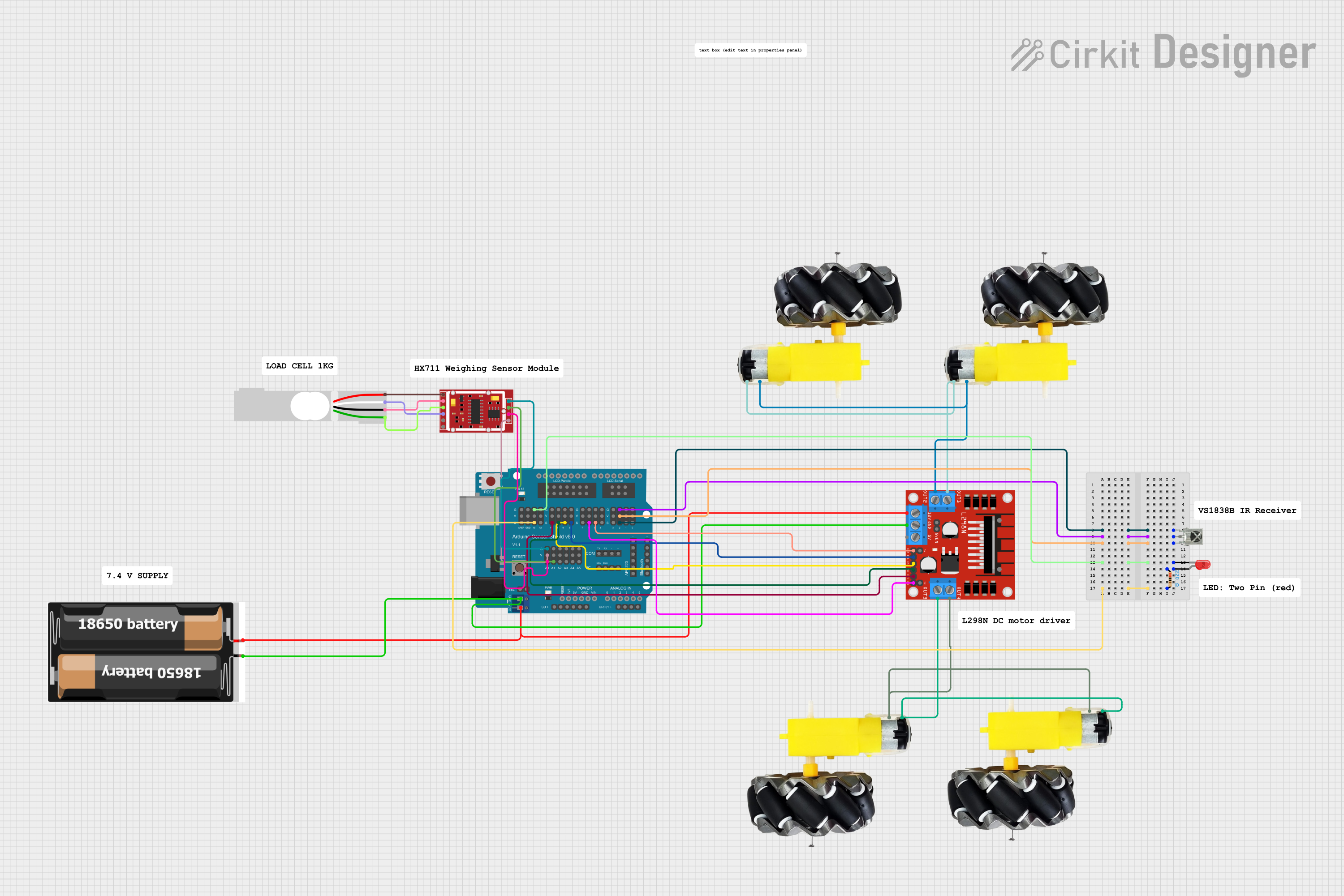
Circuit Documentation
Summary
This document provides a detailed overview of a circuit designed to interface various components including an Arduino UNO, HX711 Weighing Sensor Module, L298N DC motor driver, motors with wheels, a VS1838B IR Receiver, a red LED, a resistor, a battery pack (2x 18650), and an Arduino Sensor Shield v5.0. The circuit is designed to receive IR signals, drive motors, and measure weight using a load cell. The Arduino UNO, equipped with a sensor shield, serves as the central processing unit, controlling the motor driver, reading sensor data, and managing power distribution.
Component List
Arduino UNO
- Microcontroller board based on the ATmega328P
- Digital I/O pins, analog input pins, power pins, and communication interfaces
HX711 Weighing Sensor Module
- Precision 24-bit analog-to-digital converter (ADC) for weight scales
- Designed to interface with a load cell
L298N DC Motor Driver
- Dual H-bridge motor driver capable of driving a pair of DC motors or a stepper motor
- Provides the ability to drive motors with forward, reverse, and stop controls
Motors and Wheels
- DC motors coupled with wheels for mobility
- Requires power and ground connections for operation
VS1838B IR Receiver
- Infrared receiver module for remote control applications
- Outputs a signal when it detects IR light at its operating frequency
LED: Two Pin (red)
- Standard red LED for indication purposes
- Requires a current-limiting resistor to prevent damage
Resistor
- Fixed resistor with a resistance of 220 Ohms
- Used to limit current to the LED
2x 18650 Battery Pack
- Power source consisting of two 18650 lithium-ion batteries
- Provides power to the circuit
Arduino Sensor Shield v5.0
- Expansion board for Arduino UNO
- Facilitates easy connections to various sensors and modules
Wiring Details
Arduino UNO
- Connected to the Arduino Sensor Shield v5.0
HX711 Weighing Sensor Module
VCCconnected toA0-VCCon the Arduino Sensor Shield v5.0CK/TXconnected toA0-SIGon the Arduino Sensor Shield v5.0DO/RXconnected toA1-SIGon the Arduino Sensor Shield v5.0GNDconnected toA0-GNDon the Arduino Sensor Shield v5.0
L298N DC Motor Driver
12Vconnected to theVCCof the 2x 18650 battery pack andVCCon the Arduino Sensor Shield v5.0GNDconnected to theGNDof the 2x 18650 battery pack andGNDon the Arduino Sensor Shield v5.0IN1toIN4connected to8-S,9-S,10-S, and11-Srespectively on the Arduino Sensor Shield v5.0ENAandENBconnected to5-Sand6-Son the Arduino Sensor Shield v5.0OUT1toOUT4connected to the respectivevccandGNDpins of the motors and wheels
Motors and Wheels
- Two sets of
vccandGNDconnected toOUT1/OUT2andOUT3/OUT4on the L298N DC motor driver
VS1838B IR Receiver
OUTconnected to2-Son the Arduino Sensor Shield v5.0GNDconnected to2-Gon the Arduino Sensor Shield v5.0VCCconnected to2-Von the Arduino Sensor Shield v5.0
LED: Two Pin (red)
cathodeconnected to13-Gon the Arduino Sensor Shield v5.0anodeconnected to one end of the resistor
Resistor
- One end connected to the
anodeof the LED - The other end connected to
13-Son the Arduino Sensor Shield v5.0
Load Cell - Red/white/black/green
A-andA+connected to the correspondingA-andA+on the HX711 Weighing Sensor ModuleE-andE+connected to the correspondingE-andE+on the HX711 Weighing Sensor Module
Documented Code
Arduino UNO Code (sketch.ino)
void setup() {
  // put your setup code here, to run once:

}

void loop() {
  // put your main code here, to run repeatedly:

}
Additional Notes
- The provided code is a template and does not contain any functional code specific to the circuit's operation.
- Users must implement the setup and loop functions to initialize the components and define the circuit's behavior during operation.