
Arduino UNO and DHT22 Temperature and Humidity Sensor with Serial Monitoring
View and Edit Project In Cirkit Designer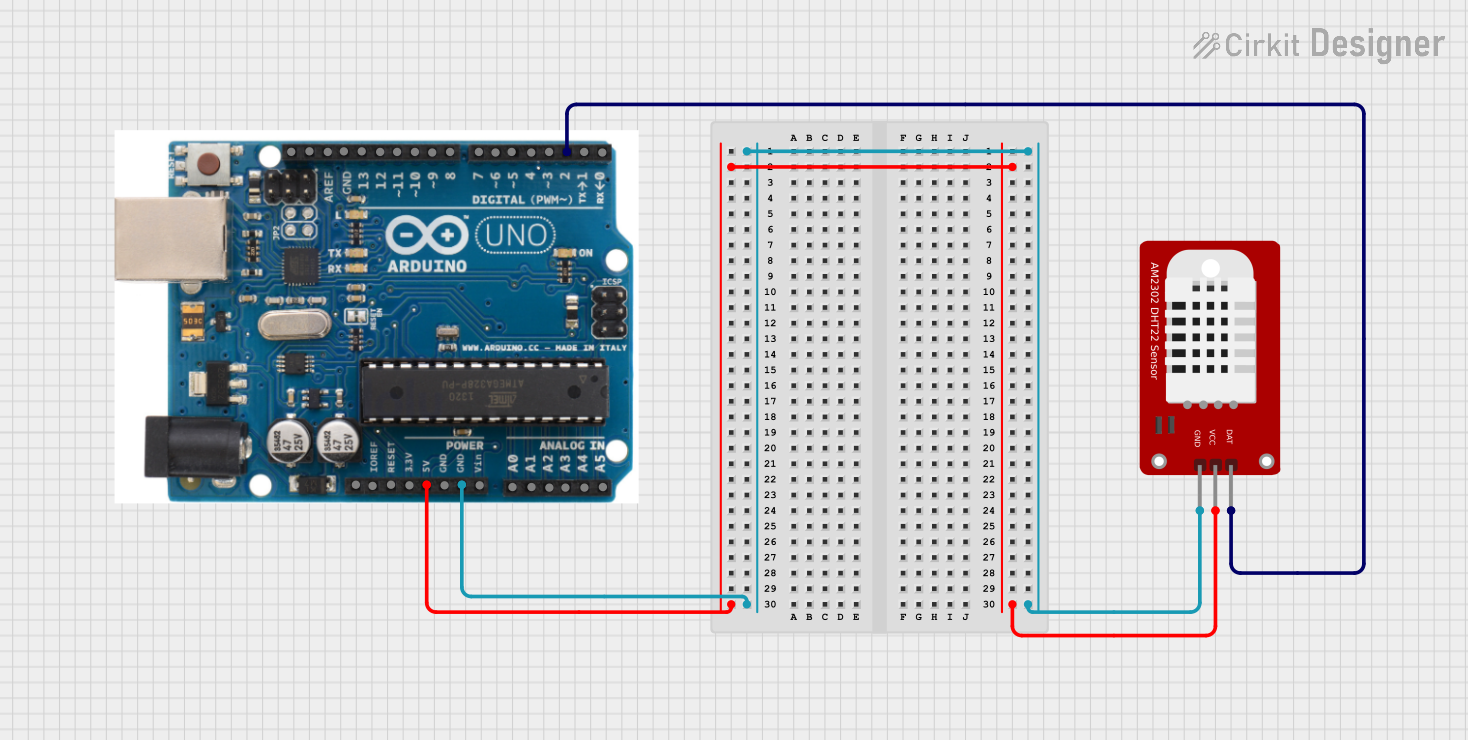
Circuit Documentation
Summary
This circuit involves an Arduino UNO microcontroller interfaced with a DHT22 temperature and humidity sensor. The Arduino UNO reads data from the DHT22 sensor and outputs the temperature and humidity readings to the Serial Monitor.
Component List
Arduino UNO
- Description: A microcontroller board based on the ATmega328P.
- Pins: SDA, AREF, GND, 13, 12, 11, 10, 9, 8, 7, 6, 5, 4, 3, 2, 1, 0, A5, A4, A3, A2, A1, A0, Vin, 5V, 3.3V, RESET, IOREF, SCL
DHT22
- Description: A digital temperature and humidity sensor.
- Pins: GND, VCC, DAT
Wiring Details
Arduino UNO
- GND: Connected to GND of DHT22
- 5V: Connected to VCC of DHT22
- Pin 2: Connected to DAT of DHT22
DHT22
- GND: Connected to GND of Arduino UNO
- VCC: Connected to 5V of Arduino UNO
- DAT: Connected to Pin 2 of Arduino UNO
Code Documentation
Arduino UNO Code
#include "DHT.h"  // Include the DHT library

#define DHTPIN 4      // GPIO pin connected to the DHT22 data pin
#define DHTTYPE DHT22 // Specify the sensor type (DHT11, DHT22, etc.)

DHT dht(DHTPIN, DHTTYPE);

void setup() {
  Serial.begin(115200); // Initialize serial communication
  dht.begin();          // Initialize the DHT sensor
  Serial.println("DHT22 Sensor Test");
}

void loop() {
  // Read temperature as Celsius
  float temperature = dht.readTemperature();
  // Read humidity
  float humidity = dht.readHumidity();

  // Check if any reading failed
  if (isnan(temperature) || isnan(humidity)) {
    Serial.println("Failed to read from DHT sensor!");
    return;
  }

  // Print the results to the Serial Monitor
  Serial.print("Temperature: ");
  Serial.print(temperature);
  Serial.println(" °C");

  Serial.print("Humidity: ");
  Serial.print(humidity);
  Serial.println(" %");

  delay(2000); // Wait for 2 seconds before reading again
}
DHT22 Code
void setup() {
  // put your setup code here, to run once:

}

void loop() {
  // put your main code here, to run repeatedly:

}
This documentation provides a comprehensive overview of the circuit, including a summary, detailed component list, wiring details, and the code used for the microcontrollers.