
Arduino UNO Bluetooth-Controlled Robotic System with Water Pump
View and Edit Project In Cirkit Designer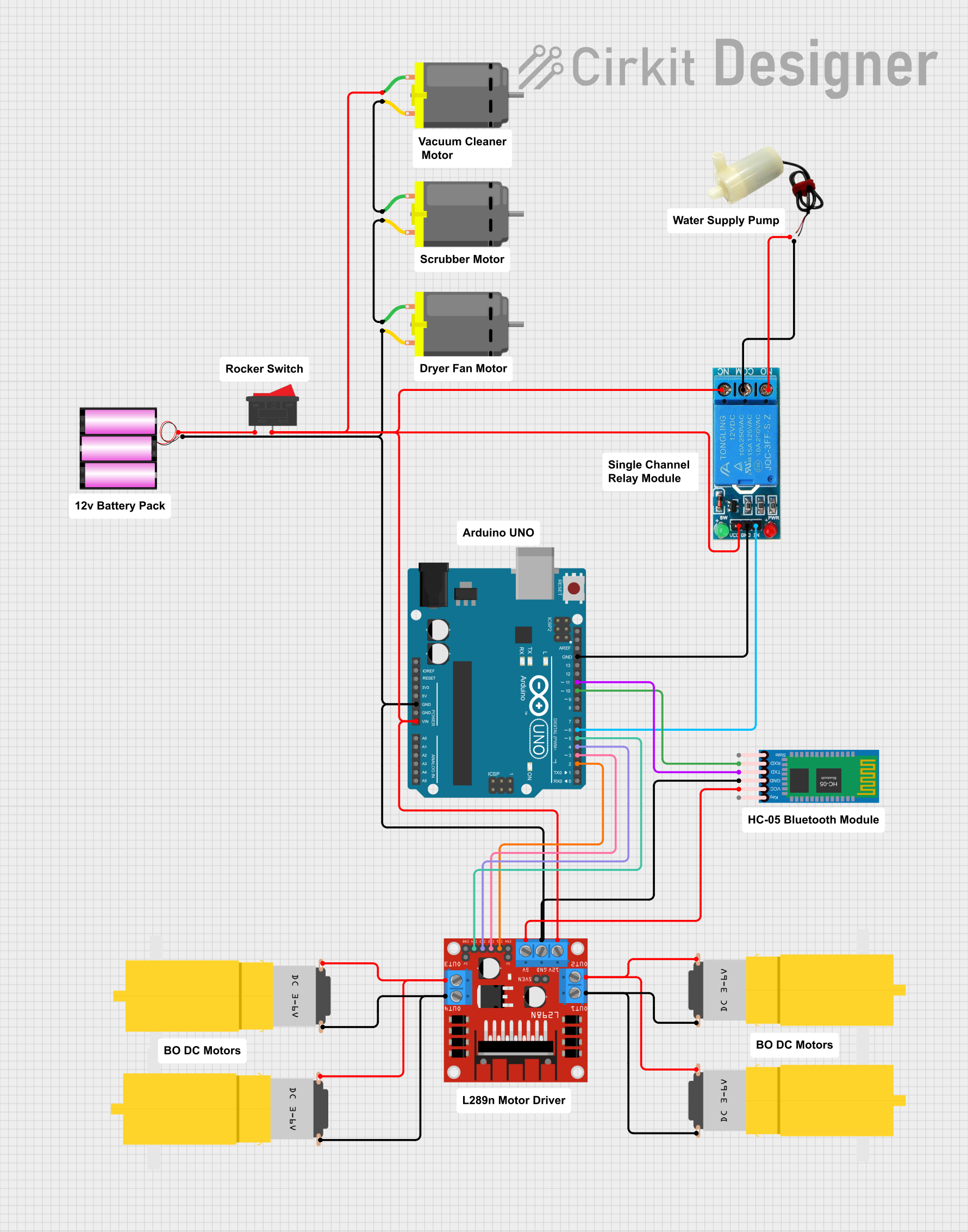
Circuit Documentation
Summary
This circuit is designed to control multiple motors and a water pump using an Arduino UNO microcontroller. The circuit includes a Bluetooth module for wireless communication, a motor driver for controlling the motors, a relay for controlling the water pump, and a rocker switch for power control. The Arduino UNO is programmed to receive commands via Bluetooth to control the motors and periodically activate the water pump.
Component List
Arduino UNO
- Description: Microcontroller board based on the ATmega328P.
- Pins: UNUSED, IOREF, Reset, 3.3V, 5V, GND, Vin, A0, A1, A2, A3, A4, A5, SCL, SDA, AREF, D13, D12, D11, D10, D9, D8, D7, D6, D5, D4, D3, D2, D1, D0
L298N DC Motor Driver
- Description: Dual H-Bridge motor driver module.
- Pins: OUT1, OUT2, 12V, GND, 5V, OUT3, OUT4, 5V-ENA-JMP-I, 5V-ENA-JMP-O, +5V-J1, +5V-J2, ENA, IN1, IN2, IN3, IN4, ENB
5V Mini Water Pump
- Description: Small water pump powered by 5V.
- Pins: positive pin, negative pin
Motor amarillo motorreductor hobby
- Description: Hobby motor with gearbox.
- Pins: vcc, GND
DC Motor
- Description: Standard DC motor.
- Pins: pin 1, pin 2
Battery 12V
- Description: 12V battery for power supply.
- Pins: +, -
12V Single Channel Relay
- Description: Relay module for switching high power devices.
- Pins: NC, COM, NO, IN, GND, VCC
Rocker Switch
- Description: On/Off switch.
- Pins: 1, 2
HC-05 Bluetooth Module
- Description: Bluetooth module for wireless communication.
- Pins: Key, VCC, GND, TXD, RXD, State
Wiring Details
Arduino UNO
GND connected to:
- L298N DC Motor Driver (GND)
- Battery 12V (-)
- DC Motor (pin 2)
- HC-05 Bluetooth Module (GND)
- 12V Single Channel Relay (GND)
Vin connected to:
- DC Motor (pin 1)
- L298N DC Motor Driver (12V)
- 12V Single Channel Relay (NC, VCC)
- Rocker Switch (2)
D11 connected to:
- HC-05 Bluetooth Module (TXD)
D10 connected to:
- HC-05 Bluetooth Module (RXD)
D6 connected to:
- 12V Single Channel Relay (IN)
D5 connected to:
- L298N DC Motor Driver (IN4)
D4 connected to:
- L298N DC Motor Driver (IN3)
D3 connected to:
- L298N DC Motor Driver (IN2)
D2 connected to:
- L298N DC Motor Driver (IN1)
L298N DC Motor Driver
GND connected to:
- Arduino UNO (GND)
- Battery 12V (-)
12V connected to:
- Arduino UNO (Vin)
- DC Motor (pin 1)
- 12V Single Channel Relay (NC, VCC)
- Rocker Switch (2)
5V connected to:
- HC-05 Bluetooth Module (VCC)
OUT1 connected to:
- Motor amarillo motorreductor hobby (GND, GND)
OUT2 connected to:
- Motor amarillo motorreductor hobby (vcc, vcc)
OUT3 connected to:
- Motor amarillo motorreductor hobby (GND, GND)
OUT4 connected to:
- Motor amarillo motorreductor hobby (vcc, vcc)
5V Mini Water Pump
positive pin connected to:
- 12V Single Channel Relay (NO)
negative pin connected to:
- 12V Single Channel Relay (COM)
DC Motor
pin 1 connected to:
- DC Motor (pin 2)
pin 2 connected to:
- DC Motor (pin 1)
Battery 12V
+ connected to:
- Rocker Switch (1)
- connected to:
- Arduino UNO (GND)
- L298N DC Motor Driver (GND)
- DC Motor (pin 2)
- HC-05 Bluetooth Module (GND)
12V Single Channel Relay
NC connected to:
- Arduino UNO (Vin)
- DC Motor (pin 1)
- L298N DC Motor Driver (12V)
- Rocker Switch (2)
COM connected to:
- 5V Mini Water Pump (negative pin)
NO connected to:
- 5V Mini Water Pump (positive pin)
IN connected to:
- Arduino UNO (D6)
GND connected to:
- Arduino UNO (GND)
VCC connected to:
- Arduino UNO (Vin)
Rocker Switch
1 connected to:
- Battery 12V (+)
2 connected to:
- Arduino UNO (Vin)
- DC Motor (pin 1)
- L298N DC Motor Driver (12V)
- 12V Single Channel Relay (NC, VCC)
HC-05 Bluetooth Module
GND connected to:
- Arduino UNO (GND)
VCC connected to:
- L298N DC Motor Driver (5V)
TXD connected to:
- Arduino UNO (D11)
RXD connected to:
- Arduino UNO (D10)
Code Documentation
#include <SoftwareSerial.h>

#define IN1 2
#define IN2 3
#define IN3 4
#define IN4 5

#define RELAY_PIN 6 // Define pin for relay module

SoftwareSerial bt(11, 10); // RX, TX

char data;

void setup() {
  Serial.begin(9600);

  // Motor control pins
  pinMode(IN1, OUTPUT);
  pinMode(IN2, OUTPUT);
  pinMode(IN3, OUTPUT);
  pinMode(IN4, OUTPUT);

  // Relay pin setup
  pinMode(RELAY_PIN, OUTPUT);

  // Set initial states
  digitalWrite(IN1, LOW);
  digitalWrite(IN2, LOW);
  digitalWrite(IN3, LOW);
  digitalWrite(IN4, LOW);
  digitalWrite(RELAY_PIN, LOW); // Ensure relay is OFF initially

  bt.begin(9600);
}

void loop() {
  // Bluetooth data handling
  while (bt.available()) {
    data = bt.read();
    Serial.println(data);

    switch (data) {
      case 'F':
        forward();
        break;

      case 'B':
        reverse();
        break;

      case 'L':
        left();
        break;

      case 'R':
        right();
        break;

      case 'S':
        stoprobot();
        break;
    }
  }

  // No Bluetooth data handling
  if (bt.available() < 0) {
    //Serial.println("No Bluetooth Data");
  }

  // Activate water pump via relay every 5 seconds
  activateWaterPump();

  delay(100);
}

void forward() {
  digitalWrite(IN1, HIGH);
  digitalWrite(IN2, LOW);
  digitalWrite(IN3, LOW);
  digitalWrite(IN4, HIGH);
  delay(20);
}

void reverse() {
  digitalWrite(IN1, LOW);
  digitalWrite(IN2, HIGH);
  digitalWrite(IN3, HIGH);
  digitalWrite(IN4, LOW);
  delay(20);
}

void left() {
  digitalWrite(IN1, HIGH);
  digitalWrite(IN2, LOW);
  digitalWrite(IN3, HIGH);
  digitalWrite(IN4, LOW);
  delay(20);
}

void right() {
  digitalWrite(IN1, LOW);
  digitalWrite(IN2, HIGH);
  digitalWrite(IN3, LOW);
  digitalWrite(IN4, HIGH);
  delay(20);
}

void stoprobot() {
  digitalWrite(IN1, LOW);
  digitalWrite(IN2, LOW);
  digitalWrite(IN3, LOW);
  digitalWrite(IN4, LOW);
  delay(20);
}

// Function to activate the water pump via relay
void activateWaterPump() {
  static unsigned long lastActivation = 0;
  unsigned long currentMillis = millis();

  // Check if 5 seconds have passed since the last activation
  if (currentMillis - lastActivation >= 500