
Arduino UNO-Based Sensor Data Acquisition System with Bluetooth and Wi-Fi Connectivity
View and Edit Project In Cirkit Designer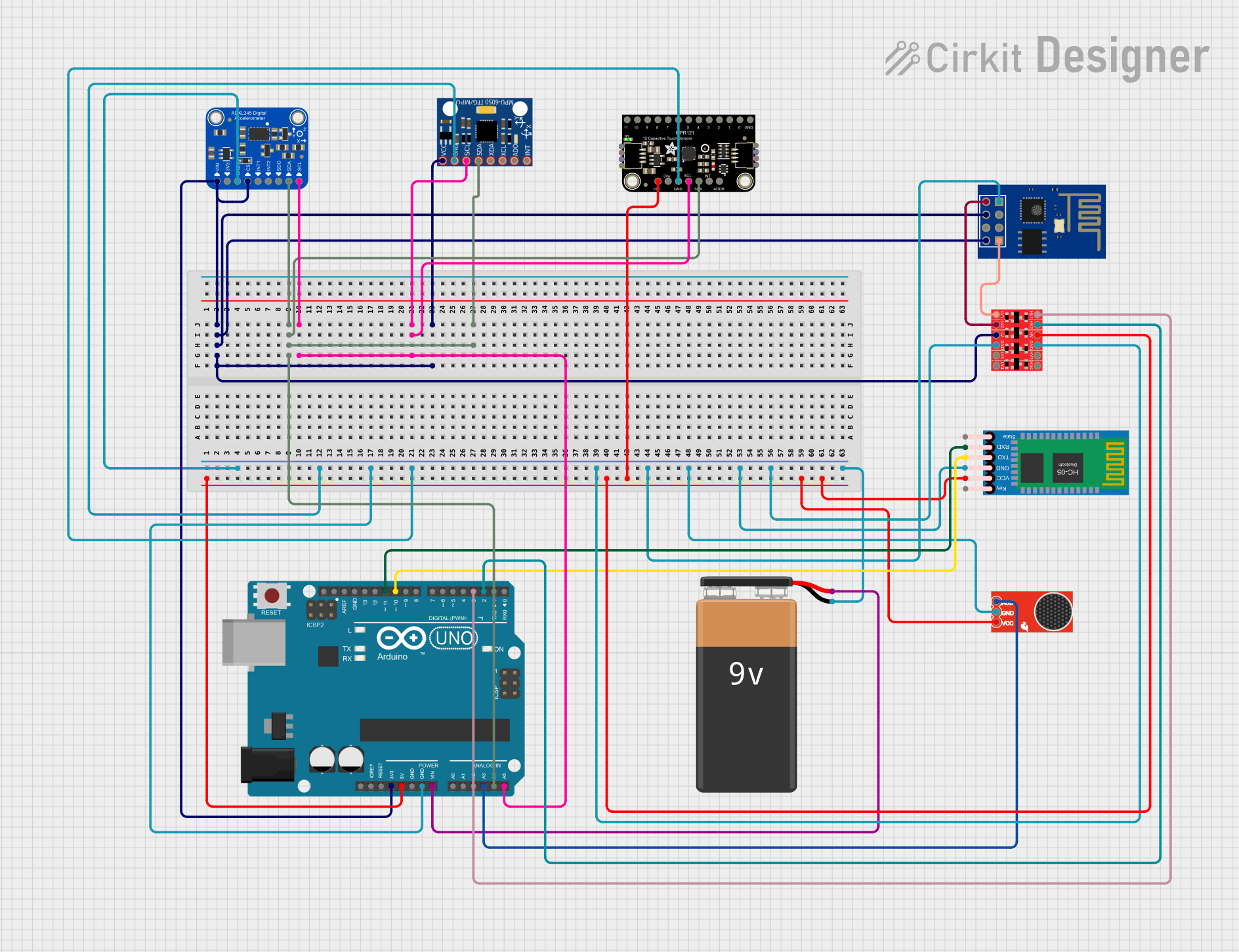
Circuit Documentation
Summary
This circuit integrates a variety of sensors and modules to create a multifunctional system capable of sensing motion, touch, sound, and providing wireless communication capabilities. The core of the circuit is an Arduino UNO microcontroller, which interfaces with an MPU-6050 gyroscope and accelerometer, an Adafruit MPR121 capacitive touch sensor, a SparkFun Electret Microphone for audio input, an HC-05 Bluetooth module for wireless data transmission, and an ESP8266 ESP-01 WiFi module for network connectivity. A Bi-Directional Logic Level Converter is used to safely step down the 5V signals from the Arduino to 3.3V levels required by the ESP8266. The entire system is powered by a 9V battery connected to the Arduino's Vin pin.
Component List
- Arduino UNO: A microcontroller board based on the ATmega328P, featuring digital and analog I/O pins.
- MPU-6050: A motion-tracking device combining a 3-axis gyroscope and a 3-axis accelerometer.
- Adafruit MPR121: A capacitive touch sensor controller capable of managing 12 individual electrodes.
- HC-05 Bluetooth Module: A wireless communication module for Bluetooth connectivity.
- ESP8266 ESP-01 WiFi Module: A WiFi module offering internet connectivity for microcontroller projects.
- Bi-Directional Logic Level Converter: A device that safely steps down 5V signals to 3.3V and vice versa.
- SparkFun Electret Microphone Breakout: An audio input module that captures sound for processing.
- 9V Battery: A standard 9V battery providing power to the circuit.
- Adafruit ADXL345: A small, thin, low power, 3-axis accelerometer with high resolution (13-bit) measurement.
Wiring Details
Arduino UNO
- 5V: Powers the Logic Level Converter, MPR121, Electret Microphone, and HC-05 Bluetooth Module.
- 3.3V: Powers the Logic Level Converter, ESP8266, MPU-6050, and ADXL345.
- GND: Common ground for all components.
- A4 (SDA): Connected to the SDA pins of MPR121, MPU-6050, and ADXL345 for I2C communication.
- A5 (SCL): Connected to the SCL pins of MPR121, MPU-6050, and ADXL345 for I2C communication.
- Vin: Connected to the 9V battery to power the Arduino.
- A3: Connected to the AUD pin of the Electret Microphone for audio input.
- D11: Connected to the RXD pin of the HC-05 Bluetooth Module for serial communication.
- D10: Connected to the TXD pin of the HC-05 Bluetooth Module for serial communication.
- D3: Connected to HV1 pin of the Logic Level Converter for level shifting.
- D2: Connected to HV2 pin of the Logic Level Converter for level shifting.
MPU-6050
- VCC: Powered by the 3.3V from the Arduino.
- GND: Connected to the common ground.
- SCL: Connected to the A5 pin of the Arduino for I2C communication.
- SDA: Connected to the A4 pin of the Arduino for I2C communication.
Adafruit MPR121
- VCC: Powered by the 5V from the Arduino.
- GND: Connected to the common ground.
- SCL: Connected to the A5 pin of the Arduino for I2C communication.
- SDA: Connected to the A4 pin of the Arduino for I2C communication.
HC-05 Bluetooth Module
- VCC: Powered by the 5V from the Arduino.
- GND: Connected to the common ground.
- TXD: Connected to the D10 pin of the Arduino for serial communication.
- RXD: Connected to the D11 pin of the Arduino for serial communication.
ESP8266 ESP-01 WiFi Module
- VCC: Powered by the 3.3V from the Arduino.
- CH_PD: Also powered by the 3.3V from the Arduino.
- GND: Connected to the common ground.
- TXD: Connected to the LV2 pin of the Logic Level Converter for level-shifted serial communication.
- RXD: Connected to the LV1 pin of the Logic Level Converter for level-shifted serial communication.
Bi-Directional Logic Level Converter
- HV: Powered by the 5V from the Arduino.
- LV: Powered by the 3.3V from the Arduino.
- GND: Connected to the common ground.
- HV1: Connected to the D3 pin of the Arduino.
- HV2: Connected to the D2 pin of the Arduino.
- LV1: Connected to the RXD pin of the ESP8266.
- LV2: Connected to the TXD pin of the ESP8266.
SparkFun Electret Microphone Breakout
- VCC: Powered by the 5V from the Arduino.
- GND: Connected to the common ground.
- AUD: Connected to the A3 pin of the Arduino for audio signal input.
9V Battery
- +: Connected to the Vin pin of the Arduino to supply power.
- -: Connected to the common ground.
Adafruit ADXL345
- VIN: Powered by the 3.3V from the Arduino.
- GND: Connected to the common ground.
- SCL: Connected to the A5 pin of the Arduino for I2C communication.
- SDA/SDIO: Connected to the A4 pin of the Arduino for I2C communication.
Documented Code
#include <Wire.h>
#include <Adafruit_ADXL345_U.h>
#include <MPU6050.h>
#include <Adafruit_MPR121.h>
#include <SoftwareSerial.h>
#include <ESP8266WiFi.h>

// ADXL345 Accelerometer
Adafruit_ADXL345_Unified accel = Adafruit_ADXL345_Unified(12345);

// MPU6050 Gyroscope
MPU6050 mpu;

// MPR121 Capacitive Sensor
Adafruit_MPR121 cap = Adafruit_MPR121();

// HC-05 Bluetooth Module
SoftwareSerial BTSerial(2, 3); // RX, TX

// Wi-Fi Module ESP8266
SoftwareSerial espSerial(10, 11); // RX, TX for ESP8266

// Microphone Sensor (Analog)
int micPin = A0;

void setup() {
  Serial.begin(9600);
  Wire.begin();

  // Initialize Accelerometer
  if (!accel.begin()) {
    Serial.println("Could not find a valid ADXL345 sensor, check wiring!");
    while (1);
  }

  // Initialize Gyroscope
  mpu.initialize();
  if (!mpu.testConnection()) {
    Serial.println("MPU6050 connection failed");
    while (1);
  }

  // Initialize Capacitive Sensor
  if (!cap.begin(0x5A)) {
    Serial.println("MPR121 not found, check wiring?");
    while (1);
  }

  // Initialize Bluetooth Module
  BTSerial.begin(9600);
  Serial.println("Bluetooth module ready");

  // Initialize Wi-Fi Module
  espSerial.begin(9600);
  Serial.println("ESP8266 module ready");

  // Battery Setup (if any voltage monitoring needed)
}

void loop() {
  // Read ADXL345 Accelerometer
  sensors_event_t event;
  accel.getEvent(&event);
  Serial.print("Accel X: "); Serial.print(event.acceleration.x); Serial.print(" m/s^2 ");
  Serial.print("Y: "); Serial.print(event.acceleration.y); Serial.print(" m/s^2 ");
  Serial.print("Z: "); Serial.print(event.acceleration.z); Serial.println(" m/s^2");

  // Read MPU6050 Gyroscope
  Serial.print("MPU6050 Gyro X: "); Serial.println(mpu.getRotationX());
  Serial.print("Y: "); Serial.println(mpu.getRotationY());
  Serial.print("Z: "); Serial.println(mpu.getRotationZ());

  // Read Capacitive Sensors
  uint16_t touched = cap.touched();
  for (uint8_t i = 0; i < 12; i++) {
    if (touched & (1 << i)) {
      Serial.print("Electrode "); Serial.print(i); Serial.println(" was touched");
    }
  }

  // Read Microphone (Analog)
  int micValue = analogRead(micPin);
  Serial.print("Mic Value: "); Serial.println(micValue);

  // Bluetooth Communication
  if (BTSerial.available()) {
    char btData = BTSerial.read();
    Serial.print("Bluetooth Data: "); Serial.println(btData);
  }

  // Wi-Fi Communication (example: send AT command)
  espSerial.println("AT");
  if (espSerial.available()) {
    String espData = espSerial.readString();
    Serial.print("ESP8266 Response: "); Serial.println(espData);
  }

  delay(1000);  // Adjust the delay as necessary
}
This code initializes and reads data from the various sensors connected to the Arduino UNO. It also handles serial communication with the HC-05 Bluetooth module and the ESP8266 WiFi module. The accelerometer data is read and printed to the serial monitor, as is the gyroscope data from the MPU6050. The capacitive touch states are checked and reported,