
Circuit Documentation
Summary of the Circuit
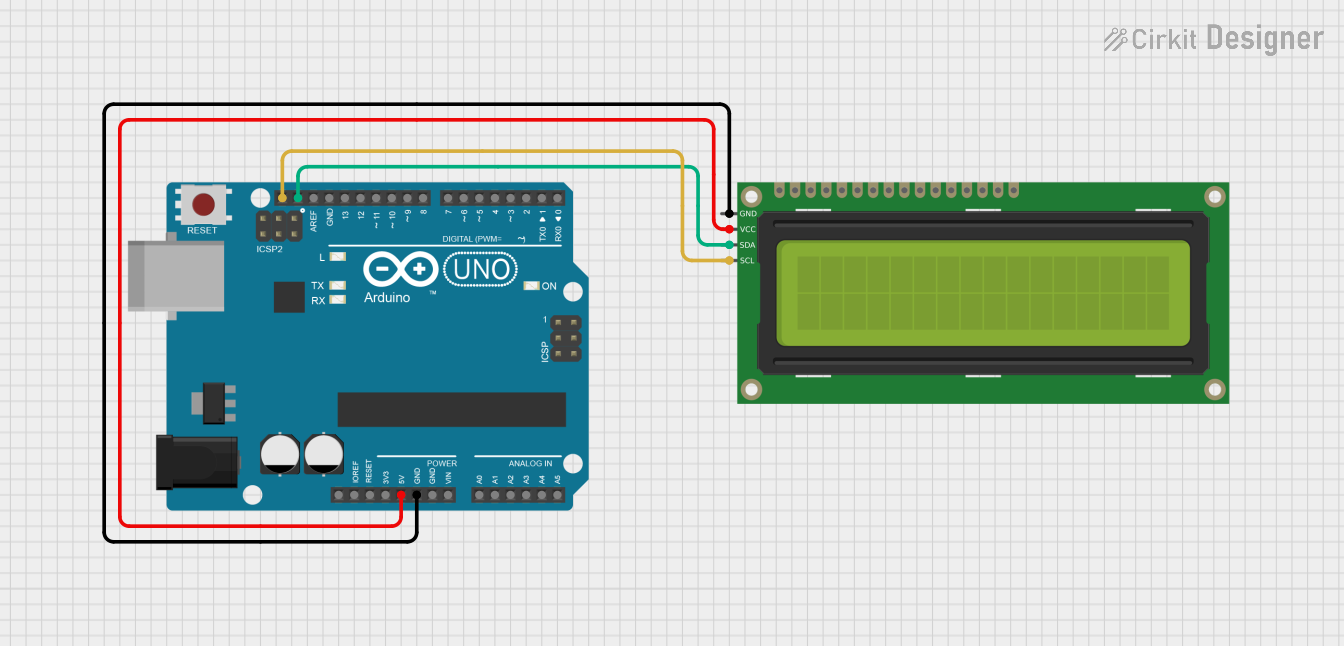
This circuit consists of an Arduino UNO microcontroller board interfaced with a 16x2 I2C LCD display. The Arduino UNO serves as the central processing unit, controlling the display output on the LCD. The I2C communication protocol is used for data transfer between the Arduino and the LCD, minimizing the number of required connections and simplifying the wiring. The LCD display is used to show information or data processed by the Arduino.
Component List
Arduino UNO
- Description: A microcontroller board based on the ATmega328P.
- Pins Used:
5V: Power supply to the board and connected components.GND: Ground reference for the circuit.SCL: Serial Clock line for I2C communication.SDA: Serial Data line for I2C communication.
- Purpose: Acts as the main controller for the circuit, executing the embedded code and communicating with the LCD.
16x2 I2C LCD
- Description: A 16-character by 2-line liquid crystal display with an I2C interface.
- Pins Used:
GND: Ground reference for the display.VCC: Power supply for the display.SDA: Serial Data line for I2C communication.SCL: Serial Clock line for I2C communication.
- Purpose: Displays information sent from the Arduino UNO.
Wiring Details
Arduino UNO
5Vto 16x2 I2C LCDVCCGNDto 16x2 I2C LCDGNDSCLto 16x2 I2C LCDSCLSDAto 16x2 I2C LCDSDA
16x2 I2C LCD
VCCconnected to Arduino UNO5VGNDconnected to Arduino UNOGNDSCLconnected to Arduino UNOSCLSDAconnected to Arduino UNOSDA
Documented Code
Arduino UNO Code (sketch.ino)
void setup() {
  // put your setup code here, to run once:

}

void loop() {
  // put your main code here, to run repeatedly:

}
The provided code is a template with empty setup() and loop() functions. The setup() function is intended to contain initialization code that runs once when the microcontroller is powered on or reset. The loop() function is designed to contain the main logic of the program, which runs repeatedly as long as the microcontroller is powered.
Additional Notes
- The code for the Arduino UNO is currently a skeleton and needs to be populated with the logic for initializing and using the I2C interface to communicate with the 16x2 I2C LCD.
- The actual display logic and any other required functionality should be implemented within the
setup()andloop()functions. - The
documentation.txtfile is empty and does not contain any additional information.