
Arduino Leonardo Food Spoilage Detector with Wi-Fi Connectivity
View and Edit Project In Cirkit Designer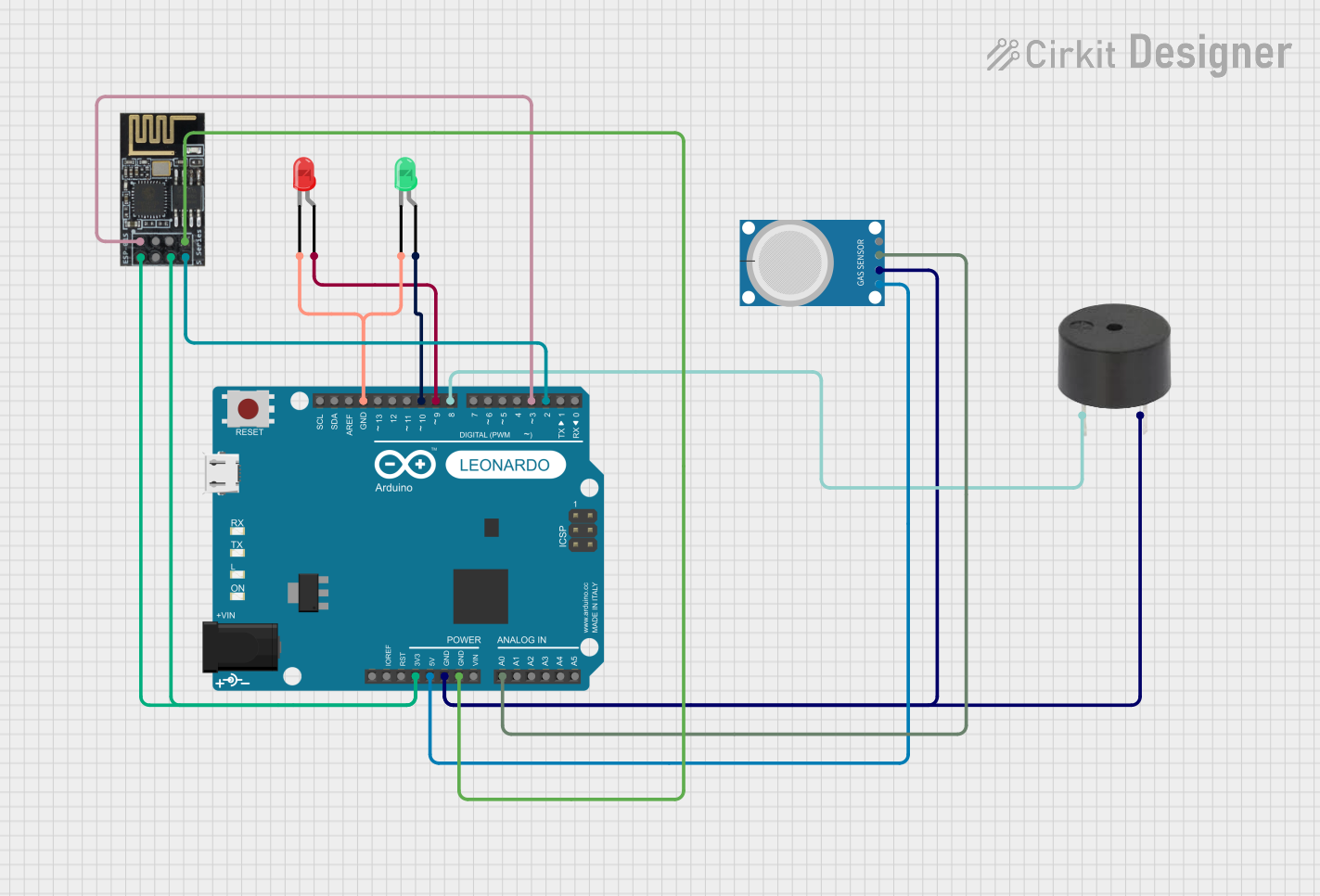
Circuit Documentation
Summary
This circuit is designed to monitor the pH level of food using an MQ-4 gas sensor and provide visual and auditory alerts based on the pH value. The circuit includes an Arduino Leonardo microcontroller, an MQ-4 gas sensor, a red LED, a green LED, a buzzer, and a WiFi module (ESP8266-01) for potential wireless communication. The system displays the pH value on an LCD and uses LEDs and a buzzer to indicate whether the food is fresh or spoiled.
Component List
Arduino Leonardo (Rev3b)
- Description: Microcontroller board based on the ATmega32u4.
- Pins: D0/RX, D1/TX, D2/SDA, D3 PWM/SCL, D4/A6, D5 PWM, D6 PWM/A7, D7, n.c., IOREF, RESET, 3V3, 5V, GND, VIN, A0, A1, A2, A3, A4, A5, D8/A8, D9 PWM/A9, D10 PWM/A10, D11 PWM, D12/A11, D13 PWM, AREF, SDA, SCL
MQ-4
- Description: Gas sensor used to detect methane (CH4) and other gases.
- Pins: A0, D0, GND, VCC
LED: Two Pin (red)
- Description: Red LED for visual indication.
- Pins: cathode, anode
LED: Two Pin (green)
- Description: Green LED for visual indication.
- Pins: cathode, anode
Buzzer
- Description: Buzzer for auditory alerts.
- Pins: PIN, GND
WiFi module ESP8266-01
- Description: WiFi module for wireless communication.
- Pins: RX, GPIO0, GPIO2, GND, +3V3, Reset, CH-PD Chip power down, TX
Wiring Details
Arduino Leonardo (Rev3b)
- D2/SDA connected to TX of WiFi module ESP8266-01
- D3 PWM/SCL connected to RX of WiFi module ESP8266-01
- 3V3 connected to +3V3 and CH-PD Chip power down of WiFi module ESP8266-01
- 5V connected to VCC of MQ-4
- GND connected to GND of MQ-4, GND of buzzer, GND of WiFi module ESP8266-01, cathode of red LED, and cathode of green LED
- A0 connected to D0 of MQ-4
- D8/A8 connected to PIN of buzzer
- D9 PWM/A9 connected to anode of red LED
- D10 PWM/A10 connected to anode of green LED
MQ-4
- VCC connected to 5V of Arduino Leonardo
- GND connected to GND of Arduino Leonardo
- D0 connected to A0 of Arduino Leonardo
LED: Two Pin (red)
- anode connected to D9 PWM/A9 of Arduino Leonardo
- cathode connected to GND of Arduino Leonardo
LED: Two Pin (green)
- anode connected to D10 PWM/A10 of Arduino Leonardo
- cathode connected to GND of Arduino Leonardo
Buzzer
- PIN connected to D8/A8 of Arduino Leonardo
- GND connected to GND of Arduino Leonardo
WiFi module ESP8266-01
- TX connected to D2/SDA of Arduino Leonardo
- RX connected to D3 PWM/SCL of Arduino Leonardo
- +3V3 connected to 3V3 of Arduino Leonardo
- CH-PD Chip power down connected to 3V3 of Arduino Leonardo
- GND connected to GND of Arduino Leonardo
Code Documentation
#include <LiquidCrystal.h>

// Pin definitions
const int mq4Pin = A0; // MQ4 sensor analog pin
const int redLedPin = 9; // Red LED pin
const int greenLedPin = 10; // Green LED pin
const int buzzerPin = 8; // Buzzer pin

// Initialize the LCD (pins: rs, en, d4, d5, d6, d7)
LiquidCrystal lcd(12, 11, 5, 4, 3, 2);

void setup() {
    pinMode(redLedPin, OUTPUT);
    pinMode(greenLedPin, OUTPUT);
    pinMode(buzzerPin, OUTPUT); // Set buzzer pin as output
    lcd.begin(16, 2); // Set up the LCD's number of columns and rows
    Serial.begin(9600);
}

void loop() {
    int mq4Value = analogRead(mq4Pin); // Read MQ4 sensor value
    float phValue = map(mq4Value, 0, 1023, 0, 14); // Example mapping to pH scale

    lcd.setCursor(0, 0);
    lcd.print("pH Value: ");
    lcd.print(phValue);

    if (phValue > 7.5) {
        digitalWrite(redLedPin, HIGH); // Turn on red LED
        digitalWrite(greenLedPin, LOW); // Turn off green LED
        digitalWrite(buzzerPin, HIGH); // Activate buzzer
        lcd.setCursor(0, 1);
        lcd.print("Food Spoiled!");
    } else {
        digitalWrite(redLedPin, LOW); // Turn off red LED
        digitalWrite(greenLedPin, HIGH); // Turn on green LED
        digitalWrite(buzzerPin, LOW); // Deactivate buzzer
        lcd.setCursor(0, 1);
        lcd.print("Food Fresh!");
    }

    delay(1000); // Wait for a second before the next reading
}
This code initializes the necessary pins and sets up the LCD. In the loop function, it reads the value from the MQ-4 sensor, maps it to a pH value, and updates the LCD display. Depending on the pH value, it turns on the appropriate LED and activates or deactivates the buzzer to indicate whether the food is fresh or spoiled.