
Circuit Documentation
Summary
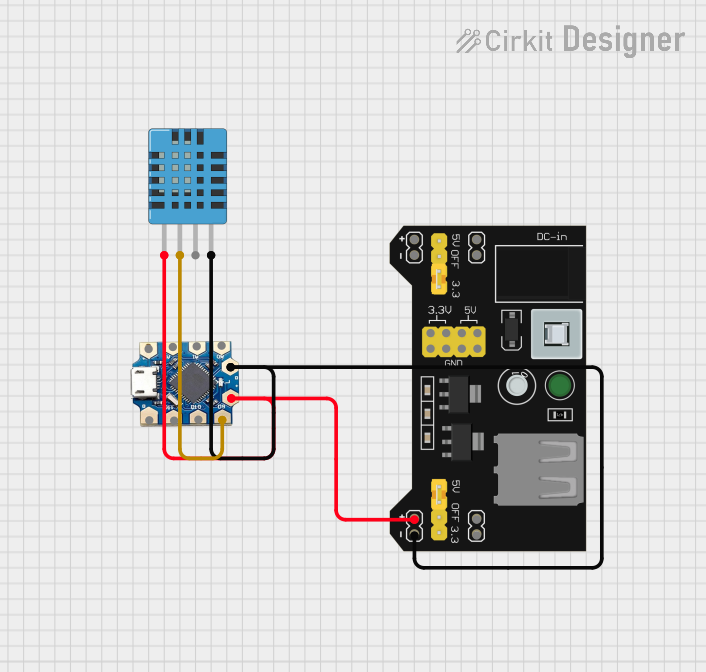
This circuit involves an Arduino Leonardo Tiny Atmega32U4 microcontroller, a DHT11 humidity and temperature sensor, and an MB102 Breadboard Power Supply Module. The microcontroller reads temperature and humidity data from the DHT11 sensor and outputs the data to the serial monitor. The MB102 Breadboard Power Supply Module provides the necessary power to the circuit components.
Component List
Leonardo Tiny Atmega32U4
- Description: A microcontroller board based on the ATmega32U4.
- Pins: +5v, A2, A1, A0, -5v, D2, D1, D0
MB102 Breadboard Power Supply Module 3.3V/5V
- Description: A power supply module that provides 3.3V and 5V outputs.
- Pins: VCC, GND, 3.3V, 5V
DHT11 Humidity and Temperature Sensor
- Description: A sensor that measures humidity and temperature.
- Pins: VDD, DATA, NULL, GND
Wiring Details
Leonardo Tiny Atmega32U4
- +5v: Connected to VCC of MB102 Breadboard Power Supply Module
- -5v: Connected to GND of MB102 Breadboard Power Supply Module and GND of DHT11 Humidity and Temperature Sensor
- D0: Connected to DATA of DHT11 Humidity and Temperature Sensor
MB102 Breadboard Power Supply Module 3.3V/5V
- VCC: Connected to +5v of Leonardo Tiny Atmega32U4 and VDD of DHT11 Humidity and Temperature Sensor
- GND: Connected to -5v of Leonardo Tiny Atmega32U4 and GND of DHT11 Humidity and Temperature Sensor
DHT11 Humidity and Temperature Sensor
- VDD: Connected to VCC of MB102 Breadboard Power Supply Module
- DATA: Connected to D0 of Leonardo Tiny Atmega32U4
- GND: Connected to GND of MB102 Breadboard Power Supply Module and -5v of Leonardo Tiny Atmega32U4
Documented Code
/* How to use DHT-11 sensor with Arduino uno
   Temperature and humidity sensor
   Dev: Michalis Vasilakis // Date: 1/7/2015 // www.ardumotive.com */

//Libraries
#include <DHT.h>

//Constants
#define DHTPIN 2     // what pin we're connected to
#define DHTTYPE DHT11   // DHT 11  (AM2302)
// Initialize DHT sensor for normal 16mhz Arduino
DHT dht(DHTPIN, DHTTYPE);

//Variables
int chk;
float hum;  //Stores humidity value
float temp; //Stores temperature value

void setup()
{
    Serial.begin(9600);
    dht.begin();
}

void loop()
{
    //Read data and store it to variables hum and temp
    hum = dht.readHumidity();
    temp= dht.readTemperature();
    //Print temp and humidity values to serial monitor
    Serial.print("Humidity: ");
    Serial.print(hum);
    Serial.print(" %, Temp: ");
    Serial.print(temp);
    Serial.println(" Celsius");
    delay(2000); //Delay 2 sec.
}
This code initializes the DHT11 sensor and reads the temperature and humidity values. It then prints these values to the serial monitor every 2 seconds.