
Arduino UNO LED Control with ACS712 Current Sensor and ZMPT101B Voltage Sensor
View and Edit Project In Cirkit Designer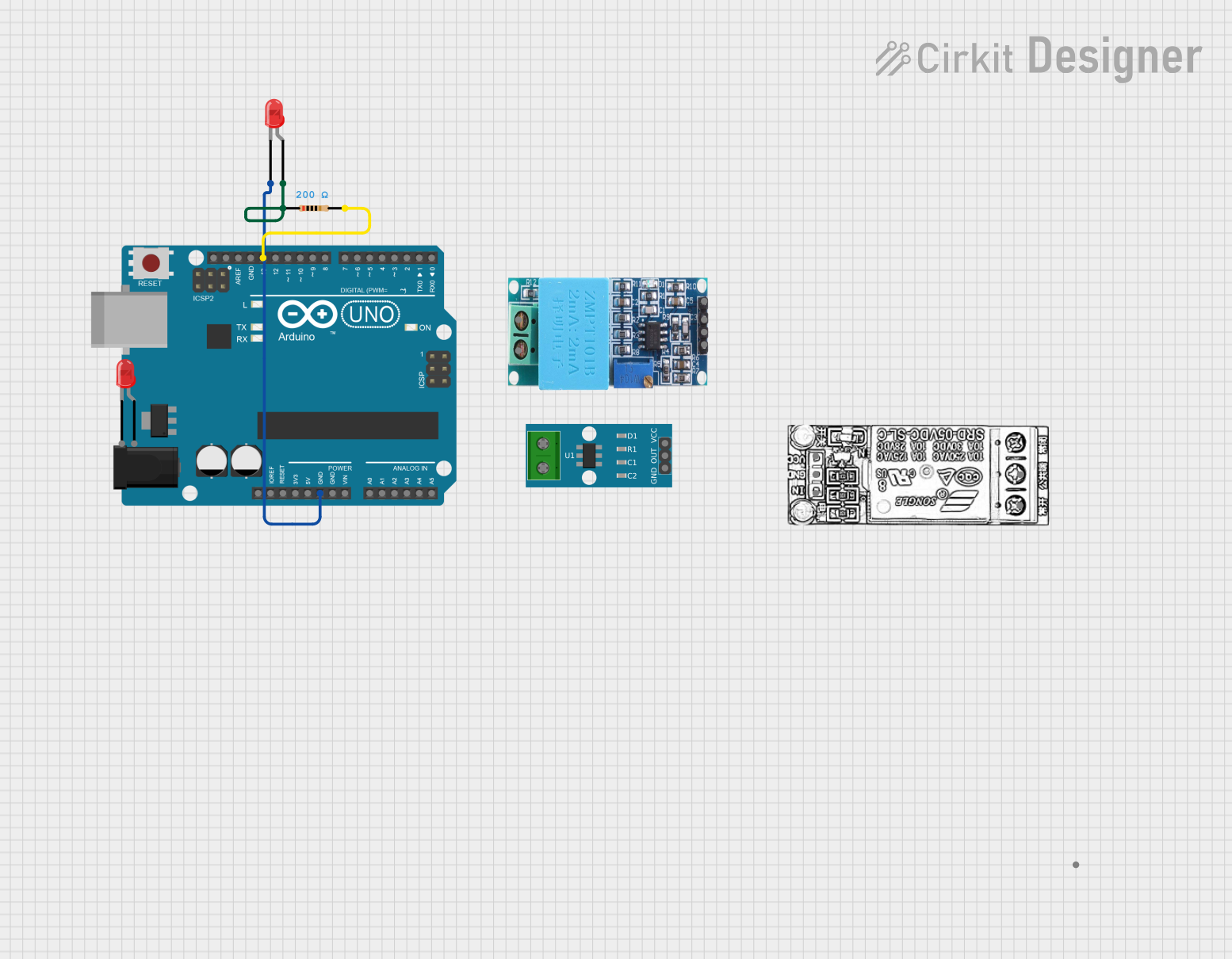
Circuit Documentation
Summary
This document provides a detailed overview of a circuit that includes an Arduino UNO microcontroller, a current sensor, a voltage sensor, a relay module, and two LEDs with associated resistors. The circuit is designed to control an LED using the Arduino UNO.
Component List
ACS712 Current Sensor 5A 20A 30A
- Pins: 1, 2, GND, OUT, VCC
- Description: Current sensor for measuring current in the circuit.
ZMPT101B
- Pins: OUT, GND, VCC, NEUTRO, FASE
- Description: Voltage sensor for measuring voltage in the circuit.
Arduino UNO
- Pins: UNUSED, IOREF, Reset, 3.3V, 5V, GND, Vin, A0, A1, A2, A3, A4, A5, SCL, SDA, AREF, D13, D12, D11, D10, D9, D8, D7, D6, D5, D4, D3, D2, D1, D0
- Description: Microcontroller for controlling the circuit.
LED: Two Pin (red)
- Pins: cathode, anode
- Description: Red LED for visual indication.
RELAY MODULE
- Pins: NC, COM, INPUT, GND, VCC
- Description: Relay module for switching high power devices.
Resistor
- Pins: pin1, pin2
- Description: Resistor to limit current through the LED.
- Properties:
- Resistance: 200 Ohms
Wiring Details
ACS712 Current Sensor 5A 20A 30A
- Pins: 1, 2, GND, OUT, VCC
- Connections: Not connected in this circuit.
ZMPT101B
- Pins: OUT, GND, VCC, NEUTRO, FASE
- Connections: Not connected in this circuit.
Arduino UNO
- Pins:
- GND: Connected to cathode of LED (red)
- D13: Connected to pin2 of Resistor
LED: Two Pin (red)
- Pins:
- cathode: Connected to GND of Arduino UNO
- anode: Connected to pin1 of Resistor
RELAY MODULE
- Pins: NC, COM, INPUT, GND, VCC
- Connections: Not connected in this circuit.
Resistor
- Pins:
- pin1: Connected to anode of LED (red)
- pin2: Connected to D13 of Arduino UNO
Documented Code
Arduino UNO Code
void setup() {
  // put your setup code here, to run once:
  pinMode(13, OUTPUT);
}

void loop() {
  // put your main code here, to run repeatedly:
  digitalWrite(13, HIGH);
}
This code sets pin 13 of the Arduino UNO as an output and continuously sets it to HIGH, which will turn on the connected LED.