
Arduino Uno R3-based Rock-Paper-Scissors Game with OLED Display
View and Edit Project In Cirkit Designer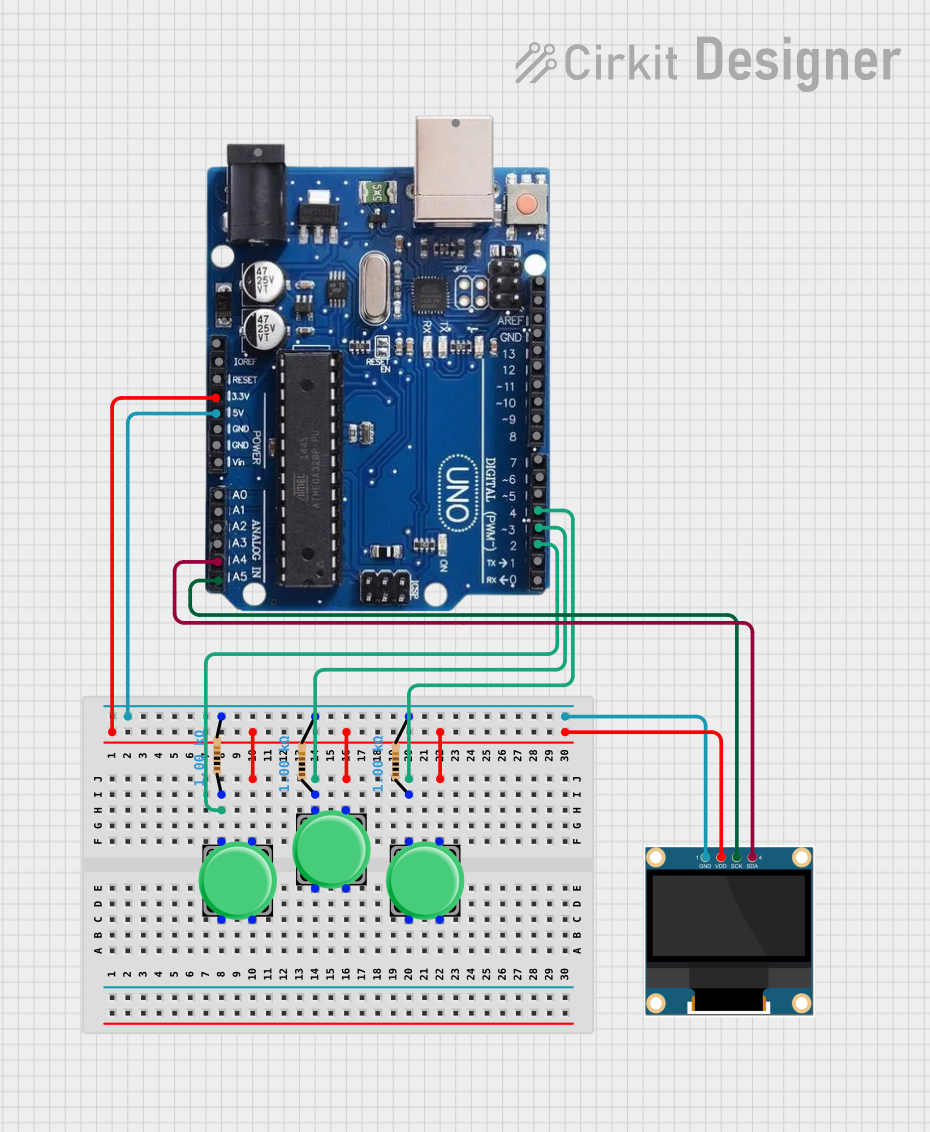
Circuit Documentation
Summary of the Circuit
This circuit is designed to interface an Arduino Uno R3 microcontroller with a 0.96" OLED display and three pushbuttons. The pushbuttons are used to input a player's choice in a game of Rock-Paper-Scissors, which is then displayed on the OLED. The Arduino controls the game logic and the OLED display, which shows the choices and the outcome of the game. Each pushbutton is connected to the Arduino through a 1000 Ohm resistor, and the OLED communicates with the Arduino via the I2C protocol.
Component List
Pushbutton
- Description: A standard pushbutton used for user input.
- Pins: Pin 1, Pin 2, Pin 3, Pin 4
Resistor
- Description: A resistor with a resistance of 1000 Ohms.
- Pins: pin1, pin2
- Properties: Resistance: 1000 Ohms
0.96" OLED
- Description: A small OLED display for visual output.
- Pins: GND, VDD, SCK, SDA
Arduino Uno R3
- Description: A microcontroller board based on the ATmega328P.
- Pins: USB Port, Power Jack, Not Connected, IOREF, RESET, 3.3V, 5V, GND, VIN, A0-A5, SCL, SDA, AREF, Digital Pins 0-13
Wiring Details
Pushbutton
- Pin 3 is connected to the Arduino's 5V.
- Pin 1 is connected to a 1000 Ohm resistor, which is then connected to the Arduino's digital pins 2, 3, or 4 depending on the button.
Resistor
- pin2 is connected to the Arduino's GND.
- pin1 is connected to the corresponding pushbutton's Pin 1.
0.96" OLED
- VDD is connected to the Arduino's 5V.
- GND is connected to the Arduino's GND.
- SCK is connected to the Arduino's A5/SCL.
- SDA is connected to the Arduino's A4/SDA.
Arduino Uno R3
- 5V and GND are used to power the pushbuttons and the OLED display.
- Digital Pins 2, 3, 4 are used as input pins for the pushbuttons.
- A4/SDA and A5/SCL are used for I2C communication with the OLED display.
Documented Code
#include <SPI.h>
#include <Wire.h>
#include <Adafruit_GFX.h>
#include <Adafruit_SSD1306.h>

#define SCREEN_WIDTH 128 // OLED display width, in pixels
#define SCREEN_HEIGHT 64 // OLED display height, in pixels

Adafruit_SSD1306 display(SCREEN_WIDTH, SCREEN_HEIGHT, &Wire, -1);

const int LeftButtonPin = 2;
const int MiddleButtonPin = 3;
const int RightButtonPin = 4;

int playerchoice, compchoice;

void setup() {
  pinMode(LeftButtonPin, INPUT);
  pinMode(MiddleButtonPin, INPUT);
  pinMode(RightButtonPin, INPUT);

  Serial.begin(115200);
  randomSeed(analogRead(0));

  if(!display.begin(SSD1306_SWITCHCAPVCC, 0x3C)) { // Address 0x3D for 128x64
    Serial.println(F("SSD1306 allocation failed"));
    for(;;);
  }
  delay(2000);
  display.clearDisplay();
}

void loop() {
  playerchoice = 0;
  compchoice = 0;

  display.setTextSize(1);
  display.setTextColor(WHITE);

  display.setCursor(10,0); // 128  x 64
  display.println("Lets Play a Game!");
  display.setCursor(23,15);
  display.println("(choose one)");
  display.setCursor(0,30);
  display.println("ROCK PAPER or SCISSOR");
  display.setCursor(0,45);
  display.println("LEFT MIDDLE or RIGHT");

  display.display();

  while (playerchoice == 0)
  {
    if (digitalRead(LeftButtonPin) == HIGH)
    {
    playerchoice = 1;
    display.clearDisplay();
    display.setCursor(0,0);
    display.println("You Chose");
    display.setCursor(5,15);
    display.println("Rock");
    display.display();
    }

    if (digitalRead(MiddleButtonPin) == HIGH)
    {
    playerchoice = 2;
    display.clearDisplay();
    display.setCursor(0,0);
    display.println("You Chose");
    display.setCursor(5,15);
    display.println("Paper");
    display.display();
    }

    if (digitalRead(RightButtonPin) == HIGH)
    {
    playerchoice = 3;
    display.clearDisplay();
    display.setCursor(0,0);
    display.println("You Chose");
    display.setCursor(5,15);
    display.println("Scissor");
    display.display();
    }

  }

  display.drawLine(60, 0, 60, 29, WHITE);
  display.drawLine(0, 29, 128, 29, WHITE);
  display.display();

  delay(500);

  compchoice = random(1, 4);

    if (compchoice==1)
    {
    display.setCursor(68,0);
    display.println("Comp Chose");
    display.setCursor(73,15);
    display.println("Rock");
    display.display();
    }

    if (compchoice==2)
    {
    display.setCursor(68,0);
    display.println("Comp Chose");
    display.setCursor(73,15);
    display.println("Paper");
    display.display();
    }

    if (compchoice==3)
    {
    display.setCursor(68,0);
    display.println("Comp Chose");
    display.setCursor(73,15);
    display.println("Scissor");
    display.display();
    }

  delay(1000);

  if(playerchoice==compchoice)
  {
    display.setCursor(32, 40);
    display.println("Its a Tie!");
    display.display();
  }
  else if ((playerchoice == 1 && compchoice == 3) ||
           (playerchoice == 2 && compchoice == 1) ||
           (playerchoice == 3 && compchoice == 2))
  {
    display.setCursor(32, 40);
    display.println("You Won!");
    display.display();
  }
  else
  {
    display.setCursor(32, 40);
    display.println("Comp Won!");
    display.display();
  }

  delay(2000);
  display.clearDisplay();

  //display.drawBitmap(75, 20, middle_finger, 50, 50, 1);

}
This code is responsible for the game logic and interfacing with the OLED display and pushbuttons. It initializes the display, reads the button states, and displays the game's outcome.