
ESP32-Based Smart Irrigation System with Soil Moisture Sensing and Remote Monitoring
View and Edit Project In Cirkit Designer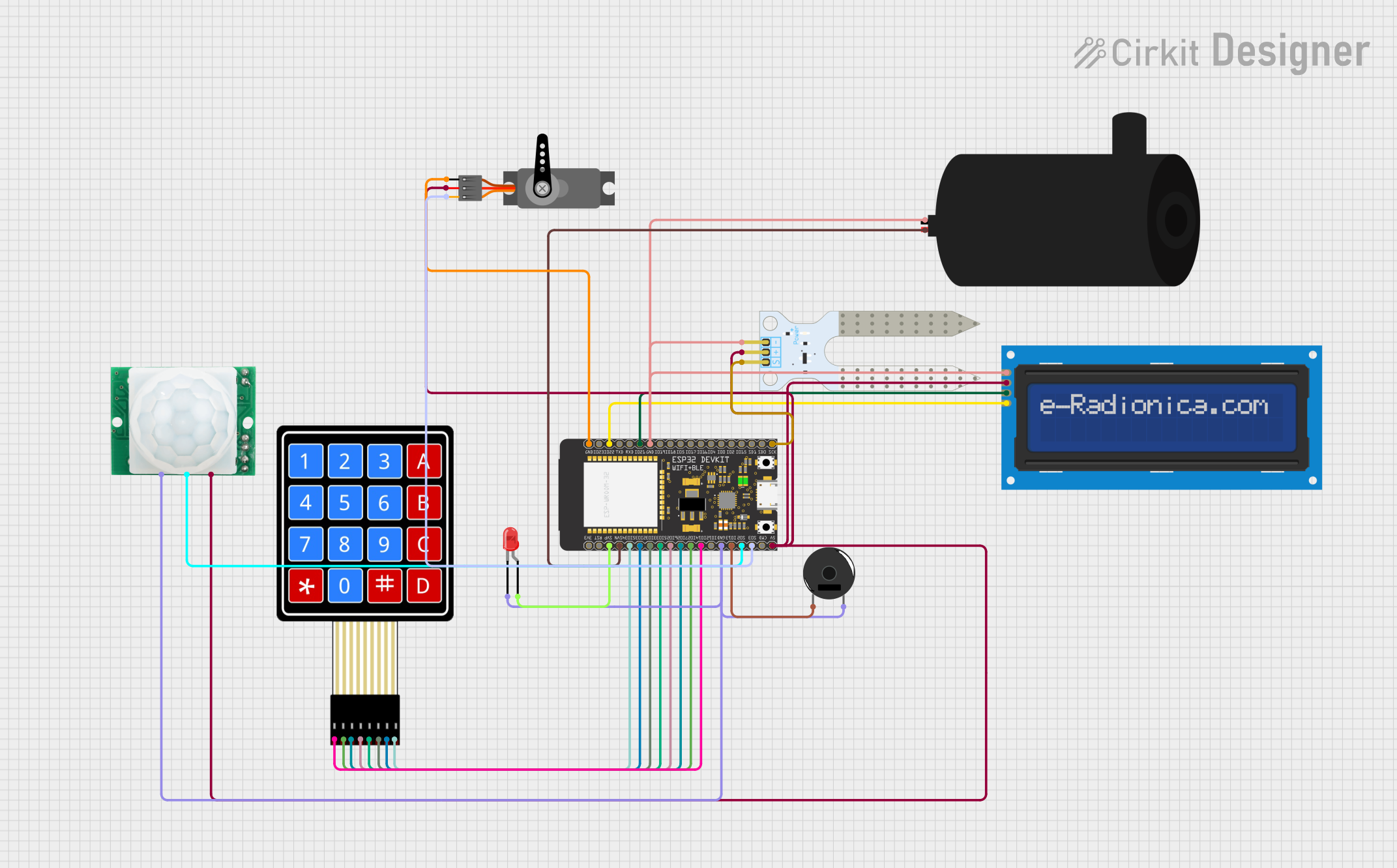
Circuit Documentation
Summary
The circuit in question appears to be a smart system that could be used for home automation or environmental monitoring. It includes a microcontroller (ESP32 Wroom) that interfaces with various sensors and actuators, including a water pump, an LCD screen, an LED, a keypad, a piezo buzzer, a motion sensor (HC-SR501), a servo motor, and a soil moisture sensor. The ESP32 Wroom is responsible for controlling these components based on sensor inputs and possibly remote commands received over WiFi. The system seems to be designed to interact with the user through the keypad and LCD screen, and it can provide feedback through the LED, buzzer, and servo motor.
Component List
Water Pump
- Description: A device used to move water from one place to another.
- Pins: Positive, Negative
LCD Screen 16x2 I2C
- Description: A 16x2 character LCD display that uses the I2C protocol for communication.
- Pins: SCL, SDA, VCC, GND
LED: Two Pin (Red)
- Description: A basic red light-emitting diode.
- Pins: Cathode, Anode
4X4 Membrane Matrix Keypad
- Description: A 4x4 matrix keypad used for user input.
- Pins: R1, R2, R3, R4, C1, C2, C3, C4
Piezo Buzzer
- Description: An electronic device that emits sound when an electric current is applied.
- Pins: Pin 1, Pin 2
HC-SR501 Motion Sensor
- Description: A passive infrared sensor that detects motion.
- Pins: GND, OUT, VCC
Servo
- Description: A rotary actuator or linear actuator that allows for precise control of angular or linear position.
- Pins: GND, VCC, PWM
ESP32 Wroom
- Description: A powerful microcontroller with WiFi capabilities for IoT projects.
- Pins: Multiple GPIOs, 3V3, Reset, GND, 5V, etc.
Soil Moisture Sensor
- Description: A sensor that measures the volumetric water content in soil.
- Pins: VCC, GND, SIG
Wiring Details
Water Pump
- Positive: Connected to ESP32 Wroom GPIO39
- Negative: Common ground with other components
LCD Screen 16x2 I2C
- SCL: Connected to ESP32 Wroom GPIO22/SCL
- SDA: Connected to ESP32 Wroom GPIO21/SDA
- VCC: Common VCC with other components
- GND: Common ground with other components
LED: Two Pin (Red)
- Cathode: Common ground with other components
- Anode: Connected to ESP32 Wroom GPIO36
4X4 Membrane Matrix Keypad
- R1: Connected to ESP32 Wroom GPIO14
- R2: Connected to ESP32 Wroom GPIO27
- R3: Connected to ESP32 Wroom GPIO26
- R4: Connected to ESP32 Wroom GPIO25
- C1: Connected to ESP32 Wroom GPIO33
- C2: Connected to ESP32 Wroom GPIO32
- C3: Connected to ESP32 Wroom GPIO35
- C4: Connected to ESP32 Wroom GPIO34
Piezo Buzzer
- Pin 1: Connected to ESP32 Wroom GPIO13
- Pin 2: Common ground with other components
HC-SR501 Motion Sensor
- GND: Common ground with other components
- OUT: Connected to ESP32 Wroom GPIO9
- VCC: Common VCC with other components
Servo
- GND: Common ground with other components
- VCC: Common VCC with other components
- PWM: Connected to ESP32 Wroom GPIO10
Soil Moisture Sensor
- VCC: Common VCC with other components
- GND: Common ground with other components
- SIG: Connected to ESP32 Wroom GPIO6
Documented Code
#include <Servo.h>
#include <LiquidCrystal_I2C.h>
#include <Keypad.h>
#include <FB_Const.h>
#include <FB_Error.h>
#include <FB_Network.h>
#include <FB_Utils.h>
#include <Firebase.h>
#include <FirebaseFS.h>
#include <MB_File.h>
#include <WiFiClient.h>
#include <WiFiServer.h>
#include <WiFiUdp.h>
#include <Arduino.h>
#include <WiFi.h>
#include <FirebaseESP32.h>

// Provide the token generation process info.
#include <addons/TokenHelper.h>

// Provide the RTDB payload printing info and other helper functions.
#include <addons/RTDBHelper.h>

/* 1. Define the WiFi credentials */
#define WIFI_SSID "Doudi"
#define WIFI_PASSWORD "douda189douda"
// Replace with your Firebase project credentials

// For the following credentials, see examples/Authentications/SignInAsUser/EmailPassword/EmailPassword.ino

/* 2. Define the API Key */
#define API_KEY "AIzaSyDHT-lsd8mCGmw142ZQs3V5BCtPNTcLTVI"

/* 3. Define the RTDB URL */
#define DATABASE_URL "https://smarty-39b21-default-rtdb.firebaseio.com/" //<databaseName>.firebaseio.com or <databaseName>.<region>.firebasedatabase.app

/* 4. Define the user Email and password that alreadey registerd or added in your project */
#define USER_EMAIL "saadorra189@mail.com"
#define USER_PASSWORD "1892003"

// Define Firebase Data object
FirebaseData fbdo;

FirebaseAuth auth;
FirebaseConfig config;

unsigned long sendDataPrevMillis = 0;

unsigned long count = 0;

Servo servo;
LiquidCrystal_I2C i2c(0x27, 16, 2);
const char* password = "189"; // Password
int position = 0;
int tryAgainCounter = 0;      // Counter for "try again" resets
unsigned long lockoutStartTime = 0;  // Time when the keypad gets locked
bool isLockedOut = false;     // Flag to indicate if the keypad is locked

const byte ROWS = 4;
const byte COLS = 4;
char keys[ROWS][COLS] = {
  {'1','2','3','A'},
  {'4','5','6','B'},
  {'7','8','9','C'},
  {'*','0','#','D'}
};
byte rowPins[ROWS] = { 14, 27, 26, 25 };
byte colPins[COLS] = { 33,  32, 35, 34 };
Keypad keypad = Keypad(makeKeymap(keys), rowPins, colPins, ROWS, COLS);
void setup()
{

  Serial.begin(115200);

  WiFi.begin(WIFI_SSID, WIFI_PASSWORD);
  Firebase.begin(DATABASE_URL, API_KEY);
  Firebase.reconnectWiFi(true);
  Serial.print("Connecting to Wi-Fi");
  while (WiFi.status() != WL_CONNECTED)
  {
    Serial.print(".");
    delay(300);
  }
  Serial.println();
  Serial.print("Connected with IP: ");
  Serial.println(WiFi.localIP());
  Serial.println();

  Serial.printf("Firebase Client v%s\n\n", FIREBASE_CLIENT_VERSION);

  /* Assign the api key (required) */
  config.api_key = API_KEY;

  /* Assign the user sign in credentials */
  auth.user.email = USER_EMAIL;
  auth.user.password = USER_PASSWORD;

  /* Assign the RTDB URL (required) */
  config.database_url = DATABASE_URL;
  i2c.init();
  i2c.backlight();
  servo.attach(18);
  LockedPosition(true);

  pinMode(39, OUTPUT);//pompe
  pinMode(36, OUTPUT);//led motion  and alarm
 // pinMode(6, INPUT);// soil sensor
  pinMode(13, OUTPUT);//buzzer
  pinMode(9, INPUT);//cap motion
  pinMode(10, INPUT);//door
  i2c.setCursor(1, 0);
  i2c.print("TYPE PASSWORD");

}

void loop() {
 int humidity = dht.readHumidity();

  // Print readings to the Serial Monitor
  Serial.print("Humidity: ");
  Serial.print(humidity);
  Serial.print(" %\t");
 if (isnan(humidity)) {
    Serial.println("Failed to read from SMS sensor!");
    return;
  }
  if (Firebase.getInt(fbdo, "/my_aplk/OUTL")) {
    if (fbdo.dataAvailable()) {  // Check if data is available
      digitalWrite(36, fbdo.intData() == 1 ? HIGH : LOW);}
  }


  if (Firebase.getInt(fbdo, "/my_aplk/OUD")) {
    if (fbdo.dataAvailable()) {
      digitalWrite(13, fbdo.intData() == 1 ? HIGH : LOW);
    }
  }


  if (Firebase.getInt(fbdo, "/my_aplk/PIPE")) {
    if (fbdo