
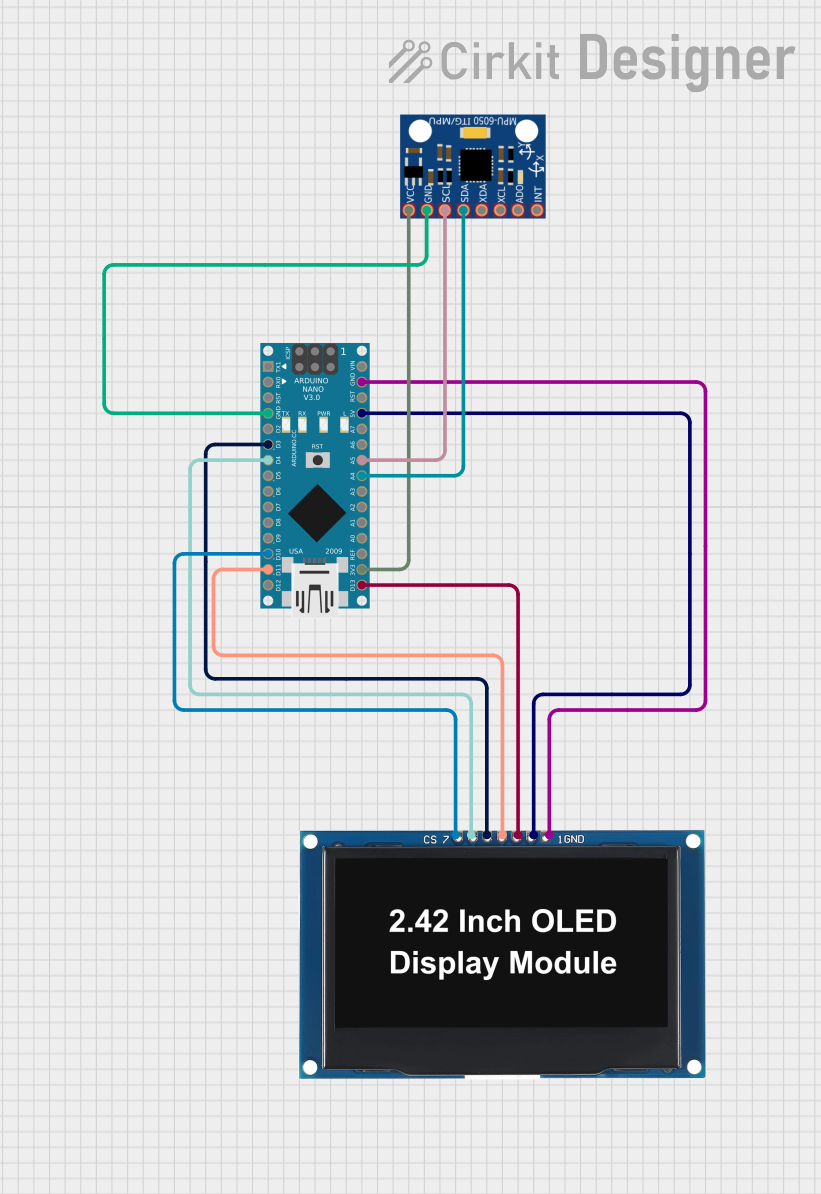
Circuit Documentation
Summary
This circuit involves an Arduino Nano microcontroller interfaced with an MPU-6050 sensor and an OLED display. The Arduino Nano reads angle data from the MPU-6050 sensor and displays the angle on the OLED display. The angle range is from -60.0 to 60.0 degrees.
Component List
Arduino Nano
- Description: A small, complete, and breadboard-friendly board based on the ATmega328P.
- Pins: D1/TX, D0/RX, RESET, GND, D2, D3, D4, D5, D6, D7, D8, D9, D10, D11/MOSI, D12/MISO, VIN, 5V, A7, A6, A5, A4, A3, A2, A1, A0, AREF, 3V3, D13/SCK
OLED Display 2.42"
- Description: A 2.42-inch OLED display module.
- Pins: GND, VCC, SCK, SDA, RES, DC, CS
MPU-6050
- Description: A 6-axis motion tracking device that combines a 3-axis gyroscope and a 3-axis accelerometer.
- Pins: VCC, GND, SCL, SDA, XDA, XCL, AD0, INT
Wiring Details
Arduino Nano
- GND: Connected to GND of MPU-6050 and OLED Display
- D3: Connected to RES of OLED Display
- D4: Connected to DC of OLED Display
- D10: Connected to CS of OLED Display
- D11/MOSI: Connected to SDA of OLED Display
- 5V: Connected to VCC of OLED Display
- A5: Connected to SCL of MPU-6050
- A4: Connected to SDA of MPU-6050
- 3V3: Connected to VCC of MPU-6050
- D13/SCK: Connected to SCK of OLED Display
OLED Display 2.42"
- GND: Connected to GND of Arduino Nano
- VCC: Connected to 5V of Arduino Nano
- SCK: Connected to D13/SCK of Arduino Nano
- SDA: Connected to D11/MOSI of Arduino Nano
- RES: Connected to D3 of Arduino Nano
- DC: Connected to D4 of Arduino Nano
- CS: Connected to D10 of Arduino Nano
MPU-6050
- GND: Connected to GND of Arduino Nano
- VCC: Connected to 3V3 of Arduino Nano
- SCL: Connected to A5 of Arduino Nano
- SDA: Connected to A4 of Arduino Nano
Code Documentation
/*
 * This Arduino sketch reads the angle data from an MPU-6050 sensor and displays
 * the angle on an OLED display. The angle range is from -60.0 to 60.0 degrees.
 */

#include <Wire.h>
#include <Adafruit_GFX.h>
#include <Adafruit_SSD1306.h>
#include <MPU6050.h>

#define SCREEN_WIDTH 128
#define SCREEN_HEIGHT 64
#define OLED_RESET 3
#define OLED_DC 4
#define OLED_CS 10

Adafruit_SSD1306 display(SCREEN_WIDTH, SCREEN_HEIGHT, &Wire, OLED_RESET);
MPU6050 mpu;

void setup() {
  // Initialize serial communication
  Serial.begin(9600);

  // Initialize I2C communication
  Wire.begin();

  // Initialize MPU-6050
  mpu.initialize();
  if (!mpu.testConnection()) {
    Serial.println("MPU6050 connection failed");
    while (1);
  }

  // Initialize OLED display
  if (!display.begin(SSD1306_SWITCHCAPVCC, 0x3C)) {
    Serial.println("SSD1306 allocation failed");
    while (1);
  }
  display.display();
  delay(2000);
  display.clearDisplay();
}

void loop() {
  // Read angle from MPU-6050
  int16_t ax, ay, az;
  mpu.getAcceleration(&ax, &ay, &az);
  float angle = atan2(ay, az) * 180 / PI;

  // Constrain angle to -60.0 to 60.0 degrees
  angle = constrain(angle, -60.0, 60.0);

  // Display angle on OLED
  display.clearDisplay();
  display.setTextSize(2);
  display.setTextColor(SSD1306_WHITE);
  display.setCursor(0, 10);
  display.print("Angle: ");
  display.print(angle);
  display.print(" deg");
  display.display();

  delay(500);
}
This code initializes the MPU-6050 sensor and the OLED display, reads the angle data from the sensor, and displays the angle on the OLED display. The angle is constrained to a range of -60.0 to 60.0 degrees.