
Arduino UNO Bluetooth-Controlled RC Car with L298N Motor Driver
View and Edit Project In Cirkit Designer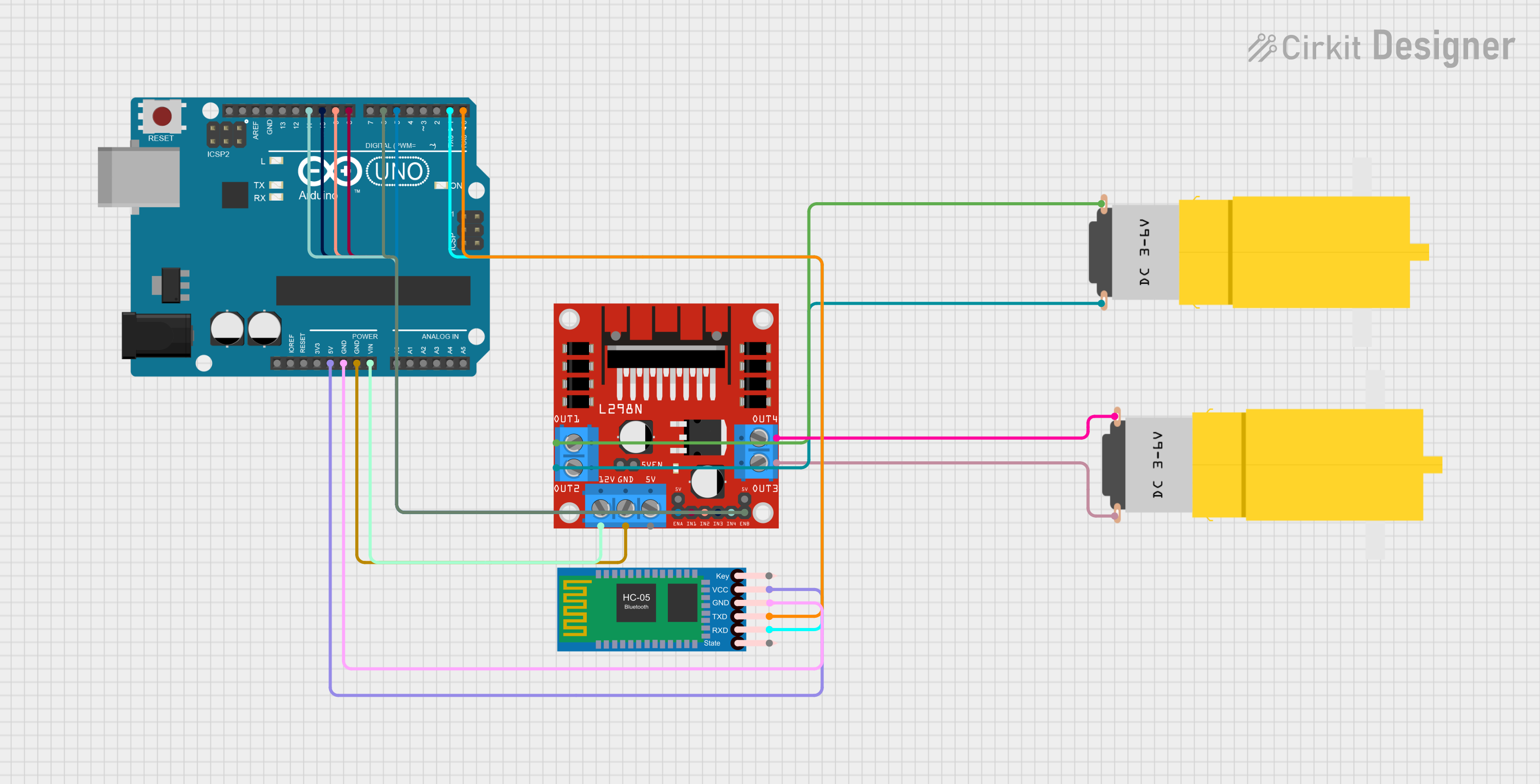
Circuit Documentation
Summary of the Circuit
This circuit is designed to control a front-wheel-drive RC car using voice commands received through an HC-05 Bluetooth module. The Arduino UNO microcontroller processes the commands and controls the L298N motor driver, which in turn drives two hobby motors. The HC-05 Bluetooth module enables wireless communication with the Arduino, allowing for remote control of the car's movements.
Component List
Arduino UNO
- Description: A microcontroller board based on the ATmega328P.
- Purpose: Acts as the central processing unit for the RC car, interpreting Bluetooth commands and controlling the motor driver.
L298N DC Motor Driver
- Description: A dual H-bridge motor driver capable of driving two DC motors.
- Purpose: Receives signals from the Arduino to control the speed and direction of the motors.
HC-05 Bluetooth Module
- Description: A Bluetooth module for serial communication.
- Purpose: Provides a wireless communication interface between the Arduino and a Bluetooth-enabled device.
Motor Amarillo Motorreductor Hobby (x2)
- Description: A yellow DC gear motor.
- Purpose: Provides the physical movement for the RC car when driven by the motor driver.
Wiring Details
Arduino UNO
- 5V: Powers the HC-05 Bluetooth module.
- GND: Common ground for the HC-05 Bluetooth module and L298N motor driver.
- Vin: Connected to the 12V input of the L298N motor driver.
- D8: Controls IN1 on the L298N motor driver.
- D9: Controls IN2 on the L298N motor driver.
- D10: Controls IN3 on the L298N motor driver.
- D11: Controls IN4 on the L298N motor driver.
- D5: Controls ENA on the L298N motor driver.
- D6: Controls ENB on the L298N motor driver.
- D0 (RX): Receives data from the TXD pin of the HC-05 Bluetooth module.
- D1 (TX): Sends data to the RXD pin of the HC-05 Bluetooth module.
L298N DC Motor Driver
- GND: Connected to the common ground on the Arduino UNO.
- 12V: Powered by the Vin pin of the Arduino UNO.
- IN1, IN2, IN3, IN4: Receive control signals from the Arduino to operate the motors.
- ENA, ENB: Enable pins for the motor channels, controlled by the Arduino.
- OUT1, OUT2: Connected to one of the hobby motors.
- OUT3, OUT4: Connected to the other hobby motor.
HC-05 Bluetooth Module
- VCC: Powered by the 5V output from the Arduino UNO.
- GND: Connected to the common ground on the Arduino UNO.
- TXD: Transmits data to the RX pin (D0) of the Arduino UNO.
- RXD: Receives data from the TX pin (D1) of the Arduino UNO.
Motor Amarillo Motorreductor Hobby
- vcc: Connected to OUT1 and OUT4 of the L298N motor driver for each motor respectively.
- GND: Connected to OUT2 and OUT3 of the L298N motor driver for each motor respectively.
Documented Code
/*
 * Arduino Sketch for Front-Wheel Drive RC Car with Voice Recognition
 *
 * This code controls a front-wheel-drive RC car using voice commands received
 * via the HC-05 Bluetooth module. The Arduino UNO processes the commands and
 * controls the L298N motor driver to drive the motors accordingly.
 */

// Pin definitions
const int IN1 = 8;
const int IN2 = 9;
const int IN3 = 10;
const int IN4 = 11;
const int ENA = 5;
const int ENB = 6;
const int BT_RX = 0;
const int BT_TX = 1;

void setup() {
  // Initialize motor control pins
  pinMode(IN1, OUTPUT);
  pinMode(IN2, OUTPUT);
  pinMode(IN3, OUTPUT);
  pinMode(IN4, OUTPUT);
  pinMode(ENA, OUTPUT);
  pinMode(ENB, OUTPUT);
  // Initialize Bluetooth communication
  Serial.begin(9600);
}

void loop() {
  // Check if data is available from Bluetooth
  if (Serial.available() > 0) {
    char command = Serial.read();
    // Process the received command
    switch (command) {
      case 'F':
        moveForward();
        break;
      case 'B':
        moveBackward();
        break;
      case 'L':
        turnLeft();
        break;
      case 'R':
        turnRight();
        break;
      case 'S':
        stopCar();
        break;
    }
  }
}

void moveForward() {
  digitalWrite(IN1, HIGH);
  digitalWrite(IN2, LOW);
  digitalWrite(IN3, HIGH);
  digitalWrite(IN4, LOW);
  analogWrite(ENA, 255);
  analogWrite(ENB, 255);
}

void moveBackward() {
  digitalWrite(IN1, LOW);
  digitalWrite(IN2, HIGH);
  digitalWrite(IN3, LOW);
  digitalWrite(IN4, HIGH);
  analogWrite(ENA, 255);
  analogWrite(ENB, 255);
}

void turnLeft() {
  digitalWrite(IN1, LOW);
  digitalWrite(IN2, HIGH);
  digitalWrite(IN3, HIGH);
  digitalWrite(IN4, LOW);
  analogWrite(ENA, 255);
  analogWrite(ENB, 255);
}

void turnRight() {
  digitalWrite(IN1, HIGH);
  digitalWrite(IN2, LOW);
  digitalWrite(IN3, LOW);
  digitalWrite(IN4, HIGH);
  analogWrite(ENA, 255);
  analogWrite(ENB, 255);
}

void stopCar() {
  digitalWrite(IN1, LOW);
  digitalWrite(IN2, LOW);
  digitalWrite(IN3, LOW);
  digitalWrite(IN4, LOW);
  analogWrite(ENA, 0);
  analogWrite(ENB, 0);
}
This code is responsible for setting up the Arduino UNO to receive Bluetooth commands and control the motors through the L298N motor driver. It defines the necessary pin configurations and contains functions to move the car forward, backward, turn left, turn right, and stop the car based on the received Bluetooth commands.