
Arduino UNO-Based Ultrasonic Water Level Indicator with Multicolor LED Feedback
View and Edit Project In Cirkit Designer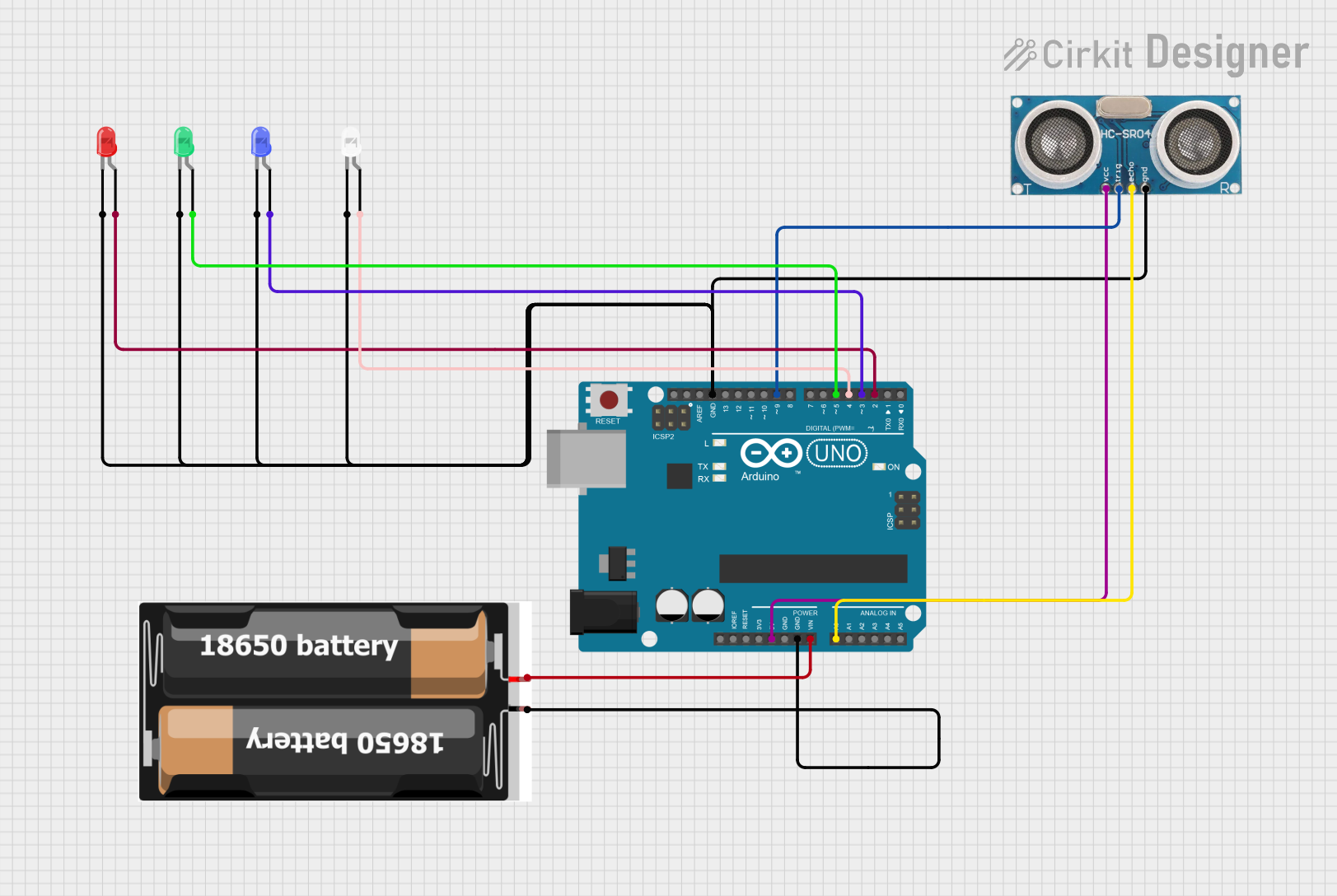
Circuit Documentation
Summary of the Circuit
This circuit is designed to measure the level of water in a tank using an ultrasonic sensor and provide visual feedback through a series of LEDs. The Arduino UNO serves as the central processing unit, controlling the ultrasonic sensor and LEDs. The ultrasonic sensor measures the distance to the water surface, and based on this distance, the Arduino activates different LEDs to indicate the water level. The circuit is powered by a 2x 18650 battery pack.
Component List
Arduino UNO
- Microcontroller board based on the ATmega328P
- It has 14 digital input/output pins, 6 analog inputs, a 16 MHz quartz crystal, a USB connection, a power jack, an ICSP header, and a reset button.
Ultrasonic Sensor
- A sensor that measures distance by emitting ultrasonic waves and measuring the time taken for the echo to return.
- Typically used for distance measurement in robotics and automation applications.
2x 18650 Battery Pack
- A power source consisting of two 18650 lithium-ion rechargeable batteries.
- Provides a voltage source for the circuit.
LED: Two Pin (white)
- A white light-emitting diode used for visual indication.
- Has an anode and cathode for connecting to a power source and ground, respectively.
LED: Two Pin (red)
- A red light-emitting diode used for visual indication.
- Has an anode and cathode for connecting to a power source and ground, respectively.
LED: Two Pin (blue)
- A blue light-emitting diode used for visual indication.
- Has an anode and cathode for connecting to a power source and ground, respectively.
LED: Two Pin (green)
- A green light-emitting diode used for visual indication.
- Has an anode and cathode for connecting to a power source and ground, respectively.
Wiring Details
Arduino UNO
- 5V pin connected to the +VCC pin of the Ultrasonic Sensor.
- GND pin connected to the GND pins of the Ultrasonic Sensor and all LEDs.
- Vin pin connected to the vcc pin of the 2x 18650 Battery Pack.
- A0 pin connected to the Echo pin of the Ultrasonic Sensor.
- D9 pin connected to the Trigger pin of the Ultrasonic Sensor.
- D2, D3, D4, D5 pins connected to the anode pins of the Red, Blue, White, and Green LEDs, respectively.
Ultrasonic Sensor
- +VCC pin connected to the 5V pin of the Arduino UNO.
- Trigger pin connected to the D9 pin of the Arduino UNO.
- Echo pin connected to the A0 pin of the Arduino UNO.
- GND pin connected to the GND pin of the Arduino UNO.
2x 18650 Battery Pack
- vcc pin connected to the Vin pin of the Arduino UNO.
- gnd pin connected to the GND pin of the Arduino UNO.
LEDs (White, Red, Blue, Green)
- Cathode pins of all LEDs connected to the GND pin of the Arduino UNO.
- Anode pins of the White, Red, Blue, and Green LEDs connected to the D4, D2, D3, and D5 pins of the Arduino UNO, respectively.
Documented Code
// Define ultrasonic sensor pins
const int ultraTrigPin = 9;
const int ultraEchoPin = A0;

// Define variables
long duration;
int distance;

// LED light pins
int redBulb = 2;
int yellowBulb = 3;
int whiteBulb = 4;

// Motor pin
int waterMotor = 7;

void setup() {
  // Start serial communication
  Serial.begin(9600);

  // Set up the pins for the ultrasonic sensor
  pinMode(ultraTrigPin, OUTPUT);
  pinMode(ultraEchoPin, INPUT);

  // Set up LED bulb pins
  pinMode(redBulb, OUTPUT);
  pinMode(yellowBulb, OUTPUT);
  pinMode(whiteBulb, OUTPUT);

  // Set up motor pin
  pinMode(waterMotor, OUTPUT);
}

void loop() {
  distance = calculate();

  // Control LEDs and motor based on the distance
  if (distance <= 5) {
    // Tank is full
    //LED indication
    //LED placed vertically to the TANK to know the measurement of water
    digitalWrite(redBulb, HIGH);//at top of the tank
    digitalWrite(yellowBulb, HIGH);//middle of the tank
    digitalWrite(whiteBulb, HIGH);//bottom of the tank
    //Motor at rest
    digitalWrite(waterMotor, LOW); // Stop filling the tank(motor stopped)
    Serial.println("Tank 100% filled");
  }
  else if (distance <= 20) {
    // Tank is partially filled (below 20 cm)
    digitalWrite(redBulb, LOW);
    digitalWrite(yellowBulb, HIGH);
    digitalWrite(whiteBulb, HIGH);
    digitalWrite(waterMotor, HIGH); // Continues filling the tank
    Serial.println("Tank 50% filled");
  }
  else if (distance <= 30) {
    // Tank is low (between 20 cm and 30 cm)
    digitalWrite(redBulb, LOW);
    digitalWrite(yellowBulb, LOW);
    digitalWrite(whiteBulb, HIGH);
    digitalWrite(waterMotor, HIGH); // Continue filling the tank
    Serial.println("TANK is empty");
  }
  else {
    // Tank is empty (greater than 30 cm)
    digitalWrite(redBulb, LOW);
    digitalWrite(yellowBulb, LOW);
    digitalWrite(whiteBulb, LOW);
    digitalWrite(waterMotor, HIGH); // Start filling the tank
    Serial.println("TANK is empty - filling started");
  }

  delay(1000); // Delay to reduce the frequency of updates
}

int calculate() {
  // Clear the TRIG pin
  digitalWrite(ultraTrigPin, LOW);
  delayMicroseconds(2);

  // Send a pulse to the TRIG pin
  digitalWrite(ultraTrigPin, HIGH);
  delayMicroseconds(10);
  digitalWrite(ultraTrigPin, LOW);

  // Read the ECHO pin
  duration = pulseIn(ultraEchoPin, HIGH);

  // Calculate distance in cm
  distance = (duration / 2) / 29.1;

  return distance;
}
This code is responsible for reading the distance from the ultrasonic sensor and controlling the LEDs and a motor based on the measured distance. The comments within the code provide additional context and explanation for each section of the code.