
Circuit Documentation
Summary
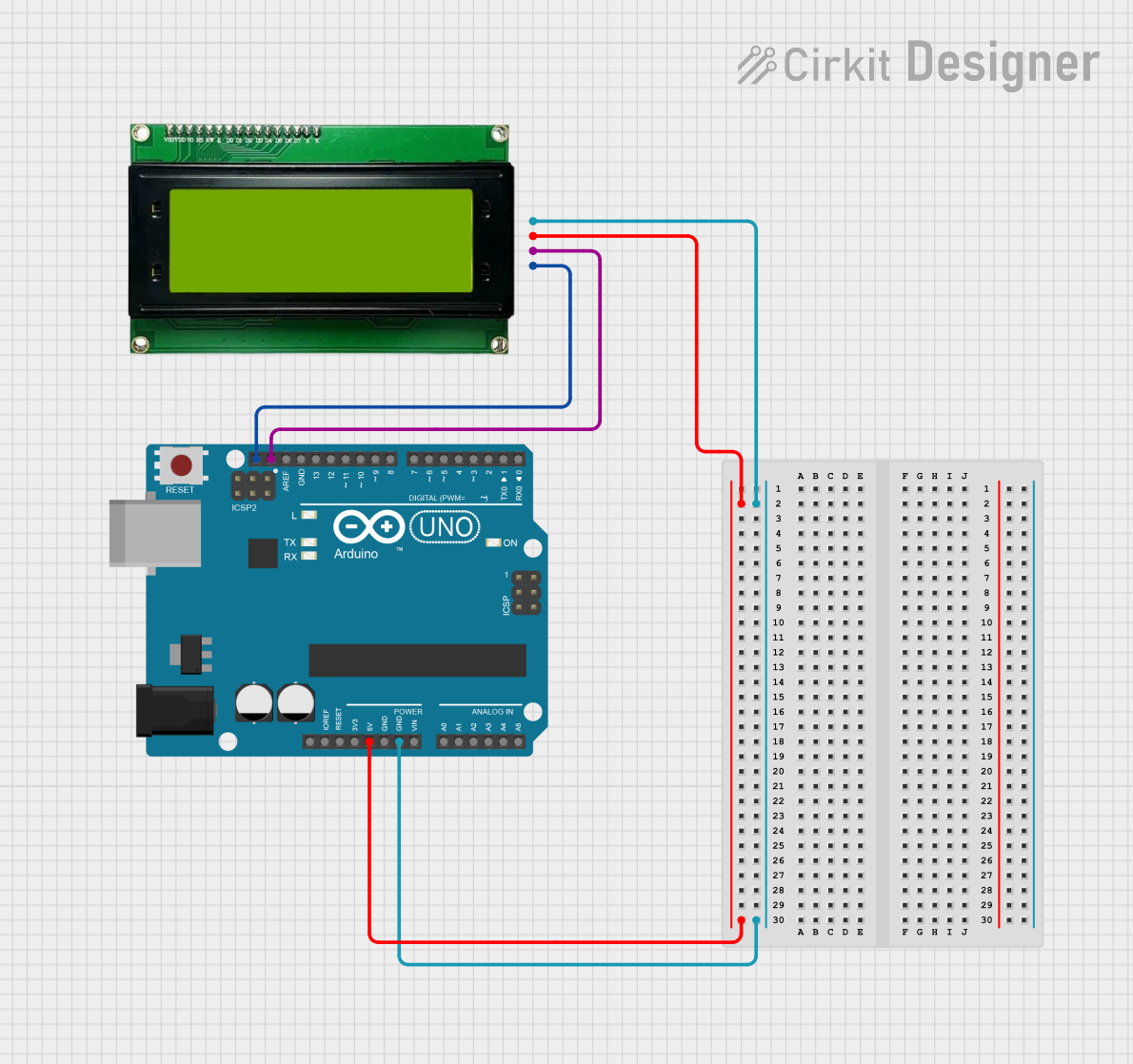
This circuit consists of an Arduino UNO microcontroller connected to an MKE-M08 LCD2004 I2C Module. The Arduino UNO provides power and communication to the LCD module, which displays the message "Hello, World!".
Component List
Arduino UNO
- Description: A microcontroller board based on the ATmega328P.
- Pins: UNUSED, IOREF, Reset, 3.3V, 5V, GND, Vin, A0, A1, A2, A3, A4, A5, SCL, SDA, AREF, D13, D12, D11, D10, D9, D8, D7, D6, D5, D4, D3, D2, D1, D0
MKE-M08 LCD2004 I2C Module
- Description: A 20x4 character LCD display module with I2C interface.
- Pins: GND, 5V, SDA, SCL
Wiring Details
Arduino UNO
- 5V: Connected to 5V of the MKE-M08 LCD2004 I2C Module
- GND: Connected to GND of the MKE-M08 LCD2004 I2C Module
- SCL: Connected to SCL of the MKE-M08 LCD2004 I2C Module
- SDA: Connected to SDA of the MKE-M08 LCD2004 I2C Module
MKE-M08 LCD2004 I2C Module
- 5V: Connected to 5V of the Arduino UNO
- GND: Connected to GND of the Arduino UNO
- SCL: Connected to SCL of the Arduino UNO
- SDA: Connected to SDA of the Arduino UNO
Code
/*
 * This Arduino Sketch displays 'Hello, World!' on a 16x2 I2C LCD.
 */

#include <Wire.h>
#include <LiquidCrystal_I2C.h>

// Set the LCD address to 0x27 for a 16 chars and 2 line display
LiquidCrystal_I2C lcd(0x27, 16, 2);

void setup() {
  // Initialize the LCD
  lcd.init();
  // Turn on the backlight
  lcd.backlight();
  // Print a message to the LCD
  lcd.setCursor(0, 0);
  lcd.print("Hello, World!");
}

void loop() {
  // Nothing to do here
}
File Name: sketch.ino
This code initializes the LCD module, turns on the backlight, and displays the message "Hello, World!" on the LCD. The setup() function is used to set up the LCD, while the loop() function remains empty as no continuous operation is required.