
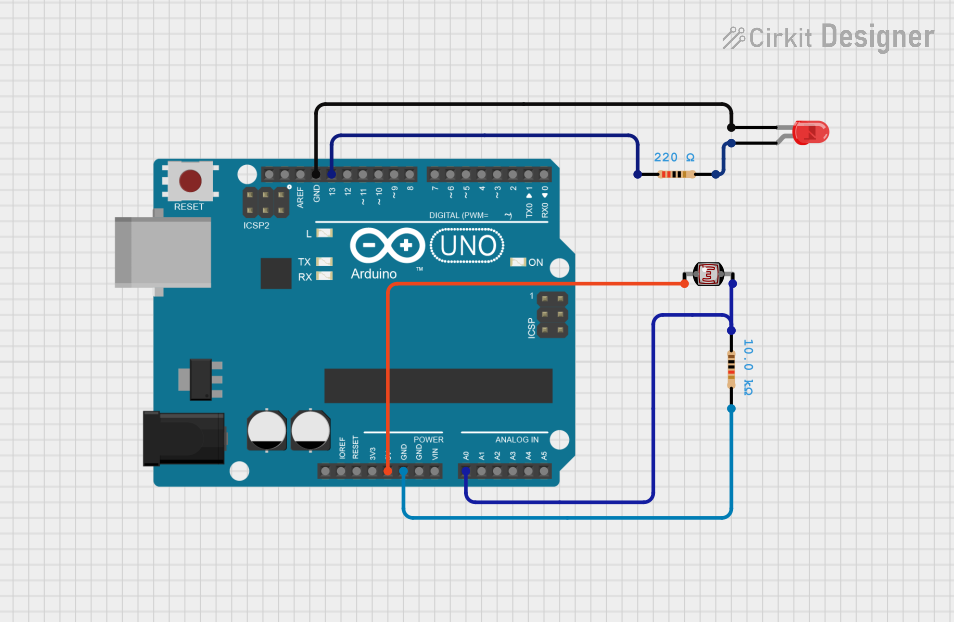
Circuit Documentation
Summary
This circuit involves an Arduino UNO microcontroller, a red LED, a photocell (LDR), and two resistors. The circuit is designed to read the light intensity using the photocell and control the LED based on the input from the photocell.
Component List
Arduino UNO
- Description: A microcontroller board based on the ATmega328P.
- Pins: UNUSED, IOREF, Reset, 3.3V, 5V, GND, Vin, A0, A1, A2, A3, A4, A5, SCL, SDA, AREF, D13, D12, D11, D10, D9, D8, D7, D6, D5, D4, D3, D2, D1, D0
LED: Two Pin (red)
- Description: A red light-emitting diode.
- Pins: cathode, anode
Resistor (220 Ohms)
- Description: A resistor with a resistance of 220 Ohms.
- Pins: pin1, pin2
Photocell (LDR)
- Description: A light-dependent resistor that changes its resistance based on the light intensity.
- Pins: pin 0, pin 1
Resistor (10k Ohms)
- Description: A resistor with a resistance of 10k Ohms.
- Pins: pin1, pin2
Wiring Details
Arduino UNO
- 5V: Connected to pin 0 of the Photocell (LDR).
- GND: Connected to pin2 of the 10k Ohm Resistor and the cathode of the LED.
- A0: Connected to pin 1 of the Photocell (LDR) and pin1 of the 10k Ohm Resistor.
- D13: Connected to pin1 of the 220 Ohm Resistor.
LED: Two Pin (red)
- cathode: Connected to GND of the Arduino UNO.
- anode: Connected to pin2 of the 220 Ohm Resistor.
Resistor (220 Ohms)
- pin1: Connected to D13 of the Arduino UNO.
- pin2: Connected to the anode of the LED.
Photocell (LDR)
- pin 0: Connected to 5V of the Arduino UNO.
- pin 1: Connected to A0 of the Arduino UNO and pin1 of the 10k Ohm Resistor.
Resistor (10k Ohms)
- pin1: Connected to pin 1 of the Photocell (LDR) and A0 of the Arduino UNO.
- pin2: Connected to GND of the Arduino UNO.
Code Documentation
Arduino UNO Code
void setup() {
  // put your setup code here, to run once:

}

void loop() {
  // put your main code here, to run repeatedly:

}
This code is a basic template for the Arduino UNO. The setup() function is used to initialize any settings, and the loop() function contains the main code that runs repeatedly. Currently, the code does not perform any specific actions.