
Circuit Documentation
Summary
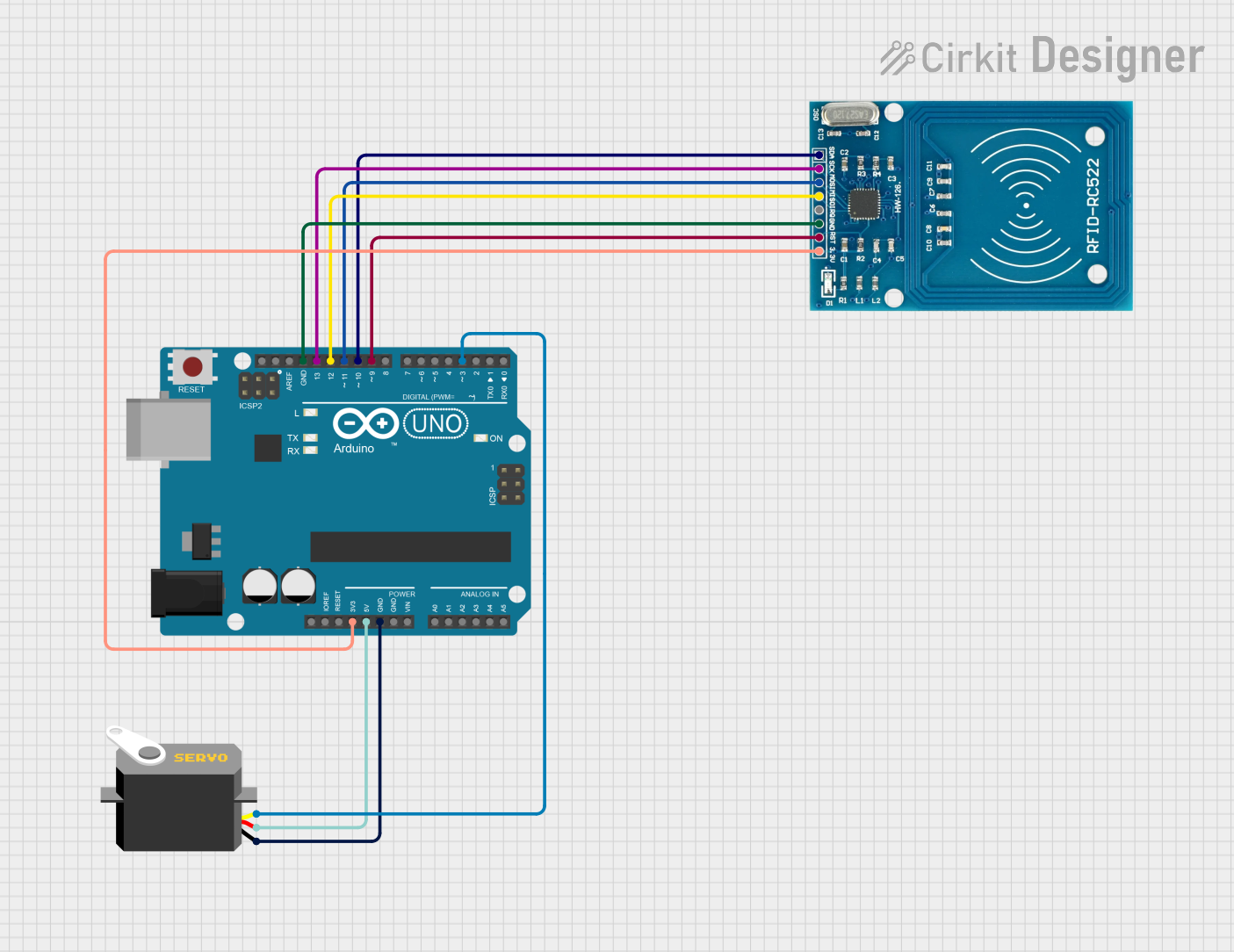
This circuit integrates an Arduino UNO microcontroller with an RFID-RC522 module and a Servo motor. The RFID module is used to read RFID tags, and the Servo motor is controlled based on the RFID tag read. The Arduino UNO serves as the central controller, managing the RFID reader and the Servo motor.
Component List
Arduino UNO
- Description: A microcontroller board based on the ATmega328P.
- Pins: UNUSED, IOREF, Reset, 3.3V, 5V, GND, Vin, A0, A1, A2, A3, A4, A5, SCL, SDA, AREF, D13, D12, D11, D10, D9, D8, D7, D6, D5, D4, D3, D2, D1, D0
RFID-RC522
- Description: A low-cost RFID reader module.
- Pins: VCC (3.3V), RST, GND, IRQ, MISO, MOSI, SCK, SDA
Servo
- Description: A small servo motor.
- Pins: gnd, vcc, pulse
Wiring Details
Arduino UNO
- 3.3V: Connected to RFID-RC522 VCC (3.3V)
- 5V: Connected to Servo vcc
- GND: Connected to Servo gnd and RFID-RC522 GND
- D13: Connected to RFID-RC522 SCK
- D12: Connected to RFID-RC522 MISO
- D11: Connected to RFID-RC522 MOSI
- D10: Connected to RFID-RC522 SDA
- D9: Connected to RFID-RC522 RST
- D3: Connected to Servo pulse
RFID-RC522
- VCC (3.3V): Connected to Arduino UNO 3.3V
- RST: Connected to Arduino UNO D9
- GND: Connected to Arduino UNO GND
- SCK: Connected to Arduino UNO D13
- MISO: Connected to Arduino UNO D12
- MOSI: Connected to Arduino UNO D11
- SDA: Connected to Arduino UNO D10
Servo
- gnd: Connected to Arduino UNO GND
- vcc: Connected to Arduino UNO 5V
- pulse: Connected to Arduino UNO D3
Code Documentation
Arduino UNO Code
#include <SPI.h>
#include <MFRC522.h>
#include <Servo.h>

#define SS_PIN 10
#define RST_PIN 9
MFRC522 mfrc522(SS_PIN, RST_PIN);   // Create MFRC522 instance

Servo myServo;  // Create servo object to control a servo

bool servoState = false;  // Variable to keep track of the servo state

void setup() {
  Serial.begin(9600);   // Initiate a serial communication
  SPI.begin();      // Initiate SPI bus
  mfrc522.PCD_Init();   // Initiate MFRC522
  myServo.attach(3);  // Attaches the servo on pin 3 to the servo object
  myServo.write(0);  // Initial position of the servo
  Serial.println("Place your RFID card/tag near the reader...");
}

void loop() {
  // Look for new cards
  if ( ! mfrc522.PICC_IsNewCardPresent()) {
    return;
  }
  // Select one of the cards
  if ( ! mfrc522.PICC_ReadCardSerial()) {
    return;
  }
  // Show UID on serial monitor
  Serial.print("UID tag :");
  String content = "";
  for (byte i = 0; i < mfrc522.uid.size; i++) {
     Serial.print(mfrc522.uid.uidByte[i] < 0x10 ? " 0" : " ");
     Serial.print(mfrc522.uid.uidByte[i], HEX);
     content.concat(String(mfrc522.uid.uidByte[i] < 0x10 ? " 0" : " "));
     content.concat(String(mfrc522.uid.uidByte[i], HEX));
  }
  Serial.println();
  content.toUpperCase();

  // Check if the UID matches your RFID tag
  if (content.substring(1) == "YOUR_RFID_TAG_UID") { // Replace with your RFID tag UID
    Serial.println("Authorized access");
    if (servoState) {
      myServo.write(0);  // Rotate servo to 0 degrees
    } else {
      myServo.write(90);  // Rotate servo to 90 degrees
    }
    servoState = !servoState;  // Toggle the servo state
  } else {
    Serial.println("Access denied");
  }
}
This code initializes the RFID reader and the Servo motor. It continuously checks for the presence of an RFID tag. When a tag is detected, it reads the UID and compares it to a predefined UID. If the UID matches, it toggles the position of the Servo motor between 0 and 90 degrees.