
Arduino UNO-Based Smart Home Monitoring System with Temperature, Humidity, Gas Detection, and Door Status Alert
View and Edit Project In Cirkit Designer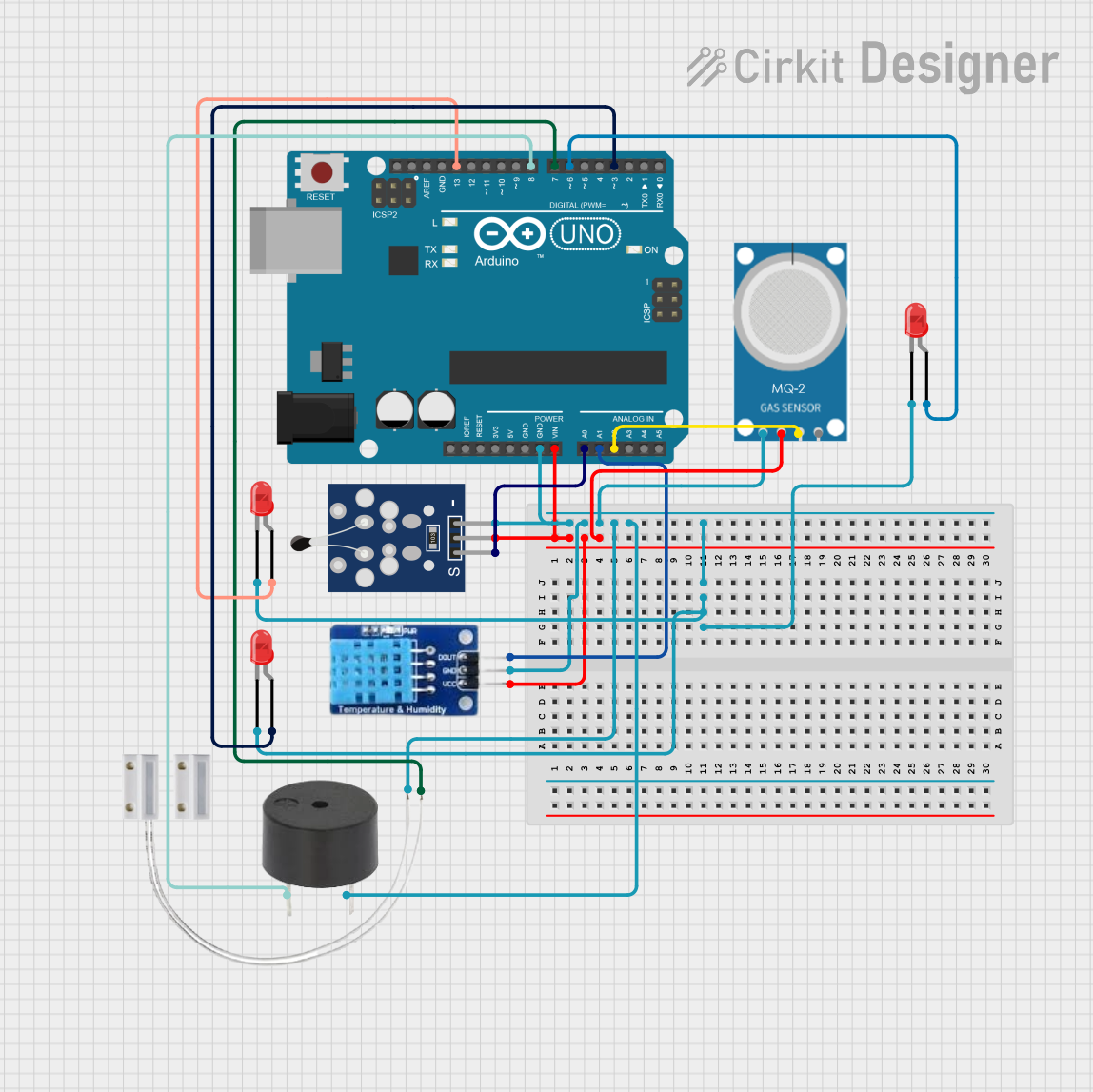
Circuit Documentation
Summary
This circuit is designed to monitor environmental conditions using various sensors and an Arduino UNO microcontroller. It includes an NTC thermistor for temperature measurement, a DHT11 sensor for humidity, an MQ-2 sensor for gas detection, and a reed switch for door status monitoring. The circuit also includes LEDs for visual indication and a buzzer for audible alerts. The Arduino UNO processes the sensor data and controls the LEDs and buzzer based on predefined thresholds.
Component List
Analog Temperature Sensor (NTC) (Wokwi Compatible)
- Pins: GND, VCC, OUT
- Description: Measures temperature using a negative temperature coefficient thermistor.
MQ-2
- Pins: GND, VCC, ANALOG, Digital
- Description: Gas sensor for detecting various gases including LPG, smoke, alcohol, propane, hydrogen, methane, and carbon monoxide.
Door MC-38
- Pins: S, GND
- Description: Magnetic reed switch used for detecting door open/close status.
LED: Two Pin (red)
- Pins: cathode, anode
- Description: Red LED for visual indication.
Arduino UNO
- Pins: UNUSED, IOREF, Reset, 3.3V, 5V, GND, Vin, A0, A1, A2, A3, A4, A5, SCL, SDA, AREF, D13, D12, D11, D10, D9, D8, D7, D6, D5, D4, D3, D2, D1, D0
- Description: Microcontroller board based on the ATmega328P.
Buzzer
- Pins: PIN, GND
- Description: Buzzer for audible alerts.
DHT11
- Pins: DATA, GND, VCC
- Description: Digital temperature and humidity sensor.
Wiring Details
Analog Temperature Sensor (NTC) (Wokwi Compatible)
- GND connected to Arduino UNO GND
- VCC connected to Arduino UNO Vin
- OUT connected to Arduino UNO A0
MQ-2
- GND connected to Arduino UNO GND
- VCC connected to Arduino UNO Vin
- ANALOG connected to Arduino UNO A2
Door MC-38
- S connected to Arduino UNO D7
- GND connected to Arduino UNO GND
LED: Two Pin (red) (1)
- cathode connected to Arduino UNO GND
- anode connected to Arduino UNO D13
LED: Two Pin (red) (2)
- cathode connected to Arduino UNO GND
- anode connected to Arduino UNO D6
LED: Two Pin (red) (3)
- cathode connected to Arduino UNO GND
- anode connected to Arduino UNO D3
Arduino UNO
- GND connected to GND of all components
- Vin connected to VCC of NTC, DHT11, and MQ-2
- A0 connected to OUT of NTC
- A1 connected to DATA of DHT11
- A2 connected to ANALOG of MQ-2
- D13 connected to anode of LED (1)
- D6 connected to anode of LED (2)
- D3 connected to anode of LED (3)
- D7 connected to S of Door MC-38
- D8 connected to PIN of Buzzer
Buzzer
- PIN connected to Arduino UNO D8
- GND connected to Arduino UNO GND
DHT11
- DATA connected to Arduino UNO A1
- GND connected to Arduino UNO GND
- VCC connected to Arduino UNO Vin
Documented Code
#include <DHT.h>
#include <math.h>
#include <SoftwareSerial.h>

SoftwareSerial espSerial(10, 11);

// NTC Thermistor setup
const int ntcPin = A0;
const int ntcLedPin = 13;
const float thresholdTemp = 25.0;
const float BETA = 3950;
const float ROOM_TEMP_RESISTANCE = 10000;
const float ROOM_TEMP = 298.15;

// DHT11 setup
#define DHTPIN A1
#define DHTTYPE DHT11
DHT dht(DHTPIN, DHTTYPE);
const int dhtLedPin = 3;
const float thresholdHumidity = 55.0;

// MQ2 Gas Sensor setup
const int mq2Pin = A2;
const int mq2LedPin = 6;
const int gasThreshold = 400;

// Reed Switch & Buzzer setup
const int reedPin = 7;
const int buzzerPin = 8;

// Function to read temperature from NTC thermistor
float readTemperature() {
    int adcValue = analogRead(ntcPin);
    float resistance = (1023.0 / adcValue - 1) * ROOM_TEMP_RESISTANCE;
    float temperatureKelvin = 1 / (1 / ROOM_TEMP + log(resistance / ROOM_TEMP_RESISTANCE) / BETA);
    return temperatureKelvin - 273.15;
}

void setup() {
    pinMode(ntcLedPin, OUTPUT);
    pinMode(dhtLedPin, OUTPUT);
    pinMode(mq2LedPin, OUTPUT);
    pinMode(reedPin, INPUT_PULLUP);
    pinMode(buzzerPin, OUTPUT);

    dht.begin();
    Serial.begin(9600);
    espSerial.begin(9600);
}

void loop() {
    // NTC Temperature check
    float temperature = readTemperature();
    Serial.print("Temperature: ");
    Serial.print(temperature);
    Serial.println(" °C");
    digitalWrite(ntcLedPin, temperature > thresholdTemp ? HIGH : LOW);

    // DHT11 Humidity check
    float humidity = dht.readHumidity();
    if (!isnan(humidity)) {
        Serial.print("Humidity: ");
        Serial.print(humidity);
        Serial.println(" %");
        digitalWrite(dhtLedPin, humidity > thresholdHumidity ? HIGH : LOW);
    } else {
        Serial.println("Failed to read from DHT sensor!");
    }

    // MQ2 Gas sensor check
    int gasLevel = analogRead(mq2Pin);
    Serial.print("Gas Level: ");
    Serial.println(gasLevel);
    digitalWrite(mq2LedPin, gasLevel > gasThreshold ? HIGH : LOW);

    // Reed Switch and Buzzer
    int reedState = digitalRead(reedPin);
    if (reedState == 1) { // Door is open
        tone(buzzerPin, 500); // Lower frequency
        Serial.println("Door is open! Buzzer ON.");
    } else {
        noTone(buzzerPin); // Turn off buzzer
        Serial.println("Door is closed. Buzzer OFF.");
    }
    espSerial.println();
    espSerial.print(temperature);
    espSerial.print(",");
    espSerial.print(humidity);
    espSerial.print(",");
    espSerial.print(gasLevel);
    espSerial.print(",");
    espSerial.print(reedState);
    espSerial.println();
    delay(1000); // Wait 1 second
}
This code initializes the sensors and components, reads data from the sensors, and controls the LEDs and buzzer based on the sensor readings. The data is also sent to a serial monitor and an external device via SoftwareSerial.