
Arduino Mega 2560-Based Load Cell and DC Motor Control System with 7-Segment Display
View and Edit Project In Cirkit Designer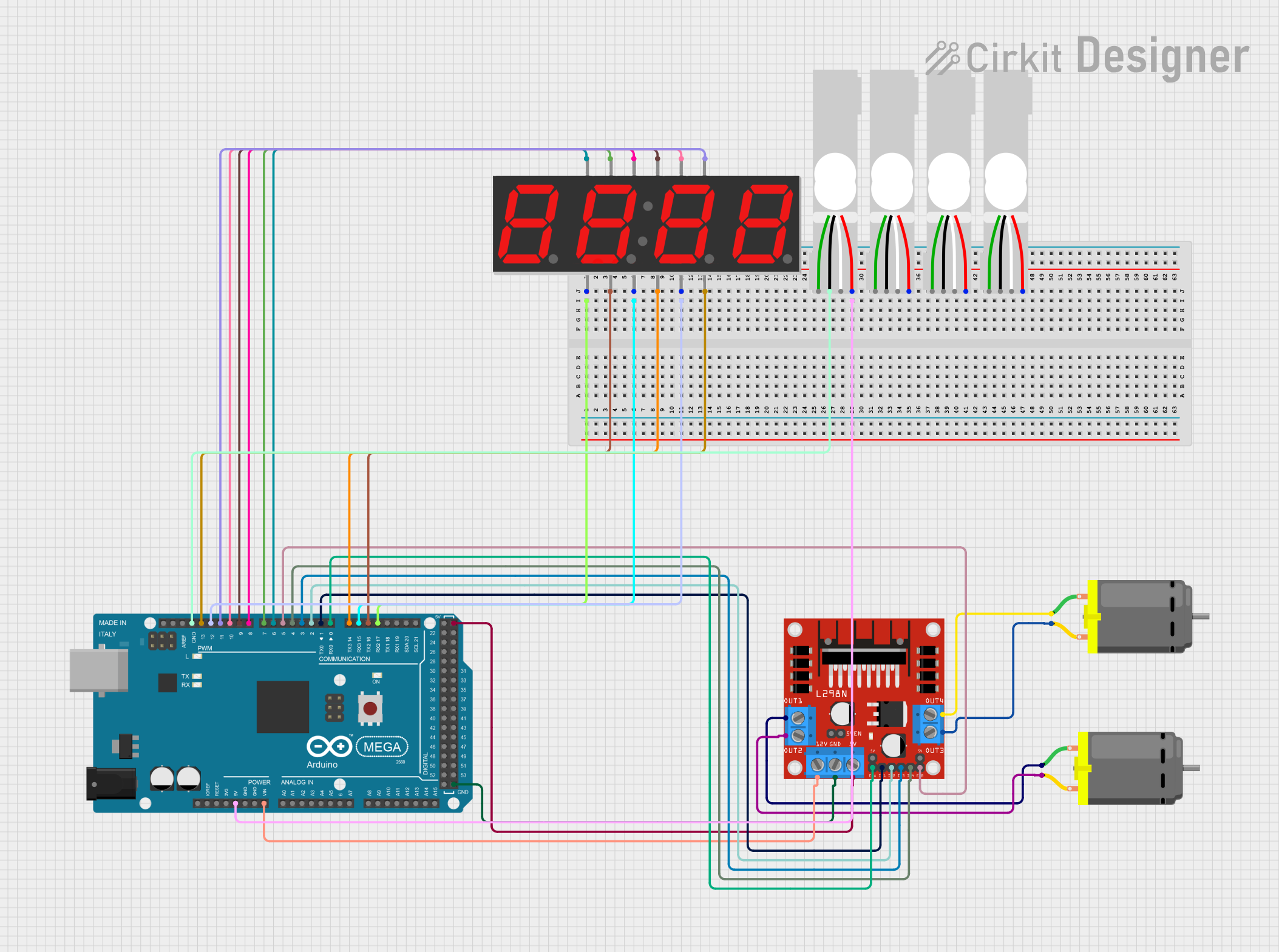
Circuit Documentation
Summary
This circuit involves an Arduino Mega 2560 microcontroller interfacing with multiple components including a 7-segment display, load cells, a DC motor driver, and DC motors. The Arduino Mega 2560 serves as the central control unit, managing the display and motor operations based on inputs from the load cells.
Component List
Arduino Mega 2560
- Description: A microcontroller board based on the ATmega2560.
- Pins: IOREF, RESET, 3V3, 5V, GND, VIN, A0-A15, D0-D53, SDA, SCL, AREF, 6swdw
7 Segment Display (4 Digit)
- Description: A 4-digit 7-segment display used for numerical output.
- Pins: 1, A, F, 2, 3, B, G, 4, C, DP, D, E
Load Cell - Red/white/black/green
- Description: A load cell used for measuring weight or force.
- Pins: E+, A-, E-, A+
L298N DC Motor Driver
- Description: A dual H-bridge motor driver used to control the speed and direction of DC motors.
- Pins: OUT1, OUT2, 12V, GND, 5V, OUT3, OUT4, 5V-ENA-JMP-I, 5V-ENA-JMP-O, +5V-J1, +5V-J2, ENA, IN1, IN2, IN3, IN4, ENB
DC Motor
- Description: A simple DC motor.
- Pins: pin 1, pin 2
Wiring Details
Arduino Mega 2560
- 5V connected to Load Cell (E+)
- 5V connected to L298N DC Motor Driver (5V)
- VIN connected to L298N DC Motor Driver (12V)
- GND connected to Load Cell (E-)
- GND connected to L298N DC Motor Driver (GND)
- D0 RX0 connected to L298N DC Motor Driver (ENA)
- D1 TX0 connected to L298N DC Motor Driver (IN1)
- D2 PWM connected to L298N DC Motor Driver (IN2)
- D3 PWM connected to L298N DC Motor Driver (IN3)
- D4 PWM connected to L298N DC Motor Driver (IN4)
- D5 PWM connected to L298N DC Motor Driver (ENB)
- D6 PWM connected to 7 Segment Display (1)
- D7 PWM connected to 7 Segment Display (A)
- D8 PWM connected to 7 Segment Display (F)
- D9 PWM connected to 7 Segment Display (2)
- D10 PWM connected to 7 Segment Display (3)
- D11 PWM connected to 7 Segment Display (B)
- D12 PWM connected to 7 Segment Display (G)
- D13 PWM connected to 7 Segment Display (4)
- D14/TX3 connected to 7 Segment Display (C)
- D15/RX3 connected to 7 Segment Display (DP)
- D16 PWM/TX2 connected to 7 Segment Display (D)
- D17 PWM/RX2 connected to 7 Segment Display (E)
7 Segment Display (4 Digit)
- Pin 1 connected to Arduino Mega 2560 (D6 PWM)
- Pin A connected to Arduino Mega 2560 (D7 PWM)
- Pin F connected to Arduino Mega 2560 (D8 PWM)
- Pin 2 connected to Arduino Mega 2560 (D9 PWM)
- Pin 3 connected to Arduino Mega 2560 (D10 PWM)
- Pin B connected to Arduino Mega 2560 (D11 PWM)
- Pin G connected to Arduino Mega 2560 (D12 PWM)
- Pin 4 connected to Arduino Mega 2560 (D13 PWM)
- Pin C connected to Arduino Mega 2560 (D14/TX3)
- Pin DP connected to Arduino Mega 2560 (D15/RX3)
- Pin D connected to Arduino Mega 2560 (D16 PWM/TX2)
- Pin E connected to Arduino Mega 2560 (D17 PWM/RX2)
Load Cell - Red/white/black/green
- E+ connected to Arduino Mega 2560 (5V)
- E- connected to Arduino Mega 2560 (GND)
L298N DC Motor Driver
- 12V connected to Arduino Mega 2560 (VIN)
- GND connected to Arduino Mega 2560 (GND)
- 5V connected to Arduino Mega 2560 (5V)
- ENA connected to Arduino Mega 2560 (D0 RX0)
- IN1 connected to Arduino Mega 2560 (D1 TX0)
- IN2 connected to Arduino Mega 2560 (D2 PWM)
- IN3 connected to Arduino Mega 2560 (D3 PWM)
- IN4 connected to Arduino Mega 2560 (D4 PWM)
- ENB connected to Arduino Mega 2560 (D5 PWM)
- OUT1 connected to DC Motor (pin 1)
- OUT2 connected to DC Motor (pin 2)
- OUT3 connected to DC Motor (pin 2)
- OUT4 connected to DC Motor (pin 1)
DC Motor
- Pin 1 connected to L298N DC Motor Driver (OUT1)
- Pin 2 connected to L298N DC Motor Driver (OUT2)
- Pin 1 connected to L298N DC Motor Driver (OUT4)
- Pin 2 connected to L298N DC Motor Driver (OUT3)
Documented Code
Arduino Mega 2560 Code
void setup() {
  // put your setup code here, to run once:

}

void loop() {
  // put your main code here, to run repeatedly:

}
This code is a basic template for the Arduino Mega 2560. The setup() function is used to initialize any settings or configurations, and the loop() function contains the main code that runs repeatedly.