
Circuit Documentation
Summary
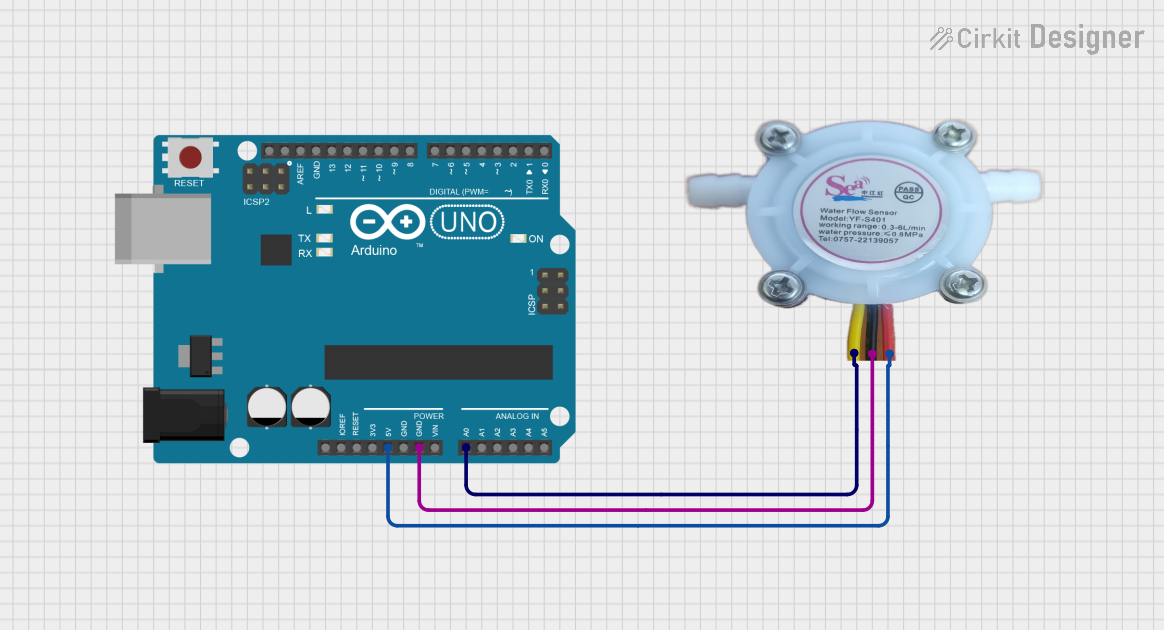
This circuit is designed to measure the water flow rate using a YF-S401 Water Flow Rate Sensor and an Arduino UNO microcontroller. The sensor outputs an analog signal proportional to the flow rate, which is read by the Arduino and displayed on the Serial Monitor.
Component List
Arduino UNO
- Description: A microcontroller board based on the ATmega328P.
- Pins: UNUSED, IOREF, Reset, 3.3V, 5V, GND, Vin, A0, A1, A2, A3, A4, A5, SCL, SDA, AREF, D13, D12, D11, D10, D9, D8, D7, D6, D5, D4, D3, D2, D1, D0
Water Flow Rate Sensor YF-S401
- Description: A sensor used to measure the flow rate of water.
- Pins: GND negative, IN positive, OUT signal output
Wiring Details
Arduino UNO
- 5V connected to IN positive of the Water Flow Rate Sensor YF-S401
- GND connected to GND negative of the Water Flow Rate Sensor YF-S401
- A0 connected to OUT signal output of the Water Flow Rate Sensor YF-S401
Water Flow Rate Sensor YF-S401
- IN positive connected to 5V of the Arduino UNO
- GND negative connected to GND of the Arduino UNO
- OUT signal output connected to A0 of the Arduino UNO
Code
/*
 * Arduino Sketch to read water flow rate from YF-S401 sensor
 * and print the flow rate to the Serial Monitor.
 *
 * Connections:
 * - Sensor OUT to Arduino A0
 * - Sensor GND to Arduino GND
 * - Sensor VCC to Arduino 5V
 */

const int sensorPin = A0; // Pin connected to sensor OUT

void setup() {
  Serial.begin(9600); // Initialize serial communication at 9600 bps
  pinMode(sensorPin, INPUT); // Set sensor pin as input
}

void loop() {
  int sensorValue = analogRead(sensorPin); // Read the sensor value
  float voltage = sensorValue * (5.0 / 1023.0); // Convert to voltage
  float flowRate = voltage * 60.0; // Convert voltage to flow rate (example conversion)
  Serial.print("Flow Rate: ");
  Serial.print(flowRate);
  Serial.println(" L/min");
  delay(1000); // Wait for 1 second before next reading
}
This code initializes the Arduino to read the analog signal from the YF-S401 sensor, converts the signal to a voltage, and then calculates the flow rate. The flow rate is printed to the Serial Monitor every second.