
ESP32-Based Smart Sensor System with Wi-Fi and GPS Integration
View and Edit Project In Cirkit Designer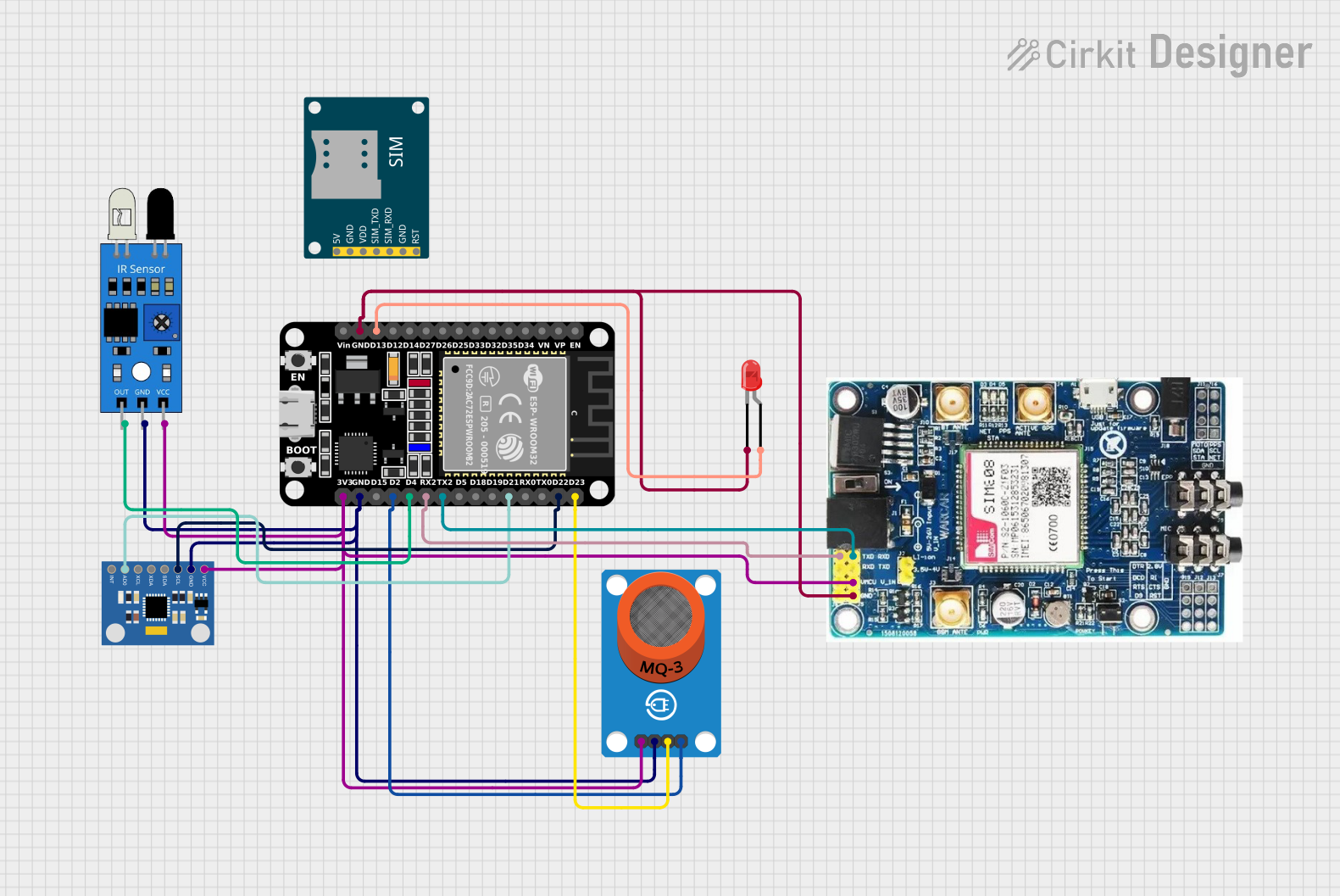
Circuit Documentation
Summary
This document provides a detailed overview of a circuit involving an ESP32 microcontroller, various sensors, and modules. The circuit is designed to read data from sensors, control an LED, and send data to a cloud server. The components include an ESP32 microcontroller, an MQ-3 alcohol sensor, an MPU6050 accelerometer and gyroscope, an IR sensor, an LED, and a SIM808 GSM GPS GPRS module.
Component List
ESP32 (30 pin)
- Description: A powerful microcontroller with built-in WiFi and Bluetooth capabilities.
- Pins: EN, VP, VN, D34, D35, D32, D33, D25, D26, D27, D14, D12, D13, GND, Vin, D23, D22, TX0, RX0, D21, D19, D18, D5, TX2, RX2, D4, D2, D15, 3V3
MQ-3 Breakout
- Description: An alcohol sensor used to detect the presence of alcohol in the air.
- Pins: VCC, GND, DO, AO
LED: Two Pin (red)
- Description: A simple red LED used for visual indication.
- Pins: cathode, anode
MPU6050 Accelerometer + Gyroscope (Wokwi Compatible)
- Description: A sensor module that provides accelerometer and gyroscope data.
- Pins: INT, AD0, XCL, XDA, SDA, SCL, GND, VCC
IR Sensor
- Description: An infrared sensor used to detect objects or measure distance.
- Pins: out, gnd, vcc
SIM808 GSM GPS GPRS Module
- Description: A module that provides GSM, GPS, and GPRS functionalities.
- Pins: TXD, RXD, VCC, GND
SIM800L GSM Module
- Description: A module that provides GSM functionalities.
- Pins: 5V, GND, VDD, SIM_TXD, SIM_RXD, RST
Wiring Details
ESP32 (30 pin)
- D13 connected to LED: Two Pin (red) anode
- GND connected to SIM808 GSM GPS GPRS module GND, LED: Two Pin (red) cathode, ir sensor gnd, MPU6050 Accelerometer + Gyroscope (Wokwi Compatible) GND, MQ-3 Breakout GND
- D23 connected to MQ-3 Breakout DO
- D22 connected to MPU6050 Accelerometer + Gyroscope (Wokwi Compatible) SCL
- D21 connected to MPU6050 Accelerometer + Gyroscope (Wokwi Compatible) AD0
- TX2 connected to SIM808 GSM GPS GPRS module RXD
- RX2 connected to SIM808 GSM GPS GPRS module TXD
- D4 connected to ir sensor out
- D2 connected to MQ-3 Breakout AO
- 3V3 connected to ir sensor vcc, MPU6050 Accelerometer + Gyroscope (Wokwi Compatible) VCC, MQ-3 Breakout VCC, SIM808 GSM GPS GPRS module VCC
MQ-3 Breakout
- DO connected to ESP32 (30 pin) D23
- AO connected to ESP32 (30 pin) D2
- GND connected to ESP32 (30 pin) GND
- VCC connected to ESP32 (30 pin) 3V3
LED: Two Pin (red)
- anode connected to ESP32 (30 pin) D13
- cathode connected to ESP32 (30 pin) GND
MPU6050 Accelerometer + Gyroscope (Wokwi Compatible)
- SCL connected to ESP32 (30 pin) D22
- AD0 connected to ESP32 (30 pin) D21
- GND connected to ESP32 (30 pin) GND
- VCC connected to ESP32 (30 pin) 3V3
IR Sensor
- out connected to ESP32 (30 pin) D4
- gnd connected to ESP32 (30 pin) GND
- vcc connected to ESP32 (30 pin) 3V3
SIM808 GSM GPS GPRS Module
- TXD connected to ESP32 (30 pin) RX2
- RXD connected to ESP32 (30 pin) TX2
- GND connected to ESP32 (30 pin) GND
- VCC connected to ESP32 (30 pin) 3V3
Documented Code
ESP32 Code
#include <Wire.h>
#include <Adafruit_MPU6050.h>
#include <Adafruit_Sensor.h>
#include <WiFi.h> // For WiFi connection
#include <HTTPClient.h> // For HTTP requests

// WiFi credentials
const char* ssid = "Your_SSID";
const char* password = "Your_PASSWORD";

// Cloud server details
const char* serverName = "https://your-cloud-server.com/api"; // Replace with your cloud API endpoint

// Sensors and pins
const int analogPin = 2;  // MQ-3 AO connected to ESP32 D2
const int digitalPin = 23; // MQ-3 DO connected to ESP32 D23
const int ledPin = 13; // Onboard LED
const int irPin = 4; // IR sensor output connected to ESP32 D4

Adafruit_MPU6050 mpu; // MPU6050 instance

void setup() {
  Serial.begin(115200);
  pinMode(digitalPin, INPUT);
  pinMode(ledPin, OUTPUT);
  pinMode(irPin, INPUT);

  // Initialize MPU6050
  if (!mpu.begin()) {
    Serial.println("Failed to find MPU6050 chip");
    while (1) delay(10);
  }
  Serial.println("MPU6050 initialized!");

  // Configure MPU6050
  mpu.setAccelerometerRange(MPU6050_RANGE_2_G); // ±2g
  mpu.setGyroRange(MPU6050_RANGE_250_DEG);     // ±250°/s
  mpu.setFilterBandwidth(MPU6050_BAND_21_HZ);  // 21 Hz filter

  // Connect to WiFi
  connectToWiFi();
}

void loop() {
  // Read sensor values
  int analogValue = analogRead(analogPin);
  int digitalValue = digitalRead(digitalPin);
  int irValue = digitalRead(irPin);

  // Print sensor values to serial
  Serial.print("Analog Value: ");
  Serial.println(analogValue);
  Serial.print("IR Sensor Value: ");
  Serial.println(irValue);

  // LED control based on digital pin
  digitalWrite(ledPin, digitalValue);

  // Fetch GPS data
  String gpsData = fetchGPSData();

  // If GPS data is valid, send to cloud
  if (!gpsData.isEmpty()) {
    sendToCloud(gpsData, analogValue, irValue);
  }

  delay(1000); // Delay 1 second
}

void connectToWiFi() {
  Serial.print("Connecting to WiFi...");
  WiFi.begin(ssid, password);
  while (WiFi.status() != WL_CONNECTED) {
    delay(1000);
    Serial.print(".");
  }
  Serial.println("\nWiFi connected!");
  Serial.print("IP Address: ");
  Serial.println(WiFi.localIP());
}

String fetchGPSData() {
  // Simulated GPS data (replace with actual GPS fetch logic)
  // Sim808 implementation can be added here
  String latitude = "17.385044"; // Replace with parsed latitude
  String longitude = "78.486671"; // Replace with parsed longitude
  String gpsData = "{\"latitude\":\"" + latitude + "\",\"longitude\":\"" + longitude + "\"}";
  return gpsData;
}

void sendToCloud(String gpsData, int alcoholLevel, int irValue) {
  if (WiFi.status() == WL_CONNECTED) {
    HTTPClient http;
    http.begin(serverName);

    // Create JSON payload
    String payload = "{\"gps\":" + gpsData + ",\"alcohol_level\":" + String(alcoholLevel) + ",\"ir_value\":" + String(irValue) + "}";
    Serial.println("Payload: " + payload);

    // Set content type and send POST request
    http.addHeader("Content-Type", "application/json");
    int httpResponseCode = http.POST(payload);

    // Handle response
    if (httpResponseCode > 0) {
      Serial.print("HTTP Response code: ");
      Serial.println(httpResponseCode);
      String response = http.getString();
      Serial.println("Server Response: " + response);
    } else {
      Serial.print("Error in sending POST: ");
      Serial.println(httpResponseCode);
    }

    // Close connection
    http.end();
  } else {
    Serial.println("WiFi not connected