
ESP32-Powered Heart Rate Monitor with TFT Display and Battery Backup
View and Edit Project In Cirkit Designer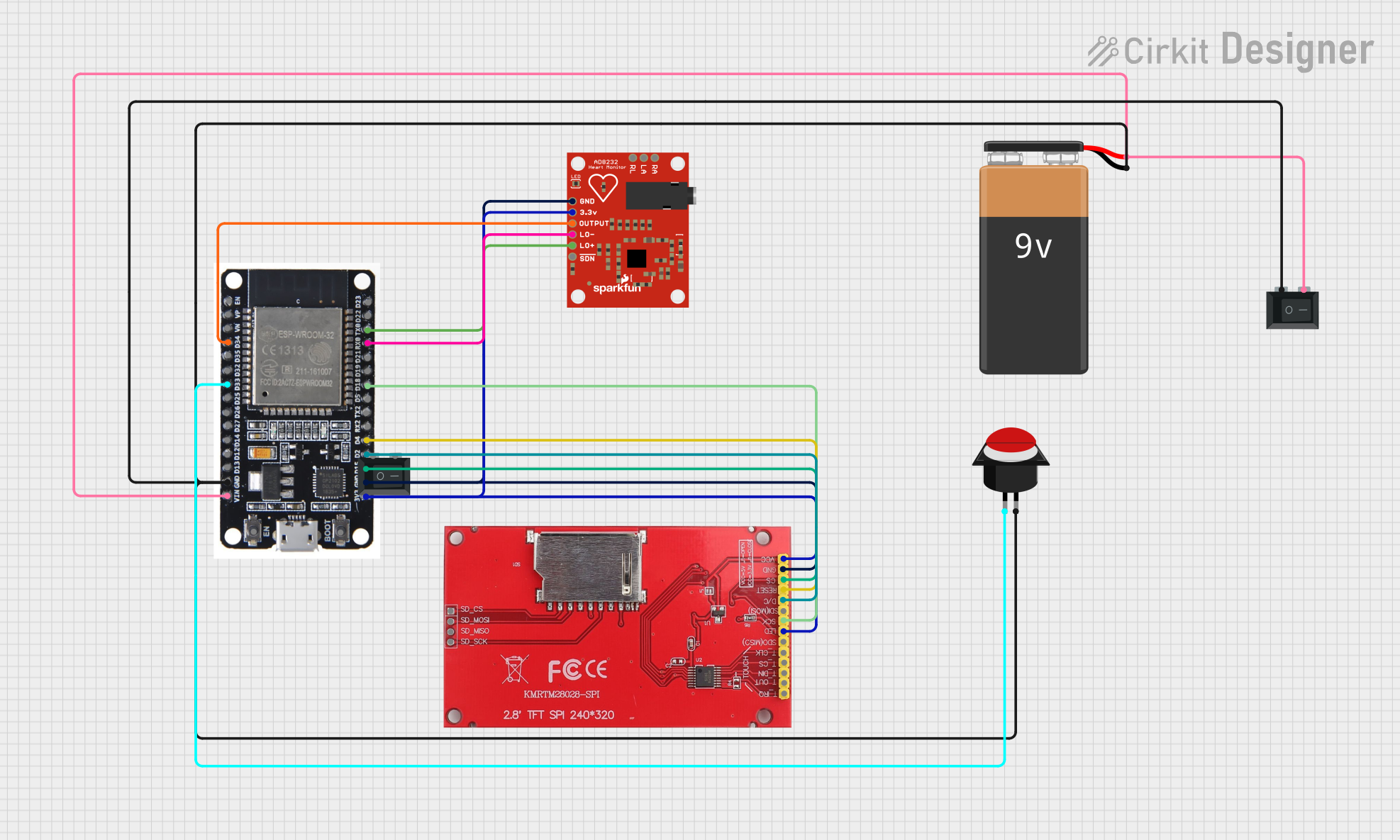
Circuit Documentation
Summary
This circuit is designed to monitor heart rate using the AD8232 Heart Rate Monitor and display the data on an ILI9341 TFT display. The circuit is controlled by an ESP32 microcontroller, which also handles user input through a push button and power control via a rocker switch. The system is powered by a 9V battery.
Component List
AD8232 Heart Rate Monitor
- Description: Monitors heart rate signals.
- Pins: GND, 3.3v, OUTPUT, LO-, LO+, SDN, RA, LA, RL
ILI9341 TFT Display
- Description: Displays graphical data.
- Pins: SD_CS, SD_MOSI, SD_MISO, SD_SCK, VCC, GND, CS, RESET, D/C, SD(MOSI), SCK, LED, SDO(MISO), T_CLK, T_CS, T_DIN, T_OUT, T_IRQ
ESP32
- Description: Microcontroller for processing and control.
- Pins: EN, VP, VN, D34, D35, D32, D33, D25, D26, D27, D14, D12, D13, GND, VIN, 3V3, D15, D2, D4, RX2, TX2, D5, D18, D19, D21, RX0, TX0, D22, D23, BOOT
Rocker Switch (SPST)
- Description: Controls power to the circuit.
- Pins: 1, 2
9V Battery
- Description: Provides power to the circuit.
- Pins: -, +
Push Button Round
- Description: User input for interaction.
- Pins: leg0, leg1
Wiring Details
AD8232 Heart Rate Monitor
- GND connected to ESP32 GND and ILI9341 TFT display GND.
- 3.3v connected to ESP32 3V3.
- OUTPUT connected to ESP32 D34.
- LO- connected to ESP32 RX0.
- LO+ connected to ESP32 TX0.
ILI9341 TFT Display
- GND connected to ESP32 GND and AD8232 Heart Rate Monitor GND.
- VCC connected to ESP32 3V3.
- LED connected to ESP32 3V3.
- CS connected to ESP32 D15.
- RESET connected to ESP32 D4.
- D/C connected to ESP32 D2.
- SCK connected to ESP32 D18.
ESP32
- GND connected to AD8232 Heart Rate Monitor GND, ILI9341 TFT display GND, 9V Battery -, Push Button Round leg1, and Rocker Switch (SPST) pin 1.
- 3V3 connected to AD8232 Heart Rate Monitor 3.3v and ILI9341 TFT display VCC and LED.
- D34 connected to AD8232 Heart Rate Monitor OUTPUT.
- RX0 connected to AD8232 Heart Rate Monitor LO-.
- TX0 connected to AD8232 Heart Rate Monitor LO+.
- D15 connected to ILI9341 TFT display CS.
- D4 connected to ILI9341 TFT display RESET.
- D2 connected to ILI9341 TFT display D/C.
- D18 connected to ILI9341 TFT display SCK.
- D33 connected to Push Button Round leg0.
- VIN connected to 9V Battery + and Rocker Switch (SPST) pin 2.
Rocker Switch (SPST)
- Pin 1 connected to ESP32 GND, 9V Battery -, and Push Button Round leg1.
- Pin 2 connected to ESP32 VIN and 9V Battery +.
9V Battery
- - connected to ESP32 GND, Push Button Round leg1, and Rocker Switch (SPST) pin 1.
- + connected to ESP32 VIN and Rocker Switch (SPST) pin 2.
Push Button Round
- leg0 connected to ESP32 D33.
- leg1 connected to ESP32 GND, 9V Battery -, and Rocker Switch (SPST) pin 1.
Documented Code
ESP32 Code
#include <TFT_eSPI.h> // Include the graphics library

// Create an instance of the TFT_eSPI class
TFT_eSPI tft = TFT_eSPI(); // Call the library

// Define scale factors for amplitude and width
float scaleFactor = 0.5; // Adjust this value to change amplitude
float widthFactor = 2.0;  // Adjust this value to change width (frequency)

// Define pin for the button
const int buttonPin = 33; // Change to the pin you use for the button

void setup() {
  // Initialize serial communication:
  Serial.begin(115200); // ESP32 usually uses a higher baud rate
  pinMode(41, INPUT);   // Setup for leads off detection LO +
  pinMode(40, INPUT);   // Setup for leads off detection LO -
  pinMode(buttonPin, INPUT_PULLUP); // Set button pin as input with pull-up

  // Initialize the TFT display
  tft.init();
  tft.setRotation(1); // Set display rotation
  tft.fillScreen(TFT_BLACK); // Clear the screen with black color

  // Step 1: Display "Group Name" in the center of the screen
  tft.setTextColor(TFT_WHITE);
  tft.setTextSize(2);

  // Calculate position to display text in the center
  String groupName = "Group Name"; // Replace with your group name
  int textWidth = tft.textWidth(groupName);
  int textHeight = tft.fontHeight(2);
  tft.setCursor((tft.width() - textWidth) / 2, (tft.height() - textHeight) / 2);
  tft.println(groupName);

// Display names to the right of "Group Name"
String names[] = {
  "1. M.Hanif",
  "P22030123032",
  "2. Nasrul",
  "3. Izzatul",
  "4. Rafi"
};

int numberOfNames = sizeof(names) / sizeof(names[0]); // Count the number of names
int unknownX = (tft.width() - textWidth) / 2 + textWidth + 10; // 10 pixels distance from "Group Name"
int unknownY = (tft.height() - textHeight) / 10; // Same Y position as "Group Name"

for (int i = 0; i < numberOfNames; i++) {
  tft.setCursor(unknownX, unknownY + i * textHeight); // Set Y position for each line
  tft.println(names[i]);
}

  // Step 2: Display "Press button to continue" in the bottom right corner
  String promptText = "Press button to continue";
  int promptWidth = tft.textWidth(promptText);
  tft.setCursor(tft.width() - promptWidth - 10, tft.height() - textHeight - 10); // 10 pixels from the edge
  tft.println(promptText);

  // Wait until the button is pressed to continue
  while (digitalRead(buttonPin) == HIGH) {
    // Wait until the button is pressed
    delay(100);
  }

  // Display "loading..." for 3 seconds
  tft.fillScreen(TFT_BLACK); // Clear the screen
  tft.setTextColor(TFT_WHITE);
  tft.setTextSize(2);
  String loadingText = "loading...";
  int loadingTextWidth = tft.textWidth(loadingText);
  tft.setCursor((tft.width() - loadingTextWidth) / 2, (tft.height() - textHeight) / 2);
  tft.println(loadingText);

  delay(3000); // Delay for 3 seconds

  // Clear the screen after loading
  tft.fillScreen(TFT_BLACK);
}

void loop() {
  if ((digitalRead(41) == HIGH) || (digitalRead(40) == HIGH)) {
    Serial.println('!');
  } else {
    // Read analog value
    int analogValue = analogRead(34); // Use GPIO 34 (or other ADC pin)
    Serial.println(analogValue);

    // Draw graph
    drawGraph(analogValue);
  }

  // Wait a bit to prevent serial data saturation
  delay(25);
}

void drawGraph(int value) {
  static int lastX = 0; // Store last X position
  static int lastY = 0; // Store last Y position

  // Apply scale factor to analog value
  int scaledValue = value * scaleFactor; // Scale the value

  // Calculate the center of the display
  int centerY = tft.height() / 2;

  // Map the scaled value to the display height, offset by the center
  int y =