
Circuit Documentation
Summary
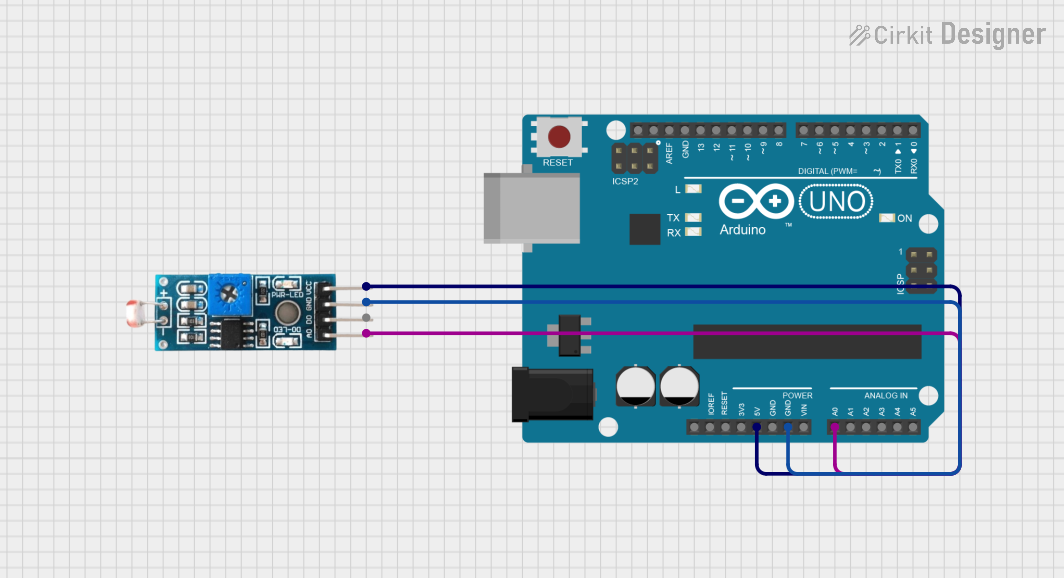
This circuit integrates an Arduino UNO with a Module LDR (Light Dependent Resistor) to measure light intensity. The Arduino UNO is programmed to read the analog voltage level from the LDR module and output the reading through its serial interface. The LDR module is powered by the 5V supply from the Arduino and its ground is connected to the Arduino's ground. The analog output from the LDR is connected to the A0 analog input pin on the Arduino.
Component List
Arduino UNO
- Description: A microcontroller board based on the ATmega328P.
- Pins: UNUSED, IOREF, Reset, 3.3V, 5V, GND, Vin, A0-A5, SCL, SDA, AREF, D0-D13
- Purpose: Acts as the central processing unit of the circuit, reads sensor data, and communicates information.
Module LDR
- Description: A light sensor module with both digital and analog outputs.
- Pins: VCC, GND, DO, AO
- Purpose: Senses the light intensity and provides an analog signal proportional to the light intensity.
Wiring Details
Arduino UNO
- 5V - Provides power to the Module LDR VCC pin.
- GND - Connected to the Module LDR GND pin to complete the power circuit.
- A0 - Receives the analog signal from the Module LDR AO pin.
Module LDR
- VCC - Connected to the Arduino UNO 5V pin for power.
- GND - Connected to the Arduino UNO GND pin to complete the power circuit.
- AO - Sends the analog signal to the Arduino UNO A0 pin.
Documented Code
Arduino UNO Code
void setup() {
  Serial.begin(9600); // Initialize serial communication at 9600 bits per second
}

void loop() {
  unsigned int AnalogValue;
  AnalogValue = analogRead(A0); // Read the input on analog pin A0
  Serial.println(AnalogValue);  // Print out the value read
}
- File Name: sketch.ino
- Description: This code initializes the serial communication and continuously reads the analog value from pin A0 (connected to the LDR module) and prints it to the serial monitor.
Module LDR Code
The Module LDR does not have associated code as it is a passive sensor component.
This documentation provides an overview of the circuit's components, their wiring, and the code running on the Arduino UNO. The circuit is designed to measure light intensity using the LDR module and output the readings through the Arduino's serial interface.