
Arduino Nano-Based ECG Data Logger with OLED Display and SD Card Storage
View and Edit Project In Cirkit Designer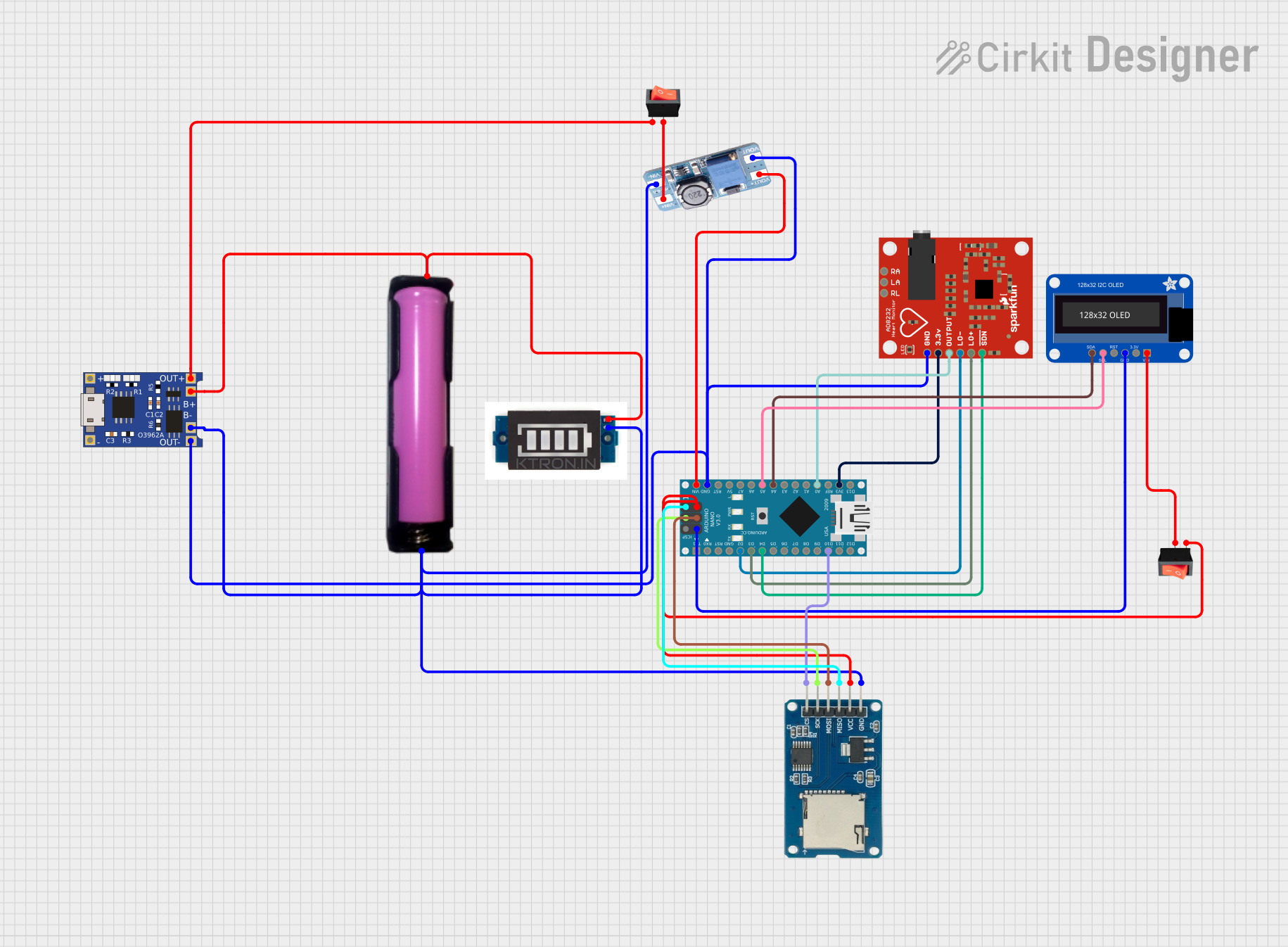
Circuit Documentation
Summary
The circuit is designed to collect and display electrocardiogram (ECG) data using an AD8232 Heart Rate Monitor. The data is sampled at a rate of 500 Hz and written to a microSD card. An OLED display shows the z-scored ECG curve, which can be turned off with a rocker switch. The Arduino Nano serves as the central processing unit, interfacing with the heart rate monitor, SD card module, and OLED display. A TP4056 module with an 18650 battery in a holder provides power management, and an MT3608 boost converter steps up the voltage to power the Arduino Nano. The circuit also includes a battery level indicator to monitor the battery status.
Component List
Arduino Nano
- Microcontroller board based on the ATmega328P
- Provides digital and analog I/O pins
- Interfaces with sensors, displays, and storage modules
TP4056
- Lithium battery charger module
- Manages charging and discharging of the 18650 battery
AD8232 Heart Rate Monitor
- Single-lead heart rate monitor
- Outputs ECG signal to be processed by the Arduino Nano
Rocker Switch (x2)
- Simple on/off switch
- Controls power to the OLED display and the MT3608 boost converter
18650 Battery in Holder
- Lithium-ion rechargeable battery
- Provides power to the circuit
Adafruit OLED Monochrome 128x32 I2C
- Small OLED display
- Shows the ECG curve and other data
Battery Level Indicator
- Indicates the charge level of the 18650 battery
Micro SD Card Module
- Storage module for logging ECG data
- Uses SPI interface for communication with Arduino Nano
MT3608
- Boost converter module
- Steps up the voltage to power the Arduino Nano
Wiring Details
Arduino Nano
D2connected to AD8232 Heart Rate MonitorLO-D3connected to AD8232 Heart Rate MonitorLO+D4connected to AD8232 Heart Rate MonitorSDND10connected to Micro SD Card ModulecsVINconnected to MT3608VOUT+GNDconnected to common ground netA5connected to Adafruit OLED Monochrome 128x32 I2CSCLA4connected to Adafruit OLED Monochrome 128x32 I2CSDAA0connected to AD8232 Heart Rate MonitorOUTPUT3V3connected to AD8232 Heart Rate Monitor3.3vD12/MISOconnected to Micro SD Card Modulemiso5Vconnected to rocker switchinputand Micro SD Card ModulevccD13/SCKconnected to Micro SD Card ModulesckD11/MOSIconnected to Micro SD Card Modulemosi
TP4056
OUT-connected to common ground netB-connected to common ground netB+connected to 18650 batteryVCCand Battery Level IndicatorPositiveOUT+connected to rocker switchinput
AD8232 Heart Rate Monitor
GNDconnected to common ground net3.3vconnected to Arduino Nano3V3OUTPUTconnected to Arduino NanoA0LO-connected to Arduino NanoD2LO+connected to Arduino NanoD3SDNconnected to Arduino NanoD4
Rocker Switch (x2)
- One switch controls the power to the OLED display:
inputconnected to Arduino Nano5Voutputconnected to Adafruit OLED Monochrome 128x32 I2CVIN
- The other switch controls the power to the MT3608 boost converter:
inputconnected to TP4056OUT+outputconnected to MT3608VIN+
18650 Battery in Holder
GNDconnected to common ground netVCCconnected to TP4056B+and Battery Level IndicatorPositive
Adafruit OLED Monochrome 128x32 I2C
VINconnected to rocker switchoutputGNDconnected to common ground netSCLconnected to Arduino NanoA5SDAconnected to Arduino NanoA4
Battery Level Indicator
Positiveconnected to 18650 batteryVCCand TP4056B+GNDconnected to common ground net
Micro SD Card Module
csconnected to Arduino NanoD10sckconnected to Arduino NanoD13/SCKmosiconnected to Arduino NanoD11/MOSImisoconnected to Arduino NanoD12/MISOvccconnected to rocker switchinputand Arduino Nano5Vgndconnected to common ground net
MT3608
VIN+connected to rocker switchoutputVIN-connected to common ground netVOUT+connected to Arduino NanoVINVOUT-connected to common ground net
Documented Code
/*
 * Arduino Sketch for ECG Data Collection and Display
 *
 * This code collects ECG data from the AD8232 Heart Rate Monitor at a sampling
 * rate of at least 500 Hz. The amplitude and time are written to a microSD card
 * and the z-scored ECG curve is displayed on an OLED display. The display can
 * be turned off using a rocker switch.
 */

#include <SPI.h>
#include <SD.h>
#include <Wire.h>
#include <Adafruit_GFX.h>
#include <Adafruit_SSD1306.h>

#define OLED_RESET 4
Adafruit_SSD1306 display(OLED_RESET);

#define ECG_PIN A0
#define LO_PLUS_PIN 3
#define LO_MINUS_PIN 2
#define SDN_PIN 4
#define SD_CS_PIN 10
#define ROCKER_SWITCH_PIN 5

File dataFile;

const int sampleRate = 500; // 500 Hz
const int sampleInterval = 1000 / sampleRate; // in milliseconds
const int bufferSize = 500; // Buffer size for z-score calculation
int ecgBuffer[bufferSize];
int bufferIndex = 0;

void setup() {
  pinMode(LO_PLUS_PIN, INPUT);
  pinMode(LO_MINUS_PIN, INPUT);
  pinMode(SDN_PIN, OUTPUT);
  pinMode(ROCKER_SWITCH_PIN, INPUT);
  digitalWrite(SDN_PIN, LOW); // Enable AD8232

  Serial.begin(9600);
  if (!SD.begin(SD_CS_PIN)) {
    Serial.println("SD card initialization failed!");
    return;
  }
  dataFile = SD.open("ecgdata.txt", FILE_WRITE);
  if (!dataFile) {
    Serial.println("Error opening ecgdata.txt");
    return;
  }

  display.begin(SSD1306_SWITCHCAPVCC, 0x3C);
  display.display();
  delay(2000);
  display.clearDisplay();
}

void loop() {
  static unsigned long lastSampleTime = 0;
  unsigned long currentTime = millis();
  if (currentTime - lastSampleTime >= sampleInterval) {
    lastSampleTime = currentTime;
    int ecgValue = analogRead(ECG_PIN);
    dataFile.print(currentTime);
    dataFile.print(",");
    dataFile.println(ecgValue);
    dataFile.flush();

    ecgBuffer[bufferIndex] = ecgValue;
    bufferIndex = (bufferIndex + 1) % bufferSize;

    if (digitalRead(ROCKER_SWITCH_PIN) == HIGH) {
      display.clearDisplay();
      display.setCursor(0, 0);
      display.print("ECG: ");
      display.println(zScore(ecgValue));
      drawECGCurve();
      display.display();
    } else {
      display.clearDisplay();
      display.display();
    }
  }
}

float zScore(int value) {
  float mean = 0;
  float stdDev = 0;
  for (int i = 0; i < bufferSize; i++) {
    mean += ecgBuffer[i];
  }
  mean /= bufferSize;
  for (int i = 0; i < bufferSize; i++) {
    stdDev += pow(ecgBuffer[i] - mean, 2);
  }
  stdDev = sqrt(stdDev / bufferSize);
  return (value - mean) / stdDev;
}

void drawECGCurve() {
  int x = 0;
  for (int i = 0; i < bufferSize - 1; i++) {
    int y1 = map(zScore(ecgBuffer[i]), -3, 3, 0, display.height());
    int y2 = map(zScore(ecgBuffer[i + 1]), -3, 3, 0, display.height());
    display.drawLine(x, y1, x + 1, y2, WHITE);
    x++;
    if (x >= display.width()) {
      x = 0;
    }
  }
}
This code is responsible for