
ESP32-Based Water Quality Monitoring System with SIM900A Communication
View and Edit Project In Cirkit Designer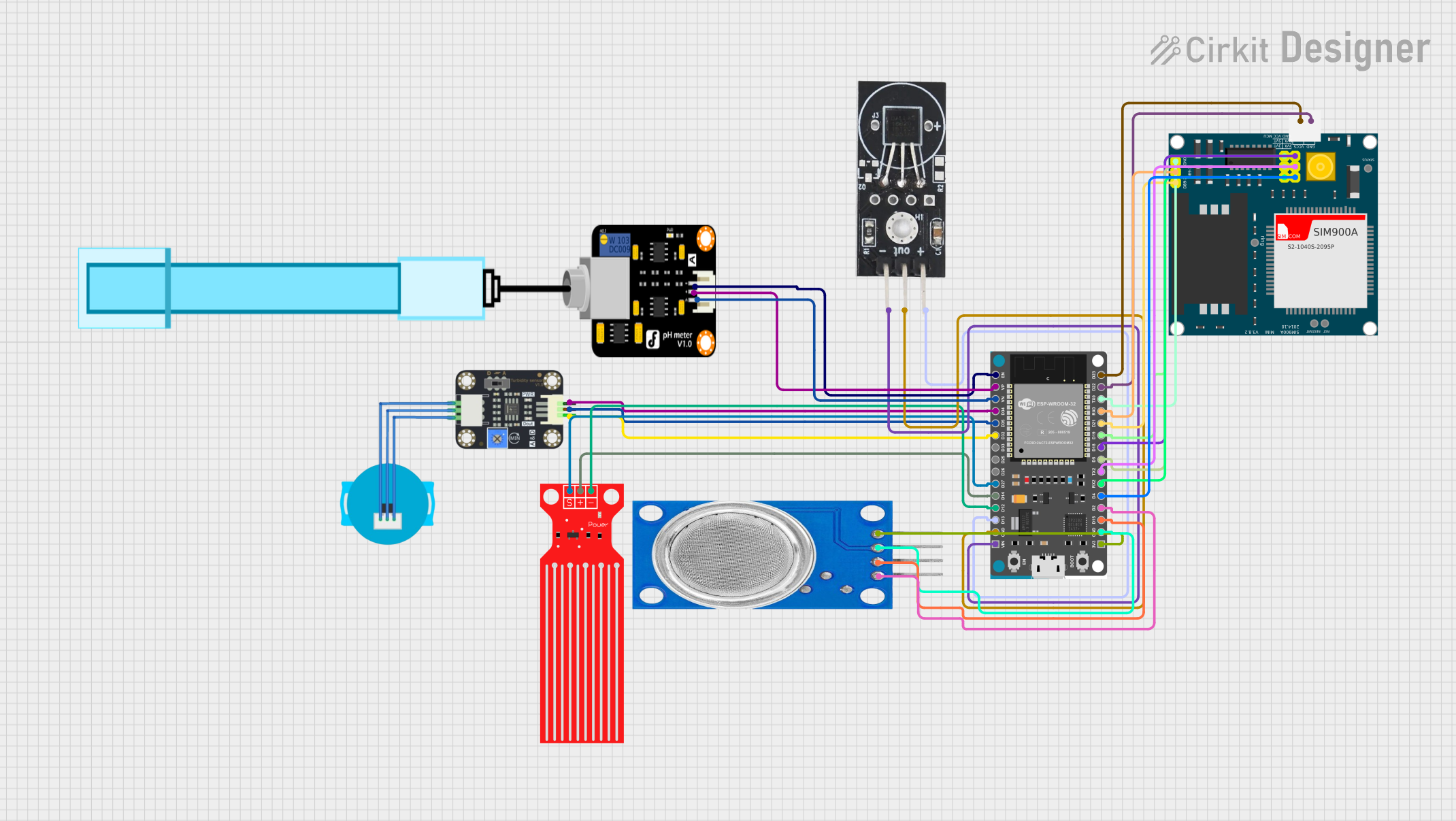
Circuit Documentation
Summary
This circuit is designed to monitor water quality using various sensors connected to an ESP32 Devkit V1. The sensors include a DS18B20 temperature sensor, a turbidity sensor, a water level sensor, a PH meter, an MQ135 air quality sensor, and a SIM900A module for communication. The ESP32 reads data from these sensors and can communicate the results via the SIM900A module.
Component List
ESP32 Devkit V1
- Description: A microcontroller with Wi-Fi and Bluetooth capabilities.
- Pins: 3V3, GND, D15, D2, D4, RX2, TX2, D5, D18, D19, D21, RX0, TX0, D22, D23, EN, VP, VN, D34, D35, D32, D33, D25, D26, D27, D14, D12, D13, VIN
DS18B20 Temperature Sensor
- Description: A digital temperature sensor.
- Pins: GND, VCC, OUT
Turbidity Sensor
- Description: A sensor to measure the turbidity (cloudiness) of water.
- Pins: OUT, VCC, GND
Water Level Sensor
- Description: A sensor to measure the water level.
- Pins: SIG, VCC, GND
SIM900A
- Description: A GSM/GPRS module for communication.
- Pins: GND, DB9-3 (RXD), DB9-2 (TXD), 5V, 3VR, 5VR, 3VT, 5VT, VCC, Ring, RESTART, RESET, STATUS
MQ135
- Description: An air quality sensor.
- Pins: VCC, GND, A0, D0
PH Meter
- Description: A sensor to measure the pH level of water.
- Pins: Signal, VCC, GND
Wiring Details
ESP32 Devkit V1
- 3V3 connected to MQ135 VCC
- GND connected to MQ135 GND
- D15 connected to MQ135 A0
- D2 connected to MQ135 D0
- D4 connected to SIM900A 3VR
- RX2 connected to SIM900A 3VT
- TX2 connected to SIM900A 5VR
- D5 connected to SIM900A 5VT
- D18 connected to SIM900A GND
- D19 connected to SIM900A VCC
- D21 connected to SIM900A DB9-2 (TXD)
- RX0 connected to SIM900A DB9-3 (RXD)
- TX0 connected to SIM900A GND
- D22 connected to SIM900A GND
- D23 connected to SIM900A 5V
- EN connected to PH Meter GND
- VP connected to PH Meter VCC
- VN connected to PH Meter Signal
- D34 connected to Turbidity Sensor GND
- D35 connected to Turbidity Sensor VCC
- D32 connected to Turbidity Sensor OUT
- D27 connected to Water Level Sensor SIG
- D14 connected to Water Level Sensor VCC
- D12 connected to Water Level Sensor GND
- D13 connected to DS18B20 Temperature Sensor VCC
- GND connected to DS18B20 Temperature Sensor OUT
- VIN connected to DS18B20 Temperature Sensor GND
DS18B20 Temperature Sensor
- VCC connected to ESP32 Devkit V1 D13
- OUT connected to ESP32 Devkit V1 GND
- GND connected to ESP32 Devkit V1 VIN
Turbidity Sensor
- OUT connected to ESP32 Devkit V1 D32
- VCC connected to ESP32 Devkit V1 D35
- GND connected to ESP32 Devkit V1 D34
Water Level Sensor
- SIG connected to ESP32 Devkit V1 D27
- VCC connected to ESP32 Devkit V1 D14
- GND connected to ESP32 Devkit V1 D12
SIM900A
- 3VR connected to ESP32 Devkit V1 D4
- 3VT connected to ESP32 Devkit V1 RX2
- 5VR connected to ESP32 Devkit V1 TX2
- 5VT connected to ESP32 Devkit V1 D5
- GND connected to ESP32 Devkit V1 D18
- VCC connected to ESP32 Devkit V1 D19
- DB9-2 (TXD) connected to ESP32 Devkit V1 D21
- DB9-3 (RXD) connected to ESP32 Devkit V1 RX0
- GND connected to ESP32 Devkit V1 TX0
- GND connected to ESP32 Devkit V1 D22
- 5V connected to ESP32 Devkit V1 D23
MQ135
- VCC connected to ESP32 Devkit V1 3V3
- GND connected to ESP32 Devkit V1 GND
- A0 connected to ESP32 Devkit V1 D15
- D0 connected to ESP32 Devkit V1 D2
PH Meter
- Signal connected to ESP32 Devkit V1 VN
- VCC connected to ESP32 Devkit V1 VP
- GND connected to ESP32 Devkit V1 EN
Code Documentation
/*
 * This Arduino Sketch is designed to check water quality using various sensors
 * connected to an ESP32 Devkit V1. The sensors include a DS18B20 temperature
 * sensor, a turbidity sensor, a water level sensor, a PH meter, an MQ135 air
 * quality sensor, and a SIM900A module for communication.
 */

#include <OneWire.h>
#include <DallasTemperature.h>

// Pin definitions
#define DS18B20_PIN 13
#define TURBIDITY_OUT_PIN 32
#define WATER_LEVEL_SIG_PIN 27
#define PH_SIGNAL_PIN 39
#define MQ135_A0_PIN 15
#define MQ135_D0_PIN 2

// OneWire and DallasTemperature instances
OneWire oneWire(DS18B20_PIN);
DallasTemperature sensors(&oneWire);

void setup() {
  // Initialize serial communication
  Serial.begin(115200);

  // Initialize sensors
  sensors.begin();
  pinMode(TURBIDITY_OUT_PIN, INPUT);
  pinMode(WATER_LEVEL_SIG_PIN, INPUT);
  pinMode(PH_SIGNAL_PIN, INPUT);
  pinMode(MQ135_A0_PIN, INPUT);
  pinMode(MQ135_D0_PIN, INPUT);
}

void loop() {
  // Read temperature from DS18B20
  sensors.requestTemperatures();
  float temperature = sensors.getTempCByIndex(0);
  Serial.print("Temperature: ");
  Serial.print(temperature);
  Serial.println(" °C");

  // Read turbidity sensor
  int turbidity = analogRead(TURBIDITY_OUT_PIN);
  Serial.print("Turbidity: ");
  Serial.println(turbidity);

  // Read water level sensor
  int waterLevel = analogRead(WATER_LEVEL_SIG_PIN);
  Serial.print("Water Level: ");
  Serial.println(waterLevel);

  // Read PH meter
  int phValue = analogRead(PH_SIGNAL_PIN);
  Serial.print("PH Value: ");
  Serial.println(phValue);

  // Read MQ135 sensor
  int mq135A0 = analogRead(MQ135_A0_PIN);
  int mq135D0 = digitalRead(MQ135_D0_PIN);
  Serial.print("MQ135 A0: ");
  Serial.println(mq135A0);
  Serial.print("MQ135 D0: ");
  Serial.println(mq135D0);

  // Delay before next reading
  delay(2000);
}
This code initializes the sensors and reads data from them in a loop, printing the results to the serial monitor. The delay of 2000 milliseconds ensures that the readings are taken at regular intervals.