
Arduino Nano Hand Gesture Control Transmitter with MPU6050 and HC-05 Bluetooth Module
View and Edit Project In Cirkit Designer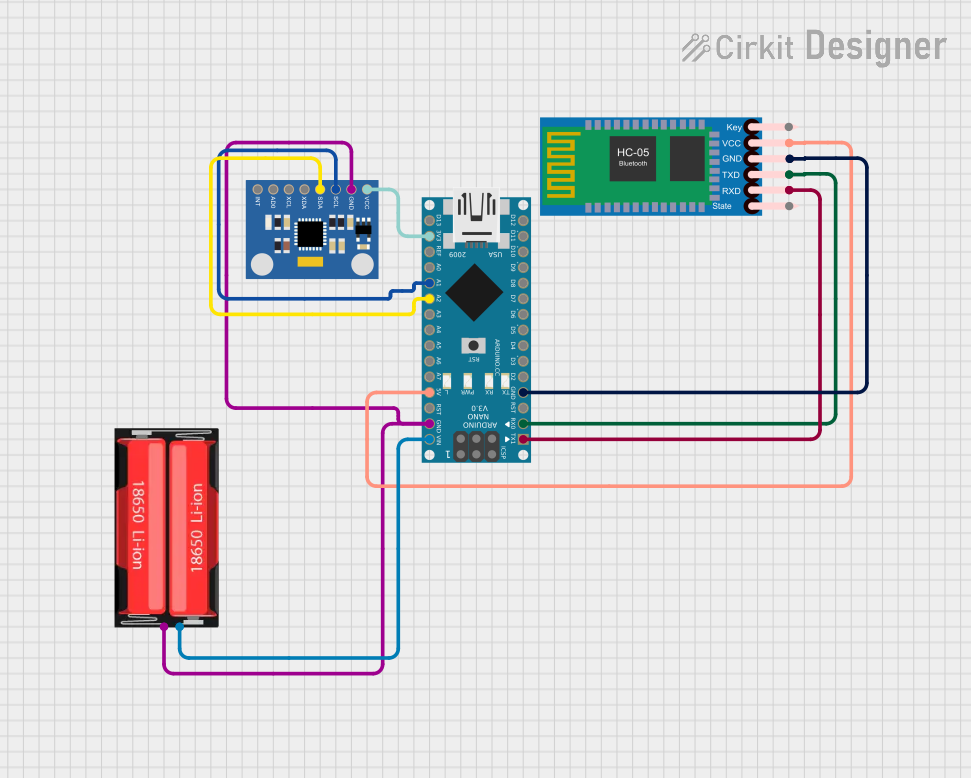
Circuit Documentation
Summary
This circuit is designed for a hand gesture control transmitter. It reads data from an MPU6050 accelerometer and gyroscope sensor and transmits the data via an HC-05 Bluetooth module. The MPU6050 is connected to the Arduino Nano via I2C, and the HC-05 is connected via serial communication. The circuit is powered by a 18650 Li-Ion battery.
Component List
Arduino Nano
- Description: A small, complete, and breadboard-friendly board based on the ATmega328P.
- Pins: D1/TX, D0/RX, RESET, GND, D2, D3, D4, D5, D6, D7, D8, D9, D10, D11/MOSI, D12/MISO, VIN, 5V, A7, A6, A5, A4, A3, A2, A1, A0, AREF, 3V3, D13/SCK
MPU6050 Accelerometer + Gyroscope (Wokwi Compatible)
- Description: A 6-axis motion tracking device that combines a 3-axis gyroscope and a 3-axis accelerometer.
- Pins: INT, AD0, XCL, XDA, SDA, SCL, GND, VCC
HC-05 Bluetooth Module
- Description: A Bluetooth module for wireless communication.
- Pins: Key, VCC, TXD, RXD, State, GND
18650 Li-Ion
- Description: A rechargeable lithium-ion battery.
- Pins: Positive, Negative
Wiring Details
Arduino Nano
- D1/TX connected to RXD of HC-05 Bluetooth Module
- D0/RX connected to TXD of HC-05 Bluetooth Module
- GND connected to GND of HC-05 Bluetooth Module, GND of MPU6050 Accelerometer + Gyroscope, and Negative of 18650 Li-Ion
- VIN connected to Positive of 18650 Li-Ion
- 5V connected to VCC of HC-05 Bluetooth Module
- A2 connected to SDA of MPU6050 Accelerometer + Gyroscope
- A1 connected to SCL of MPU6050 Accelerometer + Gyroscope
- 3V3 connected to VCC of MPU6050 Accelerometer + Gyroscope
MPU6050 Accelerometer + Gyroscope (Wokwi Compatible)
- GND connected to GND of Arduino Nano
- SDA connected to A2 of Arduino Nano
- SCL connected to A1 of Arduino Nano
- VCC connected to 3V3 of Arduino Nano
HC-05 Bluetooth Module
- RXD connected to D1/TX of Arduino Nano
- TXD connected to D0/RX of Arduino Nano
- GND connected to GND of Arduino Nano
- VCC connected to 5V of Arduino Nano
18650 Li-Ion
- Positive connected to VIN of Arduino Nano
- Negative connected to GND of Arduino Nano
Code Documentation
/*
 * HAND GESTURE CONTROL TRANSMITTER
 * This Arduino sketch reads data from an MPU6050 accelerometer and gyroscope
 * sensor and transmits the data via an HC-05 Bluetooth module. The MPU6050
 * is connected to the Arduino Nano via I2C, and the HC-05 is connected via
 * serial communication.
 */

#include <Wire.h>
#include <MPU6050.h>

MPU6050 mpu;

void setup() {
  Serial.begin(9600); // Initialize serial communication
  Wire.begin(); // Initialize I2C communication
  mpu.initialize(); // Initialize the MPU6050 sensor
  if (mpu.testConnection()) {
    Serial.println("MPU6050 connection successful");
  } else {
    Serial.println("MPU6050 connection failed");
  }
}

void loop() {
  int16_t ax, ay, az;
  int16_t gx, gy, gz;
  mpu.getMotion6(&ax, &ay, &az, &gx, &gy, &gz); // Read sensor data
  Serial.print("aX: "); Serial.print(ax);
  Serial.print(" | aY: "); Serial.print(ay);
  Serial.print(" | aZ: "); Serial.print(az);
  Serial.print(" | gX: "); Serial.print(gx);
  Serial.print(" | gY: "); Serial.print(gy);
  Serial.print(" | gZ: "); Serial.println(gz);
  delay(100); // Delay for stability
}
This code initializes the MPU6050 sensor and reads the accelerometer and gyroscope data. The data is then transmitted via the HC-05 Bluetooth module. The loop continuously reads the sensor data and prints it to the serial monitor with a delay for stability.