
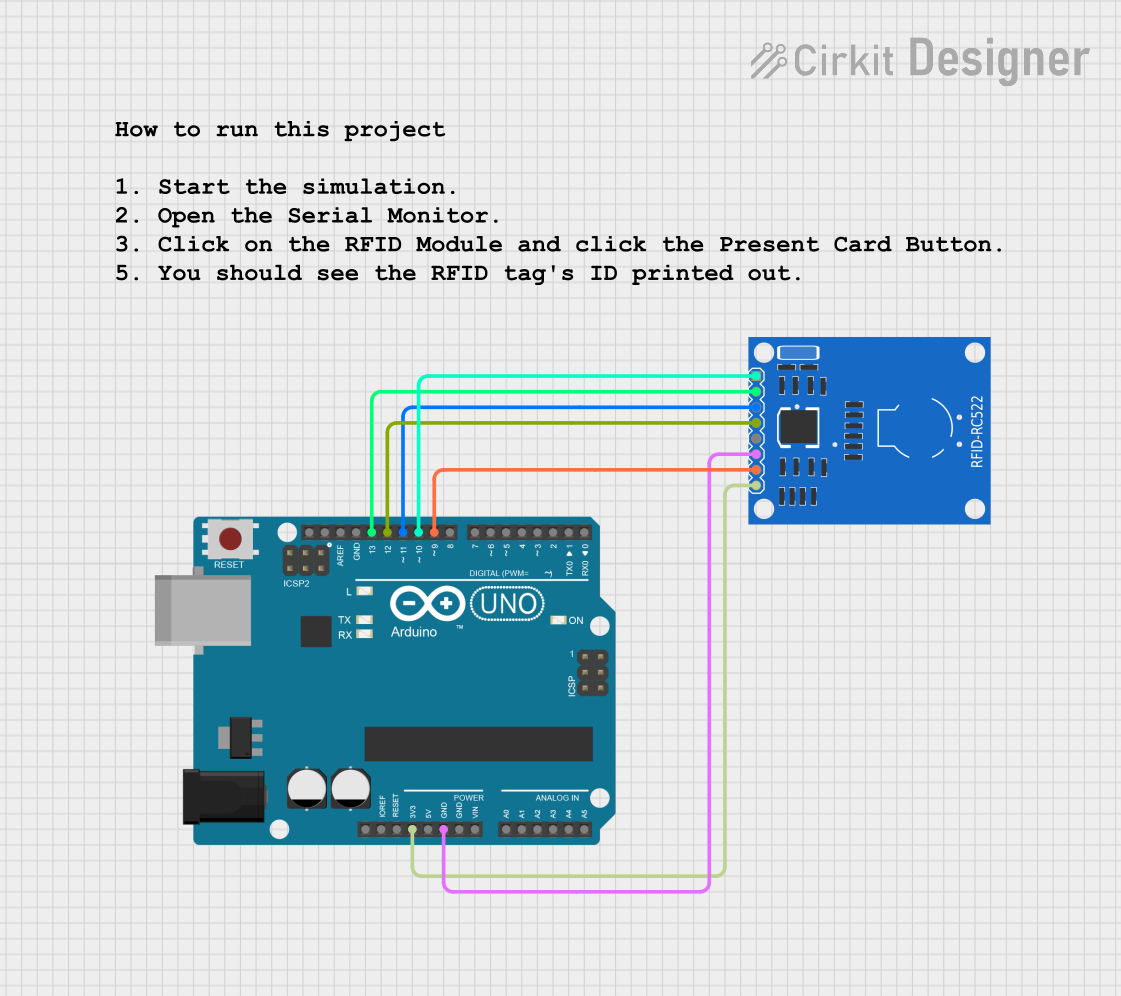
Circuit Documentation
Summary
This circuit utilizes an Arduino UNO microcontroller and an RC522 RFID module. The Arduino UNO serves as the main controller, interfacing with the RC522 module to read RFID tags. The circuit is designed to power the RFID module and facilitate communication between the two components using the SPI protocol.
Component List
Arduino UNO
- Description: A microcontroller board based on the ATmega328P. It is widely used for various electronic projects due to its ease of use and extensive community support.
- Purpose: Acts as the main controller for the circuit, handling the logic and communication with the RFID module.
RC522 RFID Module
- Description: A compact RFID reader/writer module that operates at 13.56 MHz. It is capable of reading and writing RFID tags.
- Purpose: Used to read RFID tags and communicate the data back to the Arduino UNO for processing.
Wiring Details
Arduino UNO
3.3V: Connected to the 3.3V pin of the RC522 RFID Module.
GND: Connected to the GND pin of the RC522 RFID Module.
D13: Connected to the SCK pin of the RC522 RFID Module.
D12: Connected to the MISO pin of the RC522 RFID Module.
D11: Connected to the MOSI pin of the RC522 RFID Module.
D10: Connected to the SDA pin of the RC522 RFID Module.
D9: Connected to the RST pin of the RC522 RFID Module.
Documented Code
Arduino Code
#include <SPI.h>
#include <MFRC522.h>

constexpr uint8_t SS_PIN  = 10;  // RC522 SDA pin wired to D10
constexpr uint8_t RST_PIN = 9;   // RC522 RST pin wired to D9

MFRC522 mfrc522(SS_PIN, RST_PIN);

void setup() {
  Serial.begin(115200);
  while (!Serial) { /* wait for serial */ }

  SPI.begin();
  mfrc522.PCD_Init();  // Initialize RC522

  // Read and print VersionReg (our sim returns 0x92)
  byte v = mfrc522.PCD_ReadRegister(MFRC522::VersionReg);
  Serial.print(F("MFRC522 VersionReg: 0x")); Serial.println(v, HEX);
  Serial.println(F("Present a card (toggle 'Present Card' in the component)."));
}

void loop() {
  delay(500);

  // Look for new cards
  if (!mfrc522.PICC_IsNewCardPresent()) return;
  if (!mfrc522.PICC_ReadCardSerial())   return;

  // Print UID
  Serial.print(F("UID: "));
  for (byte i = 0; i < mfrc522.uid.size; i++) {
    if (mfrc522.uid.uidByte[i] < 0x10) Serial.print('0');
    Serial.print(mfrc522.uid.uidByte[i], HEX);
    Serial.print(i + 1 < mfrc522.uid.size ? ' ' : '\n');
  }

  // Halt PICC and stop encryption
  mfrc522.PICC_HaltA();
  mfrc522.PCD_StopCrypto1();
}
Documentation Code
(Note: The documentation code section is empty as per the provided input.)
This concludes the documentation for the circuit.