
Photon 2 Motion Detector Alarm with PIR Sensor and Wi-Fi Control
View and Edit Project In Cirkit Designer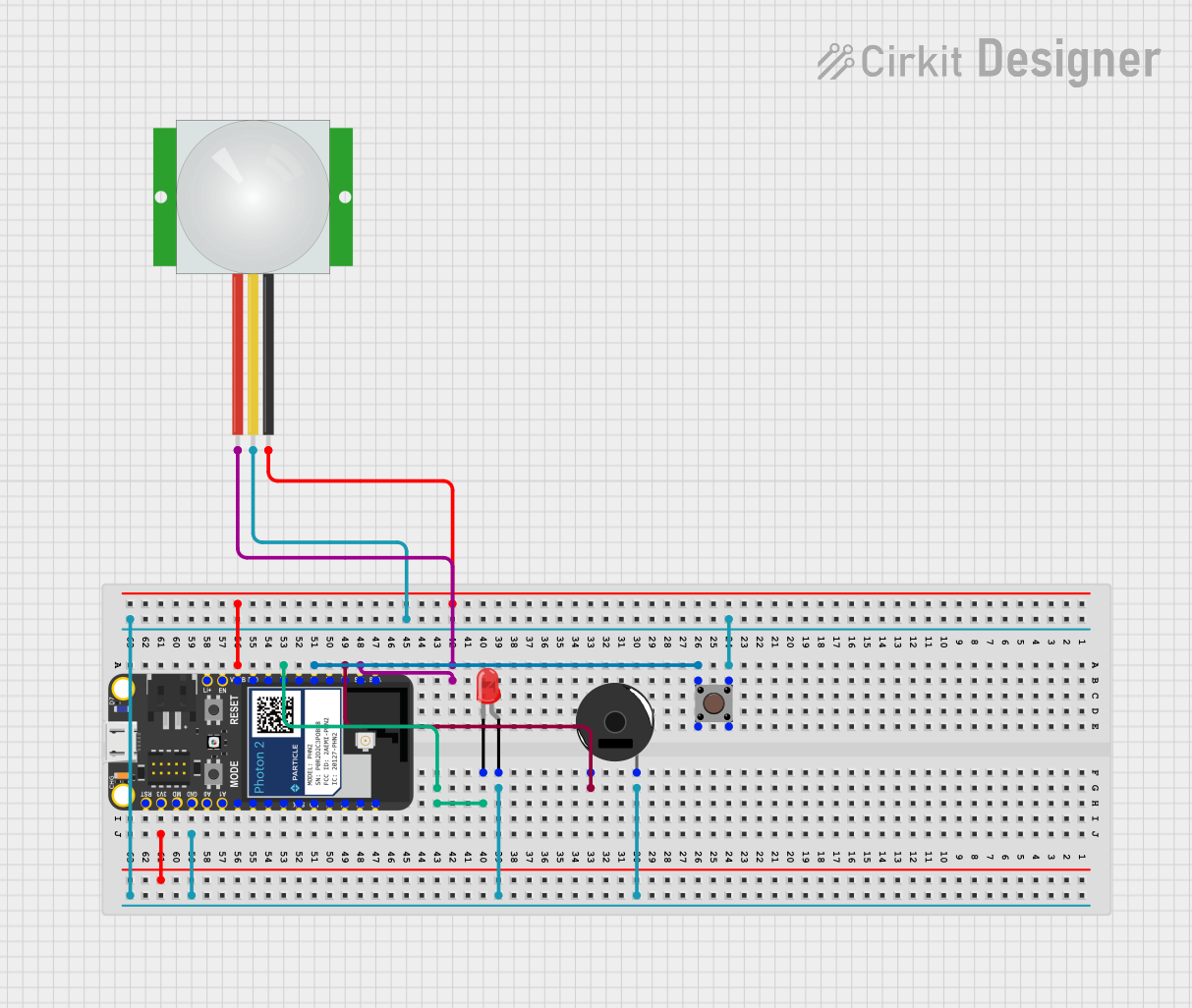
Circuit Documentation
Summary
This project is an alarm system that detects motion within a range of 10-27 feet. When motion is detected, a speaker sounds an alert, and an LED turns on. The alarm can be deactivated manually using a push button, remotely via the Particle Cloud app, or through the Particle website.
Component List
LED: Two Pin (red)
- Description: A red LED used to indicate the alarm state visually.
- Pins: Cathode, Anode
PIR Sensor
- Description: HC-SR501 PIR Infrared Sensor used for detecting motion.
- Pins: VDD, SIG, GND
Piezo Buzzer
- Description: ELSPKR-80HM-23MM-PCPIN-01 Speaker used to generate sound alerts.
- Pins: Pin 1, Pin 2
Photon 2
- Description: Particle Photon microcontroller used to run the project.
- Pins: Li+, EN, VUSB, D10, D7, D6, D5, D3, D2, D1, D0, D4, RST, 3V3, MODE, GND, A0, A1, A2, A5, S4, S3, S2, S1, S0, D9, D8, NC
Pushbutton
- Description: ELSW-PB-SPST-TH-CH-01 Push Button used to manually deactivate the alarm.
- Pins: Pin 3 (out), Pin 4 (out), Pin 1 (in), Pin 2 (in)
Wiring Details
LED: Two Pin (red)
- Anode: Connected to the common net with the pushbutton (Pin 3 and Pin 4), PIR sensor (SIG), Piezo Buzzer (Pin 2), and Photon 2 (GND).
- Cathode: Connected to Photon 2 (D6).
PIR Sensor
- VDD: Connected to Photon 2 (D1).
- SIG: Connected to the common net with the pushbutton (Pin 3 and Pin 4), LED (Anode), Piezo Buzzer (Pin 2), and Photon 2 (GND).
- GND: Connected to Photon 2 (VUSB).
Piezo Buzzer
- Pin 1: Connected to Photon 2 (D2).
- Pin 2: Connected to the common net with the pushbutton (Pin 3 and Pin 4), LED (Anode), PIR sensor (SIG), and Photon 2 (GND).
Photon 2
- D1: Connected to PIR sensor (VDD).
- D2: Connected to Piezo Buzzer (Pin 1).
- D4: Connected to pushbutton (Pin 1 and Pin 2).
- D6: Connected to LED (Cathode).
- VUSB: Connected to PIR sensor (GND).
- 3V3: Not connected in this circuit.
- GND: Connected to the common net with the pushbutton (Pin 3 and Pin 4), LED (Anode), PIR sensor (SIG), and Piezo Buzzer (Pin 2).
Pushbutton
- Pin 1 (in): Connected to Photon 2 (D4).
- Pin 2 (in): Connected to Photon 2 (D4).
- Pin 3 (out): Connected to the common net with the pushbutton (Pin 4), LED (Anode), PIR sensor (SIG), Piezo Buzzer (Pin 2), and Photon 2 (GND).
- Pin 4 (out): Connected to the common net with the pushbutton (Pin 3), LED (Anode), PIR sensor (SIG), Piezo Buzzer (Pin 2), and Photon 2 (GND).
Documented Code
Photon 2 Code
#include "Particle.h"

// Define pins
#define PIR_SENSOR_PIN D2
#define SPEAKER_PIN D1
#define BUTTON_PIN D4
#define RED_LED_PIN D6

// State variables
bool alarmActive = false;
bool alarmTriggered = false;

// Timer for alarm debounce
unsigned long alarmDeactivationTime = 0;
const unsigned long debounceTime = 500; // Debounce time in milliseconds

// Function prototypes
void checkMotion();
void triggerAlarm();
void deactivateAlarm();
void handleButtonPress();
int deactivateAlarmRemote(String command);

SYSTEM_MODE(AUTOMATIC);
SYSTEM_THREAD(ENABLED);

void setup() {
    // Pin mode settings
    pinMode(PIR_SENSOR_PIN, INPUT);
    pinMode(SPEAKER_PIN, OUTPUT);
    pinMode(BUTTON_PIN, INPUT_PULLUP);
    pinMode(RED_LED_PIN, OUTPUT);

    // Subscribe to cloud functions
    Particle.function("deactivateAlarm", deactivateAlarmRemote);

    // Attach button press interrupt
    attachInterrupt(BUTTON_PIN, handleButtonPress, FALLING);

    // Check PIR sensor periodically
    alarmTriggered = false;

    Serial.begin(9600);
    Serial.println("Motion Detector Alarm Clock Setup Complete");
}

void loop() {
    if (!alarmTriggered) {
        checkMotion();
    }
    // Prevent speaker from being continuously active if alarm is triggered
    if (alarmTriggered) {
        triggerAlarm();
    }
}

void checkMotion() {
    // Check if motion is detected
    if (digitalRead(PIR_SENSOR_PIN) == HIGH) {
        Serial.println("Motion detected");
        alarmTriggered = true;
    }
}

void triggerAlarm() {
    // Turn on the red LED to indicate the alarm is triggered
    digitalWrite(RED_LED_PIN, HIGH);

    // Generate a tone on the speaker
    tone(SPEAKER_PIN, 1000, 500); // Play 1000 Hz tone for 500 ms

    // Notify via cloud message
    Particle.publish("motionDetected", "Motion detected - Alarm triggered", PRIVATE);
}

int deactivateAlarmRemote(String command) {
    // Handle remote deactivation via cloud function
    if (command == "deactivate") {
        deactivateAlarm();
        return 1;
    }
    return -1;
}

void deactivateAlarm() {
    // Turn off the red LED
    digitalWrite(RED_LED_PIN, LOW);

    // Stop speaker sound
    noTone(SPEAKER_PIN); // Stop the tone

    // Reset alarm trigger state
    alarmTriggered = false;
    Serial.println("Alarm deactivated");
}

void handleButtonPress() {
    // Debounce button press
    if ((millis() - alarmDeactivationTime) > debounceTime) {
        alarmDeactivationTime = millis();
        deactivateAlarm();
    }
}
Project Documentation
# redlightalaram

Group Members: Naajiib Usman, Risko Galata

Description:
Our project serves as an alarm system that can detect motion in an area you would like from 10-27 feet.
When any motion is detected the the speaker we use as a sound alert goes off and the LED turns on until we turn it off.
It can be turned off in 3 different ways, the manual way which is the push button on the board,
using Particle Cloud through the particle app by
clicking on the deactivate alarm function while it is set to deactivate,
and on the particle website by typing in deactivate in the function and pressing call.

Project files:
redlightalarm.cpp

Hardware components:
Particle Photon - Microcontroller for running the project.
HC-SR501 PIR Infrared Sensor - Motion sensor for detecting movement.
ELSPKR-80HM-23MM-PCPIN-01 Speaker - Generates sound alerts (part number: ELSPKR-80HM).
Push Button (Part Number: ELSW-PB-SPST-TH-CH-01) - Used to deactivate the alarm manually.
Red LED (Part Number: ELLED5mmDirect) - Indicates the alarm state visually.
Breadboard (Part Number: ELCAB-Breadboard) - For prototyping the circuit.
Jumper Wires (Part Number: ELCAB-JWires) - For connecting components.
20 Sets Mini Micro JST 2.0 PH 3 Pin Connector Plug Male With 150mm Cable & Female by Daier (Part Number: JST-PH3P-20SET) - Used for connections.