
Circuit Documentation
Summary
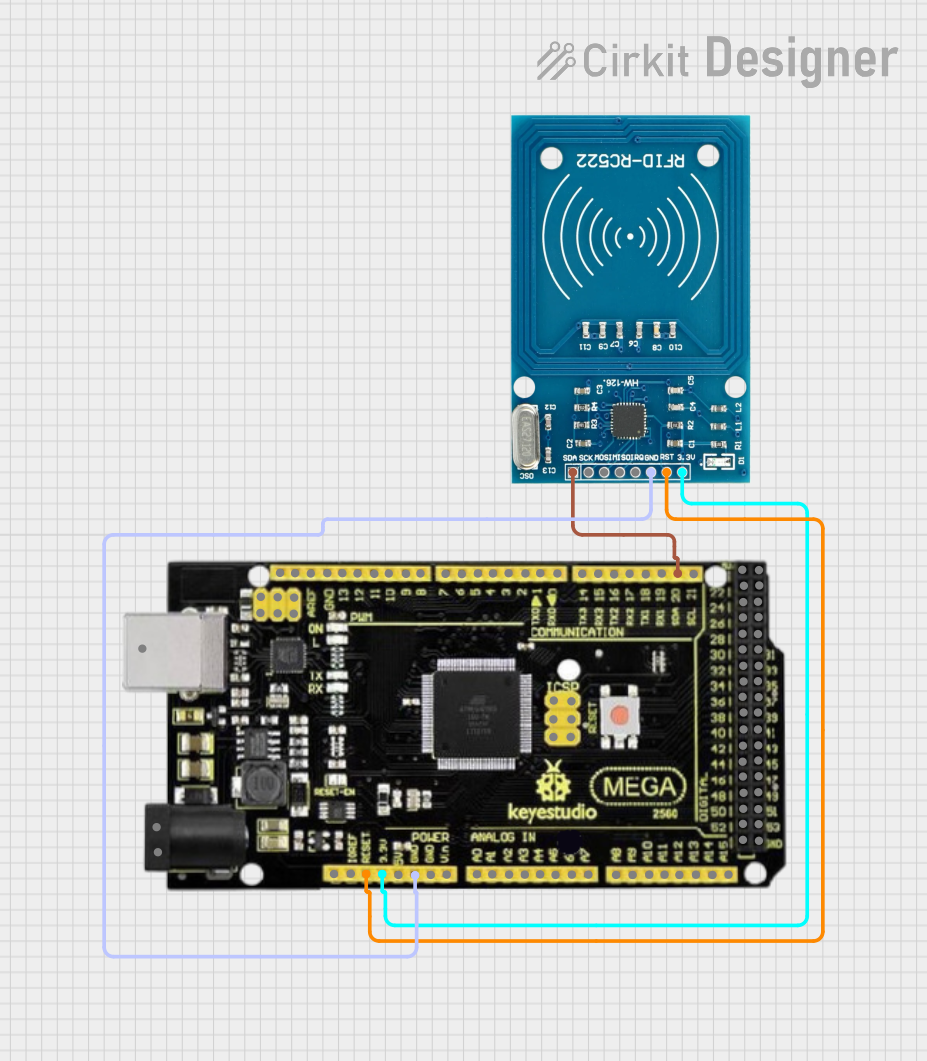
This document provides a detailed overview of a circuit that integrates an Arduino Mega 2560 R3 microcontroller with an RFID-RC522 module. The circuit is designed to read RFID tags and display their UID on a serial monitor. Additionally, it includes functionality to write data to a specific sector of the RFID tag.
Component List
Mega 2560 R3
- Description: A microcontroller board based on the ATmega2560.
- Pins: ICSP port GND, ICSP port Reset, ICSP port MOSI, ICSP port SCK, ICSP port +VCC, ICSP port MISO, SCL, SDA, AREF, GND, D13 (PWM), D12 (PWM), D11 (PWM), D10 (PWM), D9 (PWM), D8 (PWM), D7 (PWM), D6 (PWM), D5 (PWM), D4 (PWM), D3 (PWM), D2 (PWM), D1 (TX0), D0 (RX0), D14 (TX3), D15 (RX3), D16 (TX2), D17 (RX2), D18 (TX1), D19 (RX1), D20 (SDA), D21 (SCL), +5VCC, D22, D23, D24, D25, D26, D27, D28, D29, D30, D31, D32, D33, D34, D35, D36, D37, D38, D39, D40, D41, D42, D43, D44, D45, D46, D47, D48, D49, D50, D51, D52, D53, NC, IOREF, Reset, +3V3, +VCC IN, A0, A1, A2, A3, A4, A5, A6, A7, A8, A9, A10, A11, A12, A13, A14, A15, USB port.
RFID-RC522
- Description: A low-cost RFID reader module.
- Pins: VCC (3.3V), RST, GND, IRQ, MISO, MOSI, SCK, SDA.
Wiring Details
Mega 2560 R3
- D20 (SDA): Connected to RFID-RC522 SDA
- Reset: Connected to RFID-RC522 RST
- +3V3: Connected to RFID-RC522 VCC (3.3V)
- GND: Connected to RFID-RC522 GND
RFID-RC522
- SDA: Connected to Mega 2560 R3 D20 (SDA)
- RST: Connected to Mega 2560 R3 Reset
- VCC (3.3V): Connected to Mega 2560 R3 +3V3
- GND: Connected to Mega 2560 R3 GND
Code Documentation
#include <EasyMFRC522.h>
#include <RfidDictionaryView.h>
#include <Adafruit_MFRC630.h>
#include <Adafruit_MFRC630_consts.h>
#include <Adafruit_MFRC630_regs.h>
#include <MFRC522.h>
#include <MFRC522Extended.h>
#include <deprecated.h>
#include <require_cpp11.h>
#include <Arduino_AVRSTL.h>
#include <AVR_RTC.h>
#include <Adafruit_AVRProg.h>
#include <Adafruit_UPDIProg.h>

#include <SPI.h>
#include <MFRC522.h>

#define SS_PIN 53      // Slave Select Pin (SS)
#define RST_PIN 5      // Reset Pin (RST)

// Create an MFRC522 instance
MFRC522 mfrc522(SS_PIN, RST_PIN);

void setup() {
  Serial.begin(9600);  // Initialize serial monitor
  SPI.begin();         // Initialize SPI bus
  mfrc522.PCD_Init();  // Initialize MFRC522 RFID reader

  Serial.println("Place your RFID card near the reader...");
}

void loop() {
  // Look for new cards
  if (mfrc522.PICC_IsNewCardPresent()) {
    // Read the UID of the card
    if (mfrc522.PICC_ReadCardSerial()) {
      Serial.print("UID Tag: ");
      for (byte i = 0; i < mfrc522.uid.size; i++) {
        Serial.print(mfrc522.uid.uidByte[i] < 0x10 ? " 0" : " ");
        Serial.print(mfrc522.uid.uidByte[i], HEX);
      }
      Serial.println();

      // Halt the PICC (RFID tag)
      mfrc522.PICC_HaltA();
    }
  }
}

#include <SPI.h>
#include <MFRC522.h>

#define SS_PIN 53      // Slave Select Pin (SS)
#define RST_PIN 5      // Reset Pin (RST)

// Create an MFRC522 instance
MFRC522 mfrc522(SS_PIN, RST_PIN);

void setup() {
  Serial.begin(9600);  // Initialize serial monitor
  SPI.begin();         // Initialize SPI bus
  mfrc522.PCD_Init();  // Initialize MFRC522 RFID reader

  Serial.println("Place your RFID card near the reader...");
}

void loop() {
  // Look for new cards
  if (mfrc522.PICC_IsNewCardPresent()) {
    // Read the UID of the card
    if (mfrc522.PICC_ReadCardSerial()) {
      Serial.print("UID Tag: ");
      for (byte i = 0; i < mfrc522.uid.size; i++) {
        Serial.print(mfrc522.uid.uidByte[i] < 0x10 ? " 0" : " ");
        Serial.print(mfrc522.uid.uidByte[i], HEX);
      }
      Serial.println();

      // Attempt to authenticate and write to a sector (example: sector 1, block 4)
      byte sector = 1;
      byte block = 4;
      byte data[] = {'H', 'e', 'l', 'l', 'o', ' ', 'R', 'F', 'I', 'D'};

      MFRC522::StatusCode status;

      // Authenticate and write
      status = mfrc522.MIFARE_Write(block, data, sizeof(data));
      if (status == MFRC522::STATUS_OK) {
        Serial.println("Data written successfully!");
      } else {
        Serial.print("Write failed, error code: ");
        Serial.println(status);
      }

      // Halt the PICC (RFID tag)
      mfrc522.PICC_HaltA();
    }
  }
}
This code initializes the RFID reader and continuously checks for new RFID tags. When a tag is detected, it reads and prints the UID to the serial monitor. Additionally, it attempts to write data to a specific sector of the RFID tag and reports the success or failure of the write operation.