
Circuit Documentation
Summary
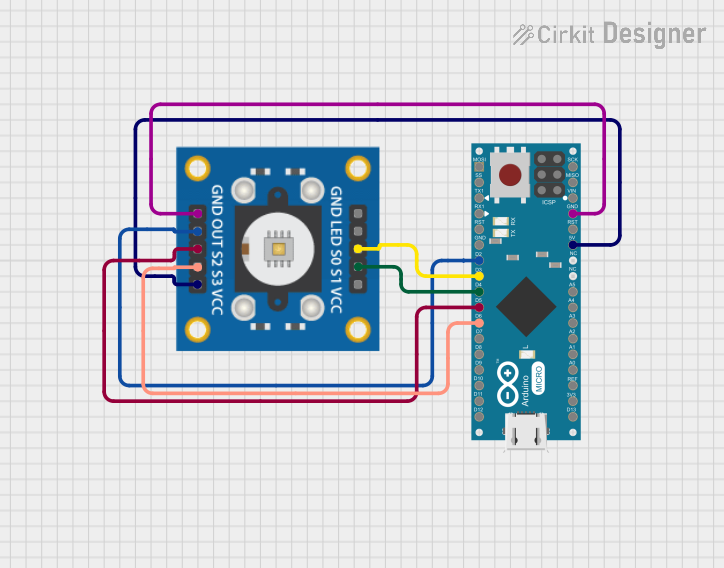
This document provides a detailed overview of a circuit that integrates a TCS3200 color sensor with an Arduino Micro (Rev3) microcontroller. The circuit is designed to read color data from the TCS3200 sensor and process it using the Arduino Micro. The document includes a list of components, wiring details, and the embedded code used in the microcontroller.
Component List
TCS3200 Color Sensor
- Description: The TCS3200 is a programmable color light-to-frequency converter. It can detect and measure the intensity of red, green, and blue light.
- Pins:
- GND
- OUT
- S2
- S3
- VCC
- LED
- S0
- S1
Arduino Micro (Rev3)
- Description: The Arduino Micro is a microcontroller board based on the ATmega32U4. It has 20 digital input/output pins, a 16 MHz crystal oscillator, a micro USB connection, an ICSP header, and a reset button.
- Pins:
- MISO
- 5V
- SCK
- MOSI
- RESET
- GND
- RXLED/SS
- D1/TX
- D0/RX
- D2/SDA
- D3/SCL
- D4 PWM/A6
- D5 PWM
- D6 PWM/A7
- D7
- D8 PWM/A8
- D9 PWM/A9
- D10 PWM/A10
- D11 PWM
- D12 PWM/A11
- VIN
- A5
- A4
- A3
- A2
- A1
- A0
- AREF
- 3V3
- D13 PWM
Wiring Details
TCS3200 Color Sensor
- GND is connected to GND on the Arduino Micro.
- OUT is connected to D2/SDA on the Arduino Micro.
- S2 is connected to D5 PWM on the Arduino Micro.
- S3 is connected to D6 PWM/A7 on the Arduino Micro.
- VCC is connected to 5V on the Arduino Micro.
- S0 is connected to D3/SCL on the Arduino Micro.
- S1 is connected to D4 PWM/A6 on the Arduino Micro.
Arduino Micro (Rev3)
- GND is connected to GND on the TCS3200.
- D2/SDA is connected to OUT on the TCS3200.
- D5 PWM is connected to S2 on the TCS3200.
- D6 PWM/A7 is connected to S3 on the TCS3200.
- 5V is connected to VCC on the TCS3200.
- D3/SCL is connected to S0 on the TCS3200.
- D4 PWM/A6 is connected to S1 on the TCS3200.
Code Documentation
Arduino Micro (Rev3) Code
void setup() {
  // put your setup code here, to run once:

}

void loop() {
  // put your main code here, to run repeatedly:

}
This code is a basic template for the Arduino Micro. The setup() function is where you initialize your settings, and the loop() function is where the main code runs repeatedly. You can add your specific code to interact with the TCS3200 sensor in these functions.
This document provides a comprehensive overview of the circuit, including the components used, their wiring, and the embedded code. This should serve as a useful reference for understanding and replicating the circuit.