
Gesture-Controlled Wheelchair with Arduino UNO, Arduino Nano, HC-05 Bluetooth Modules, and MPU6050 Accelerometer
View and Edit Project In Cirkit Designer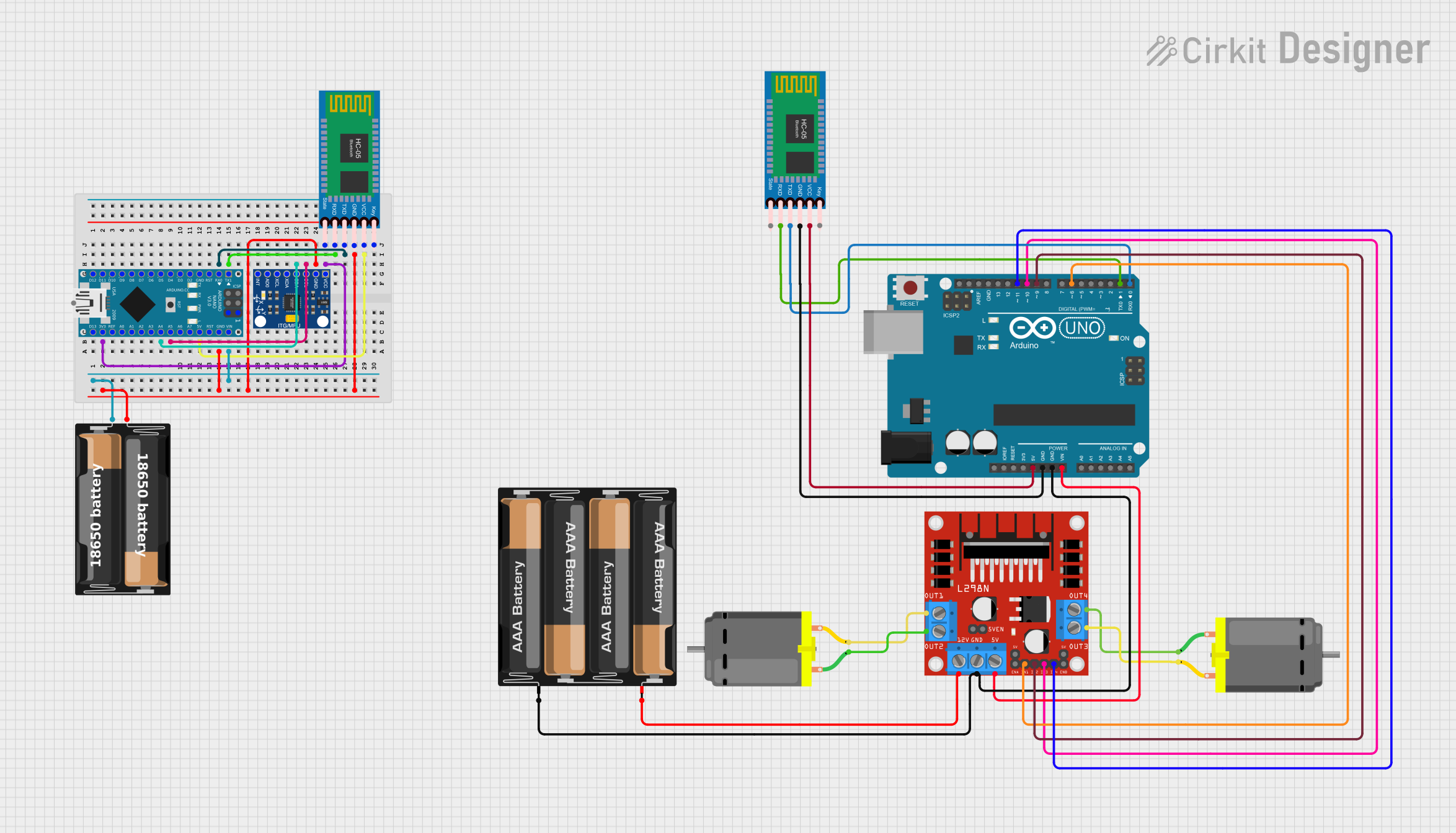
Circuit Documentation
Summary
This circuit is designed to interface an Arduino Nano with an InvenSense MPU6050 accelerometer/gyroscope and an HC-05 Bluetooth module. The Arduino Nano reads the MPU6050 data to detect gestures and sends corresponding commands via Bluetooth. Additionally, an Arduino UNO is used to control a pair of DC motors through an L298N DC motor driver, receiving commands from an HC-05 Bluetooth module. The circuit is powered by a battery case connected to the Arduino boards and the motor driver.
Component List
Arduino UNO
- Microcontroller board based on the ATmega328P
- It has 14 digital input/output pins, 6 analog inputs, a 16 MHz quartz crystal, a USB connection, a power jack, an ICSP header, and a reset button.
HC-05 Bluetooth Module (2 instances)
- Wireless communication module based on Bluetooth technology
- It has pins for Key, VCC, TXD, RXD, State, and GND.
L298N DC Motor Driver
- A dual H-bridge motor driver capable of driving two DC motors or one stepper motor
- It has pins for motor outputs, power supply, and control inputs.
DC Motor (2 instances)
- An electric motor that runs on direct current (DC) electricity
- It has two pins for connecting to a power source and control signals.
4 x AAA Battery Mount
- A battery holder for four AAA batteries
- It has pins for positive and negative terminals.
Arduino Nano
- A small, complete, and breadboard-friendly microcontroller board based on the ATmega328P
- It has 14 digital input/output pins, 8 analog inputs, and a mini-USB port.
InvenSense MPU6050
- A 6-axis motion tracking device that combines a 3-axis gyroscope and a 3-axis accelerometer
- It has pins for VCC, GND, SCL, SDA, XDA, XCL, AD0, and INT.
My Battery Case
- A custom battery holder with terminals for power supply
- It has pins for positive and negative terminals.
Wiring Details
Arduino UNO
5Vconnected to HC-05 Bluetooth Module VCCGNDconnected to HC-05 Bluetooth Module GND, L298N DC motor driver GND, and 4 x AAA Battery Mount-Vinconnected to L298N DC motor driver5VD11connected to L298N DC motor driverIN4D10connected to L298N DC motor driverIN3D9connected to L298N DC motor driverIN2D6connected to L298N DC motor driverIN1D1connected to HC-05 Bluetooth Module RXDD0connected to HC-05 Bluetooth Module TXD
HC-05 Bluetooth Module (Connected to Arduino UNO)
VCCconnected to Arduino UNO5VGNDconnected to Arduino UNOGNDTXDconnected to Arduino UNOD0RXDconnected to Arduino UNOD1
L298N DC Motor Driver
OUT1andOUT2connected to one DC MotorOUT3andOUT4connected to another DC Motor12Vconnected to 4 x AAA Battery Mount+GNDconnected to Arduino UNOGND5Vconnected to Arduino UNOVinIN1,IN2,IN3,IN4controlled by Arduino UNOD6,D9,D10,D11
DC Motors
- Each motor connected to two output pins on the L298N DC motor driver
4 x AAA Battery Mount
+connected to L298N DC motor driver12V-connected to Arduino UNOGND
Arduino Nano
3V3connected to InvenSense MPU6050 VCC and HC-05 Bluetooth Module State5Vconnected to HC-05 Bluetooth Module VCCGNDconnected to InvenSense MPU6050 GND, HC-05 Bluetooth Module GND, and My Battery Case-A4connected to InvenSense MPU6050 SDAA5connected to InvenSense MPU6050 SCLD0/RXconnected to HC-05 Bluetooth Module TXDD1/TXconnected to HC-05 Bluetooth Module RXDVINconnected to My Battery Case+
InvenSense MPU6050
VCCconnected to Arduino Nano3V3GNDconnected to Arduino NanoGNDSCLconnected to Arduino NanoA5SDAconnected to Arduino NanoA4
HC-05 Bluetooth Module (Connected to Arduino Nano)
VCCconnected to Arduino Nano5VGNDconnected to Arduino NanoGNDTXDconnected to Arduino NanoD0/RXRXDconnected to Arduino NanoD1/TXStateconnected to Arduino Nano3V3
My Battery Case
+connected to Arduino NanoVIN-connected to Arduino NanoGND
Documented Code
Arduino UNO Code
#include <Adafruit_MPU6050.h>
#include <Adafruit_Sensor.h>
#include <Wire.h>

int x, y;
Adafruit_MPU6050 mpu;

void setup(void) {
    Serial.begin(115200);
    while (!Serial)
        delay(10);

    Serial.println("Adafruit MPU6050 test!");

    // Try to initialize!
    if (!mpu.begin()) {
        Serial.println("Failed to find MPU6050 chip");
        while (1) {
            delay(10);
        }
    }
    Serial.println("MPU6050 Found!");

    mpu.setAccelerometerRange(MPU6050_RANGE_8_G);
    mpu.setGyroRange(MPU6050_RANGE_500_DEG);
    mpu.setFilterBandwidth(MPU6050_BAND_21_HZ);

    Serial.println("");
    delay(100);
}

void loop() {
    sensors_event_t a, g, temp;
    mpu.getEvent(&a, &g, &temp);
    x = a.acceleration.x;
    y = a.acceleration.y;

    Serial.print("Acceleration X: ");
    Serial.print(a.acceleration.x);
    Serial.print(", Y: ");
    Serial.print(a.acceleration.y);
    Serial.print(", Z: ");
    Serial.print(a.acceleration.z);
    Serial.println(" m/s^2");

    // Rear motors control (forward and reverse)
    if (y >= 4) {
        Serial.println("Forward");
        Serial.write("F");  // Command to move forward
    } else if (y <= -4) {
        Serial.println("Backward");
        Serial.write("B");  // Command to move backward
    } else {
        Serial.println("Stop");
        Serial.write("S");  // Command to stop
    }

    // Front motors control (left and right)
    if (x >= 4) {
        Serial.println("Left");
        Serial.write("L");  // Command to turn left
    } else if (x <= -4) {
        Serial.println("Right");
        Serial.write("R");  // Command to turn right
    }
}
HC-05 Bluetooth Module Code (Connected to Arduino UNO)
/*
 * Arduino Sketch for Gesture Control Wheelchair
 *
 * This code interfaces with an HC-05 Bluetooth module to receive commands
 * and sends them to the main Arduino UNO microcontroller to control the
 * wheelchair's movement.
 */

// Pin definitions
const int bluetoothTx = 0; // TX pin of HC-05
const int bluetoothRx = 1; // RX pin of HC-05

void setup() {
  // Initialize serial communication for Bluetooth module
  Serial.begin(115200);
}

void loop() {
  // Check if data is available from Bluetooth module
  if (Serial.available() > 0) {
    char command = Serial.read();
    // Forward the received command to the main controller
    Serial.write(command);
  }
}
Arduino Nano Code
/*
 * Arduino Sketch for Gesture Control Wheelchair
 *
 * This code interfaces with an HC-05 Bluetooth module to receive commands
 * and an MPU6050 accelerometer to detect gestures. The commands are then
 * forwarded to the main Arduino UNO microcontroller to control the
 * wheelchair's movement.
 */

#include <Wire.h>
#include <MPU6050.h>

MPU6050 mpu;

// Pin definitions
const int bluetoothTx = 1; // TX pin of HC-05
const int bluetoothRx = 0; // RX pin of HC-05

void setup() {
  // Initialize serial communication for Bluetooth module
  Serial.begin(115200);
  // Initialize MPU6050
  Wire.begin();
  mpu.initialize();
  if (!mpu.testConnection()) {
    while (1) {
      //